Table of contents
Octo Browser and Multilogin sit near the top of most shortlists for serious multi-accounting, but they get there by different routes. Octo is the younger, leaner app built around fingerprints taken from real physical devices and a Chromium core that updates unusually fast. Multilogin is the category's original enterprise platform, with two separate browser engines, bundled residential proxy traffic and some of the most granular team controls you can buy. If you are choosing between them, the real question is not which one is "undetectable" (no tool can promise that) but which set of trade-offs fits how your team actually works.
This comparison walks through how each browser builds fingerprints, how they handle automation, what team management looks like, what you pay to get started, and where each one falls short. For the underlying mechanics, our explainer on how anti-detect browsers work is a good primer, and if Multilogin is already on your list against other rivals, see GoLogin vs Multilogin and Multilogin vs Kameleo.
Quick verdict
Pick Octo Browser if stealth and a clean, fast, stable app matter most and your team is small to mid-sized. Pick Multilogin if you run multi-accounting as core infrastructure: many operators, strict permissions, mixed browser engines and heavy automation pipelines. Both work with your own proxies, run on Windows, macOS and Linux, and neither offers a permanent free plan.

Octo Browser
Browser

Multilogin
Browser
Editor score
User rating
Starting price
Founded
Octo Browser vs Multilogin at a Glance
Before getting into the details, here is how the two line up on the points buyers usually ask about first. Prices are entry-level starting points from our directory and change often, so treat them as a guide and confirm current plans on each vendor's site.
| Factor | Octo Browser | Multilogin |
|---|---|---|
| Founded | 2021 | 2015 |
| Browser engines | Chromium | Mimic (Chromium) and Stealthfox (Firefox) |
| Fingerprint approach | Parameters collected from real devices | Mature, long-tested fingerprint engine across two engines |
| Core updates | Known for shipping new Chromium versions within days | Steady, enterprise-oriented release process |
| Automation | Local API with Selenium and Puppeteer | Local API with Selenium, Puppeteer and Playwright |
| Proxies | Bring your own (HTTP(S) or SOCKS5) | Residential proxy traffic included, plus your own |
| Team controls | Reliable sharing with roles and access controls | Granular roles and permissions built for large teams |
| Profile storage | Local storage supported | Cloud and local storage |
| Free plan | No (paid trial for €1) | No |
| Starting price | €29/mo | €19/mo |
| Profiles by plan | 10 to unlimited | 10 to 1,000+ |
| Our editor rating | 4.3 / 5 | 4.6 / 5 |
The table already hints at the shape of the decision. Octo concentrates on doing one thing extremely well, a single Chromium engine with very current, very consistent fingerprints. Multilogin spreads wider, covering two engines, bundled proxies and deep organisational controls, and it charges for that breadth on higher tiers.
How Fingerprinting Differs
Every anti-detect browser is ultimately judged on one thing: whether the browser fingerprint each profile presents looks like a plausible, real user. A fingerprint is the bundle of signals a site can read from your browser, including Canvas and WebGL rendering, AudioContext output, installed fonts, screen and hardware hints, timezone, language and WebRTC behaviour. Detection systems look less at any single value and more at whether the combination is internally consistent. A Windows user agent paired with a macOS-only font list, or a GPU string that does not match the rendering output, is the kind of mismatch that gets profiles flagged.
Octo: real-device parameter library
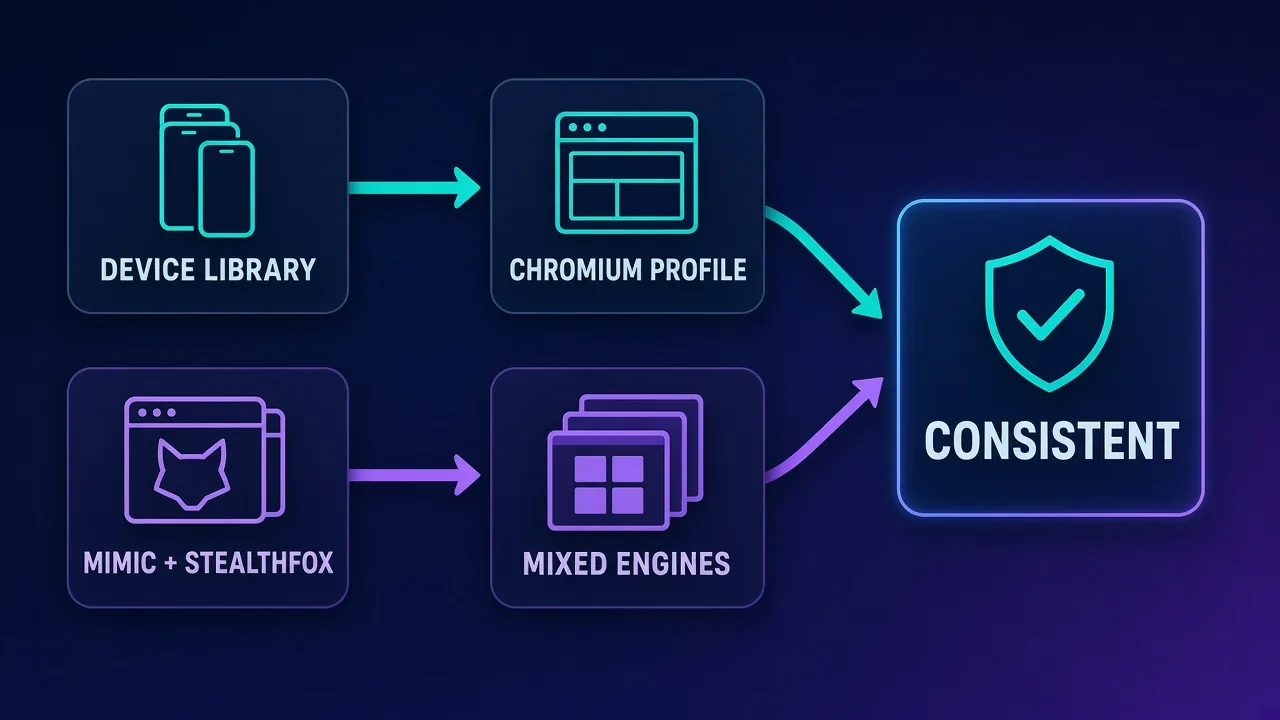
Octo's central design choice is to build profiles from a library of parameters collected from genuine hardware instead of generating values algorithmically. The practical effect is that the combinations you get tend to hang together the way a real person's browser does, because they came from real machines in the first place. Octo pairs this with a reputation for one of the fastest update cadences in the category, often shipping new Chromium versions within days of the upstream release. That matters more than it sounds: a browser that advertises an outdated version is one of the easier signals for a platform to spot, especially when most real users auto-update.
Octo also includes human-like typing emulation, so logins and form fills arrive with natural timing instead of as instant, robotic bursts of input. On sites that watch behavioural signals as well as static fingerprints, that detail helps.
Multilogin: two engines, a decade of testing
Multilogin takes a broader approach. It maintains two separate engines, Mimic (Chromium-based) and Stealthfox (Firefox-based), and its fingerprint coverage has been refined and stress-tested against detection systems since 2015. Covering Canvas, WebGL, WebRTC, AudioContext, fonts, timezone and geolocation across both engines gives Multilogin something few rivals can match: engine diversity. If you manage hundreds of accounts, having every one of them look like the same Chrome build is itself a pattern, and being able to mix Firefox-based profiles into the fleet breaks that pattern up.
No browser makes you invisible
Fingerprint quality lowers your risk, it does not remove it. Account bans also come from proxy reputation, behaviour, payment details and how quickly accounts are created or warmed up. Treat the browser as one layer of a setup, not the whole thing.
Proxy Handling and Network Setup
An anti-detect profile is only as convincing as the IP address behind it. A clean fingerprint routed through a flagged datacenter subnet, or a profile whose timezone says Berlin while its IP geolocates to Texas, undoes most of the browser's work. Both tools let you attach a proxy per profile and match timezone and geolocation to it.
Octo does not tie you to any proxy vendor. You attach HTTP(S) or SOCKS5 proxies from whichever residential, mobile, ISP or datacenter provider you already use, profile by profile. That flexibility suits teams that have negotiated their own proxy contracts or need specific carriers or cities.
Multilogin also accepts any third-party proxy, but its plans include built-in residential proxy traffic. For a new team, that means you can launch working profiles without sourcing a separate provider on day one. Heavier users will usually still bring a dedicated provider for volume, targeting depth or sticky-session control, but the bundled traffic removes a setup step.
Whichever you choose, the proxy type should match the platform. Sticky residential or ISP IPs are the usual choice for long-lived social and marketplace accounts, while rotating pools suit scraping. Our guide to residential vs ISP vs datacenter proxies covers the trade-offs in depth.
Automation and API
Both browsers expose a local API, so you can launch profiles and drive them programmatically instead of clicking through each one.
- Octo Browser works with Selenium and Puppeteer. It is best described as a rock-solid manual and scripted browser rather than an all-in-one automation suite. If you write your own scripts, it does the job well; if you want a large library of built-in, no-code task builders, Octo offers less out of the box than some rivals such as AdsPower.
- Multilogin integrates with Selenium, Puppeteer and Playwright, and its documentation and headless support are mature. It is built with developers and operations teams in mind, which is why data and QA teams often standardise on it for pipelines that run unattended.
If your workflow is a handful of operators working profiles by hand with occasional scripts, the automation gap is unlikely to matter. If you are wiring the browser into scheduled scraping, QA suites or account-maintenance jobs that run around the clock, Multilogin's Playwright support and mature tooling are a real advantage.
Team Management and Collaboration
Team features are where the two products diverge most clearly, and where the price difference on higher tiers comes from.
Octo Browser
Octo's team sharing is one of its quieter strengths. Profiles and proxies can be handed between colleagues reliably, with roles and access controls that hold up in day-to-day agency and traffic-team use. For a team of a few to a few dozen people, that is usually all you need: the ability to share a profile without exporting cookies by hand, and to stop a junior operator from deleting the wrong accounts.
Multilogin
Multilogin's team management is best in class. It offers granular roles, permissions and access controls designed for agencies and enterprises with many operators, so you can define exactly who can see, launch or edit which profiles. Combined with the choice of cloud storage for shared access or local storage for privacy and speed, it is built for organisations where a 20-person team needs clear boundaries and accountability around every account.
Performance, Stability and Day-to-Day Use
How an app feels after eight hours of use matters as much as its feature list. Octo has earned a reputation as one of the cleanest and most stable apps in the category. The interface is deliberately uncluttered, with a searchable profile list, quick tagging and one-click launch, so managing a large stable of accounts does not turn into a chore.
Multilogin is more powerful but also heavier. The desktop app demands more from your machine than lean tools, and first-time setup has a steeper learning curve than budget options. Teams that live in it every day get used to it quickly, but a solo operator on a modest laptop will notice the difference.
Pricing and Value
On paper the entry prices look counter-intuitive. Multilogin, the premium brand, starts at €19/month, while Octo starts at €29/month. The catch is in what each entry tier includes and how fast costs rise.
- Octo Browser has no permanent free plan. Instead it offers a paid trial for €1, so you can test the full app before subscribing. Plans scale from 10 profiles up to unlimited.
- Multilogin sits at the premium end overall. The entry plan has a limited number of profiles, and higher tiers climb quickly as you add profiles and team seats, though plans include residential proxy traffic. Plans scale from 10 profiles to more than 1,000.
For a fair comparison, price out the tier you would actually use in six months, not the cheapest tier. Count how many profiles you need, how many people need access, and whether you would otherwise pay separately for residential proxy traffic. Bundled proxy traffic can close a meaningful part of the gap for teams that would buy it anyway, while teams with their own proxy contracts get less value from it.
Test before you commit
Run a small pilot: create the same five profiles in each browser with the same proxies, warm them up the same way, and track how they behave on your real target platforms for a couple of weeks. Your own results on your own platforms beat any generic detection test.
Use Cases: Which Browser Fits Which Job?
Affiliate marketing and traffic arbitrage
Media buyers running many ad and social accounts care about fingerprints that survive platform checks and an app that stays out of the way. Octo's real-device fingerprints, fast updates and clean interface make it a natural fit for small to mid-sized affiliate and arbitrage teams. Larger arbitrage operations with many buyers may prefer Multilogin's tighter permission model.
E-commerce and marketplace sellers
Sellers managing several storefronts need stable, long-lived profiles tied to consistent IPs. Both tools handle this well. Octo is the lighter, simpler option; Multilogin makes more sense once several staff members need controlled access to the same stores.
Agencies managing client accounts
Agencies live and die by access control. If you need to grant a contractor access to three client profiles and nothing else, and keep an audit-friendly structure as staff change, Multilogin's granular roles are the stronger choice. Octo's sharing works well for smaller agencies with a stable core team.
Scraping, QA and automation pipelines
For unattended automation, Multilogin's support for Selenium, Puppeteer and Playwright, mature documentation and headless options give it the edge. Octo is perfectly capable for Selenium or Puppeteer scripts but is not positioned as an automation platform. If scraping is the main job, also read our roundup of the best antidetect browsers for other automation-focused options.
Strengths and Weaknesses
Octo Browser
- Fingerprints based on real devices, which tend to be internally consistent.
- One of the fastest Chromium update cadences in the category.
- Clean, stable and fast application with human typing emulation.
- Solid team features at mid tiers.
- Downsides: no free plan (the trial costs €1), less built-in automation than some rivals, and a smaller community and ecosystem.
Multilogin
- The most proven fingerprint engine in the category, refined since 2015.
- Two engines, Chromium-based Mimic and Firefox-based Stealthfox.
- Built-in residential proxy traffic included in plans.
- Mature team roles, permissions, and cloud plus local profile storage.
- Downsides: premium pricing compared with newer rivals, a heavyweight desktop app, and an entry plan with limited profiles.
Common Mistakes When Switching Between Them
Teams moving from one browser to the other often lose accounts for reasons that have nothing to do with the new tool. A few pitfalls to avoid:
- Changing the fingerprint and IP at the same time. Migrating an aged account to a brand-new fingerprint on a brand-new IP looks like a new device in a new place. Where possible, keep the same proxy and move cookies carefully.
- Mismatched timezone and geolocation. Always let the browser derive timezone, language and geolocation from the attached proxy, or set them to match.
- Cheap shared proxies. A premium browser on a flagged IP is wasted money. Use clean residential, ISP or mobile IPs for account work.
- Running too many profiles too fast. Warm up new profiles gradually. Sudden bursts of new accounts from one setup are a pattern platforms watch for.
- Ignoring updates. Keep the browser core current. An outdated version is an easy detection signal in either tool.
If profiles are getting flagged regardless of browser, the cause is often the network layer. Our guide on why proxies get blocked walks through the usual culprits.
Who Should Choose Octo Browser
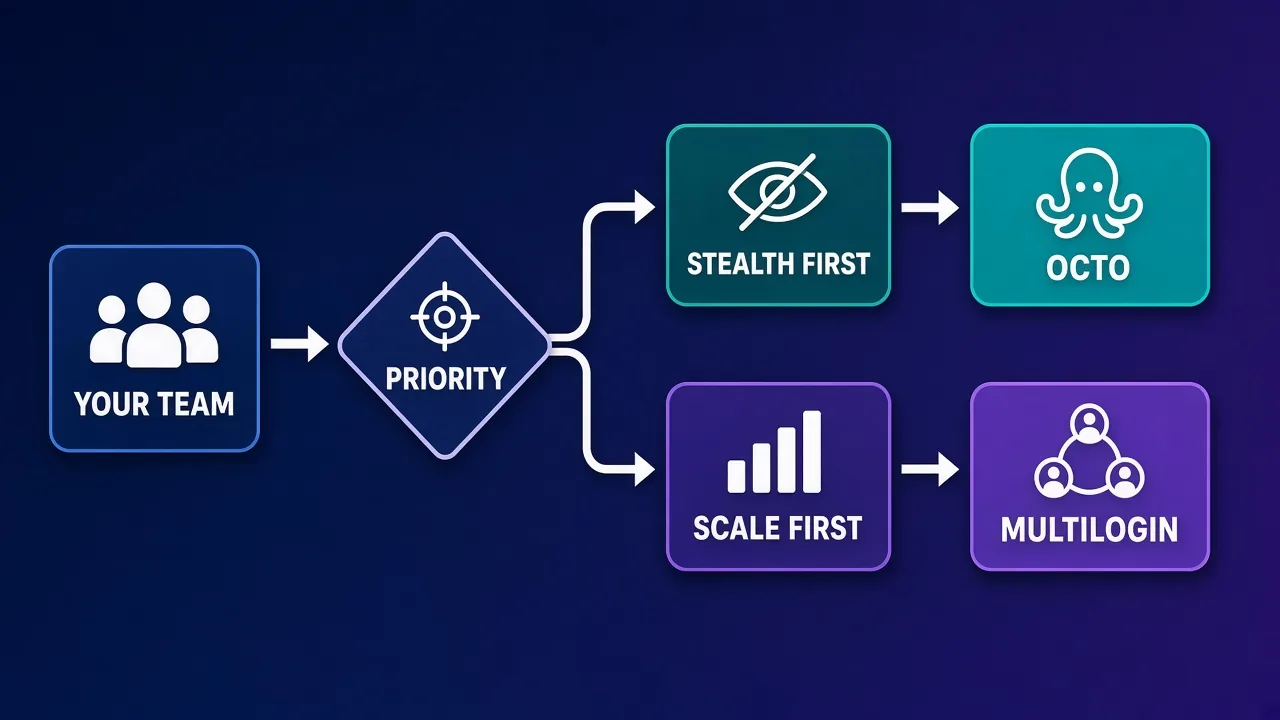
Choose Octo if you are a solo operator or a small to mid-sized team that values stealth, consistency and a fast, uncluttered app above everything else. It suits affiliate marketers, arbitrage teams and sellers who bring their own proxies, write the occasional script rather than running a full automation stack, and want a browser that simply does not get in the way. It is less suitable if you need a free tier or a large library of built-in automations.
Who Should Choose Multilogin
Choose Multilogin if multi-accounting is core infrastructure for your business: large affiliate teams, agencies with many operators, enterprise QA and data operations. Its two engines, bundled residential proxy traffic, Playwright support and granular permissions justify the premium for organisations that need reliability and control at scale. Solo users on a budget will likely find it heavier and more expensive than they need.
The Verdict
Multilogin earns the higher overall rating in our directory (4.6 versus 4.3) because it is the most complete and proven platform: two engines, included proxies, mature automation and the best team controls in the category. But "most complete" is not the same as "best for you." Octo Browser is the more focused tool, and for many smaller teams its real-device fingerprints, fast updates and clean interface deliver what they actually need with less weight.
If you are still undecided, the simplest path is to run both side by side for two weeks on the same handful of accounts and proxies. Octo's €1 trial makes that cheap to start, and your own ban rates, workflow speed and team feedback will settle the question faster than any spec sheet.
Frequently asked questions
Neither is better for everyone. Octo is the stronger fit for small to mid-sized teams that prioritise stealth and a clean, fast app, while Multilogin suits larger organisations that need two browser engines, bundled residential proxy traffic and granular team permissions.
Multilogin's entry plan starts lower at €19 per month versus €29 per month for Octo, but Multilogin's entry plan has limited profiles and higher tiers climb quickly. Compare the tier you will actually need, including profile count, team seats and whether you would otherwise buy residential proxy traffic separately.
No. Octo does not offer a permanent free plan. It offers a paid trial for €1 so you can test the full app before subscribing.
They are Multilogin's two browser engines. Mimic is Chromium-based and Stealthfox is Firefox-based, which lets you mix engines across your profiles so your accounts do not all look like the same Chrome build.
Yes. Octo lets you attach HTTP(S) or SOCKS5 proxies from any provider to each profile. Multilogin also accepts third-party proxies and additionally includes residential proxy traffic in its plans.
Multilogin has the edge for heavy automation, with a local API that supports Selenium, Puppeteer and Playwright plus mature documentation. Octo supports Selenium and Puppeteer through its local API and works well for scripts, but offers less built-in automation.
Multilogin is generally the better choice for large teams because its roles, permissions and access controls are built for agencies and enterprises with many operators. Octo's team sharing is reliable and well suited to smaller teams.
No. Both reduce fingerprint-based detection, but bans also come from proxy reputation, behaviour, payment details and account history. Use clean proxies, matching timezones and gradual warm-up alongside either browser.