Table of contents
Sending a Node.js request through a proxy should be a one-line change, but it rarely is. axios, native fetch and got each handle proxies differently, the agent packages they rely on have moved through several major versions, and one mismatch between Node's built-in fetch and the npm undici package can break a request that looks perfectly correct. This guide shows the setup that works for each client today, with HTTP(S) and SOCKS5 proxies, username and password auth, rotation across a proxy list, and the error handling you need before you point any of it at a real scraping job.
Every snippet below was run on 14 November 2026 against a local test proxy that required a username and password, using Node.js 24.22.1 and the current npm releases at the time of writing: axios 1.21.1, undici 8.12.4, got 16.2.0, https-proxy-agent 9.1.0, socks-proxy-agent 10.1.0 and hpagent 1.2.0. Where something failed in that test, we say so.
Quick answer
axios: pass a proxy object, or an HttpsProxyAgent as httpsAgent with proxy: false. fetch: use ProxyAgent from undici as the dispatcher, and import fetch from the same package. got: pass agent: { https: new HttpsProxyAgent({ proxy }) } from hpagent. SOCKS5: SocksProxyAgent for axios and got, Socks5ProxyAgent (experimental) for undici.
How a Node.js request travels through a proxy
Before the code, it helps to know what the libraries are actually doing, because most proxy bugs in Node come from a misunderstanding here rather than from a typo.
For an HTTPS target (almost every site you will scrape), your client does not hand the request to the proxy in plain text. It sends a CONNECT example.com:443 request to the proxy, including a Proxy-Authorization header if the proxy needs a username and password. If the proxy accepts, it replies 200 Connection Established and becomes a blind tunnel. Your client then performs the TLS handshake with the target through that tunnel, so the proxy sees the hostname and port but not the URL path, headers or body.
For a plain HTTP target, the client sends the full absolute URL (GET http://example.com/ HTTP/1.1) to the proxy, which fetches it and relays the response. The proxy can read and modify everything in this case.
A SOCKS5 proxy works one layer lower. The client opens a TCP connection to the SOCKS server, authenticates, asks it to connect to a host and port, and then speaks normal HTTP or TLS over that connection. If you want the deeper protocol comparison, our guide to SOCKS5 vs HTTP proxies covers it.
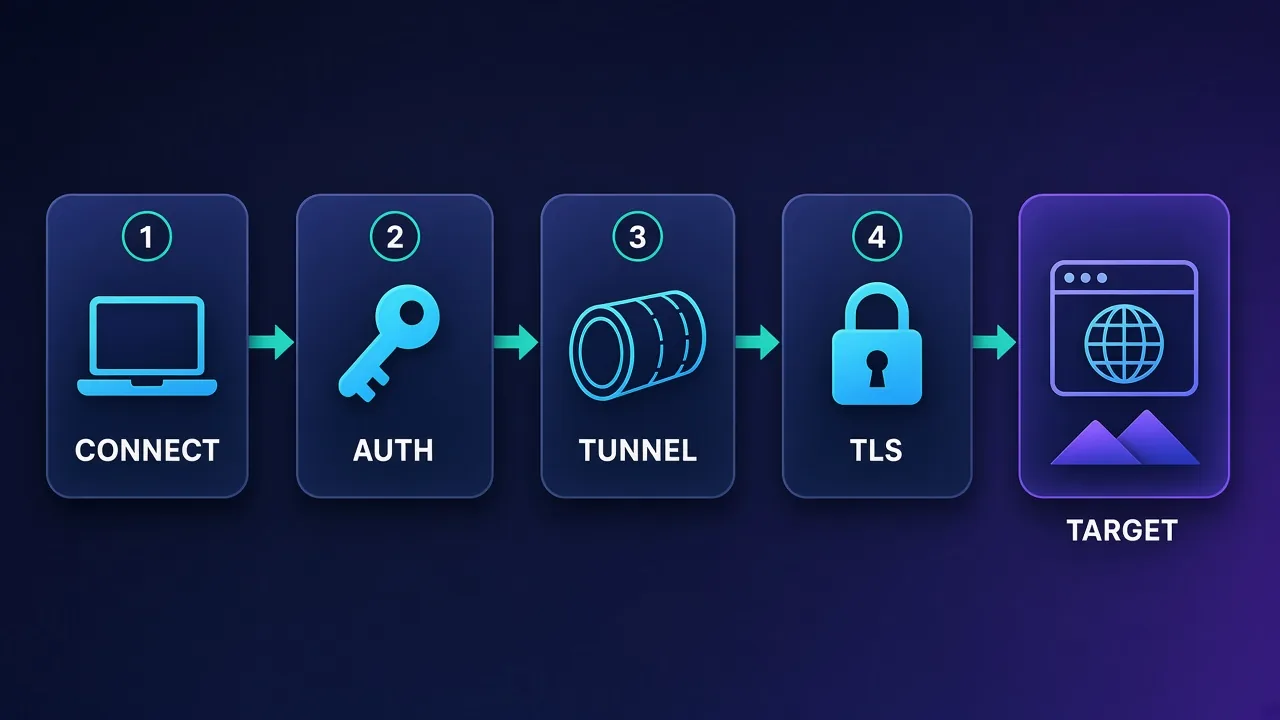
In Node, the piece that does this work is an agent (for node:http, node:https, axios and got) or a dispatcher (for undici and fetch). Choosing the right agent for the right client is most of the job.
Prerequisites: proxy details and a safe config
From your provider dashboard you need four things: the proxy host (often a gateway hostname), the port, and either a username and password or a whitelisted IP. Some providers also give separate ports or hostnames for HTTP and SOCKS5, so check which one you were issued.
Keep these out of your source code. Put them in environment variables (or your secret manager) and build one proxy URL in a single module that every client imports:
# .env (never commit this file)
PROXY_HOST=gate.example-proxy.com
PROXY_PORT=8000
PROXY_USER=your_username
PROXY_PASS=your_password
// proxy.js - build one proxy URL from environment variables
const { PROXY_HOST, PROXY_PORT, PROXY_USER, PROXY_PASS } = process.env;
// encodeURIComponent protects passwords that contain @, :, / or #
export const proxyUrl =
`http://${encodeURIComponent(PROXY_USER)}:${encodeURIComponent(PROXY_PASS)}` +
`@${PROXY_HOST}:${PROXY_PORT}`;Two details matter here. First, encodeURIComponent: provider passwords often contain characters like @ or :, and an unencoded one silently corrupts the URL, which shows up as a confusing 407 or a connection to the wrong host. Second, Node 22 or newer is the practical floor in 2026: the current got release declares node >=22 and the current undici release declares node >=22.19.0 in their package metadata.
Install only what you use:
npm i axios https-proxy-agent       # axios
npm i undici                         # fetch with a proxy
npm i got hpagent                    # got
npm i socks-proxy-agent              # SOCKS5 for axios / got
Using a proxy with axios
axios has two workable approaches. Both returned 200 for an HTTPS target through our authenticated test proxy.
Option 1: the built-in proxy option
import axios from 'axios';

const res = await axios.get('https://example.com/', {
  proxy: {
    protocol: 'http',
    host: process.env.PROXY_HOST,
    port: Number(process.env.PROXY_PORT),
    auth: {
      username: process.env.PROXY_USER,
      password: process.env.PROXY_PASS,
    },
  },
  timeout: 15000,
});

console.log(res.status);
This is the shortest route and fine for simple scripts. axios also reads HTTP_PROXY / HTTPS_PROXY environment variables by default when you do not pass a proxy object, which is convenient on a developer laptop and surprising on a server where those variables were set for something else. If you need axios to ignore the environment, set proxy: false explicitly.
Option 2: an agent (recommended for anything serious)
import axios from 'axios';
import { HttpsProxyAgent } from 'https-proxy-agent';
import { proxyUrl } from './proxy.js';

const agent = new HttpsProxyAgent(proxyUrl);

const client = axios.create({
  httpsAgent: agent,
  proxy: false,        // stop axios applying its own proxy logic on top
  timeout: 15000,
});

const res = await client.get('https://example.com/');
console.log(res.status);
We prefer the agent pattern for production code for three reasons: the same agent object works with axios, got and node:https, so you configure the proxy once; you control connection reuse through the agent; and switching to SOCKS5 is a one-line change. The important bit is proxy: false. Without it, axios can try to apply its own proxy handling (including environment variables) on top of the agent.
In our test, a wrong password through this setup produced an axios error with err.response.status === 407, which is exactly what you want: a clear, catchable signal rather than a hang.
Using a proxy with native fetch (undici)
Node's global fetch is built on undici, and it does not take an agent option. Instead you pass a dispatcher. The standard dispatcher for proxies is ProxyAgent:
import { fetch, ProxyAgent } from 'undici';
import { proxyUrl } from './proxy.js';

const dispatcher = new ProxyAgent(proxyUrl);

const res = await fetch('https://example.com/', { dispatcher });
console.log(res.status);
The version-mismatch trap
Import fetch from undici, not just ProxyAgent. In our test on Node 24.22.1, the global fetch combined with a ProxyAgent from the npm undici 8.x package failed with a bare TypeError: fetch failed, while the same agent with undici's own fetch returned 200. Node 24.22.1 bundles undici 7.30.1, so the global fetch and the npm dispatcher came from different major versions. Keeping both from one package avoids it.
If you would rather not embed credentials in the URL, ProxyAgent also accepts a token that is sent as the Proxy-Authorization header. This also worked in our test:
import { fetch, ProxyAgent } from 'undici';

const token = 'Basic ' + Buffer
  .from(`${process.env.PROXY_USER}:${process.env.PROXY_PASS}`)
  .toString('base64');

const dispatcher = new ProxyAgent({
  uri: `http://${process.env.PROXY_HOST}:${process.env.PROXY_PORT}`,
  token,
});

const res = await fetch('https://example.com/', { dispatcher });
Create the ProxyAgent once and reuse it. Each agent keeps its own connection pool; building a new one for every request throws that pooling away and opens a fresh tunnel each time.
Built-in proxy support from environment variables
Node now has its own proxy support for its built-in clients. According to the Node.js HTTP documentation, it was added in v24.5.0 and v22.21.0 and is marked "Stability 1.1 – Active development". When you set NODE_USE_ENV_PROXY=1 (or start Node with --use-env-proxy), the default global agent reads HTTP_PROXY, HTTPS_PROXY and NO_PROXY:
# Built-in fetch and node:http / node:https pick up the proxy from the environment
NODE_USE_ENV_PROXY=1 \
HTTPS_PROXY=http://user:pass@gate.example-proxy.com:8000 \
NO_PROXY=localhost,127.0.0.1 \
node app.js

# Or use the flag instead of NODE_USE_ENV_PROXY
HTTPS_PROXY=http://user:pass@gate.example-proxy.com:8000 node --use-env-proxy app.js
In our test, both the global fetch and https.get went through the authenticated proxy this way with no code changes. The docs also describe http.setGlobalProxyFromEnv() to switch it on at runtime, and a proxyEnv option for custom agents. This is ideal for corporate egress proxies or for running an existing tool through a proxy. It is less suited to scraping, because it applies one proxy to everything and does not rotate. The Node docs are also explicit that this feature is for routing traffic through a trusted proxy and is "not an anonymity or traffic-hiding feature".
Using a proxy with got
got, like axios, takes Node agents, but it wants them per protocol in an agent object. The hpagent package is the usual pairing; it takes the proxy URL as an option rather than as a constructor argument:
import got from 'got';
import { HttpsProxyAgent } from 'hpagent';
import { proxyUrl } from './proxy.js';

const res = await got('https://example.com/', {
  agent: {
    https: new HttpsProxyAgent({ proxy: proxyUrl }),
  },
  timeout: { request: 15000 },
  retry: { limit: 2 },
});

console.log(res.statusCode);
A new HttpsProxyAgent(proxyUrl) from https-proxy-agent also worked with got in our test, so if you already use that package for axios you can share one agent. If you also request plain http:// URLs, add an http key with an HttpProxyAgent; otherwise those requests skip the proxy entirely, which is an easy way to leak your real IP.
got's built-in retry is useful, but be deliberate with it. With a wrong password, our test got a RequestError reading "Bad response: 407" once retries were disabled. Retrying a 407 never helps, so do not let a generic retry policy burn time on auth failures.
Library comparison at a glance
| Client | How you attach the proxy | Package(s) needed | SOCKS5 | Best for |
|---|---|---|---|---|
| axios | proxy object, or httpsAgent + proxy: false | axios, optionally https-proxy-agent | Yes, via socks-proxy-agent | Existing axios codebases, interceptors |
| fetch (undici) | dispatcher: new ProxyAgent(url) | undici (import its fetch too) | Socks5ProxyAgent (experimental) | Modern code, standard Fetch API |
| Global fetch, env-based | NODE_USE_ENV_PROXY=1 + HTTPS_PROXY | None (Node v24.5+ / v22.21+) | No (HTTP/HTTPS proxy URLs only) | One fixed proxy, no code changes |
| got | agent: { http, https } | got + hpagent or https-proxy-agent | Yes, via socks-proxy-agent | Built-in retries, hooks, pagination |
SOCKS5 proxies in Node.js
For axios and got, socks-proxy-agent is the standard choice. One agent covers both HTTP and HTTPS targets:
import axios from 'axios';
import got from 'got';
import { SocksProxyAgent } from 'socks-proxy-agent';

// socks5h = let the proxy resolve DNS (no local DNS lookup for the target)
const agent = new SocksProxyAgent(
  'socks5h://user:pass@gate.example-proxy.com:1080'
);

// axios
await axios.get('https://example.com/', {
  httpAgent: agent, httpsAgent: agent, proxy: false,
});

// got
await got('https://example.com/', { agent: { http: agent, https: agent } });
Use the socks5h:// scheme when you want the proxy to resolve the target hostname. With plain socks5://, the client resolves DNS locally, which can leak the domains you visit to your own resolver and can give a different answer than the proxy's location would. Both axios and got returned 200 through our authenticated SOCKS5 test server, and the server log showed it receiving the hostname rather than a pre-resolved IP.
undici now ships its own SOCKS dispatcher. It worked in our test, but Node printed "ExperimentalWarning: SOCKS5 proxy support is experimental and subject to change", so treat it accordingly:
import { fetch, Socks5ProxyAgent } from 'undici';

const dispatcher = new Socks5ProxyAgent(
  'socks5://user:pass@gate.example-proxy.com:1080'
);
const res = await fetch('https://example.com/', { dispatcher });
// Node prints an ExperimentalWarning: treat this as experimental for now
Rotating proxies and retrying failed requests
There are two ways to rotate IPs, and which one you use depends on what your provider sold you.
- Rotating gateway: many residential and mobile plans give you one hostname that assigns a new exit IP per connection or per request, with "sticky" sessions usually controlled by a session ID in the username. Here your code stays simple: use the single proxy URL and let the gateway rotate. Read your provider's docs for the exact username format, because it is not standardised.
- Static list: datacenter and ISP plans often give you a list of IP:port pairs. Here you rotate in your own code.
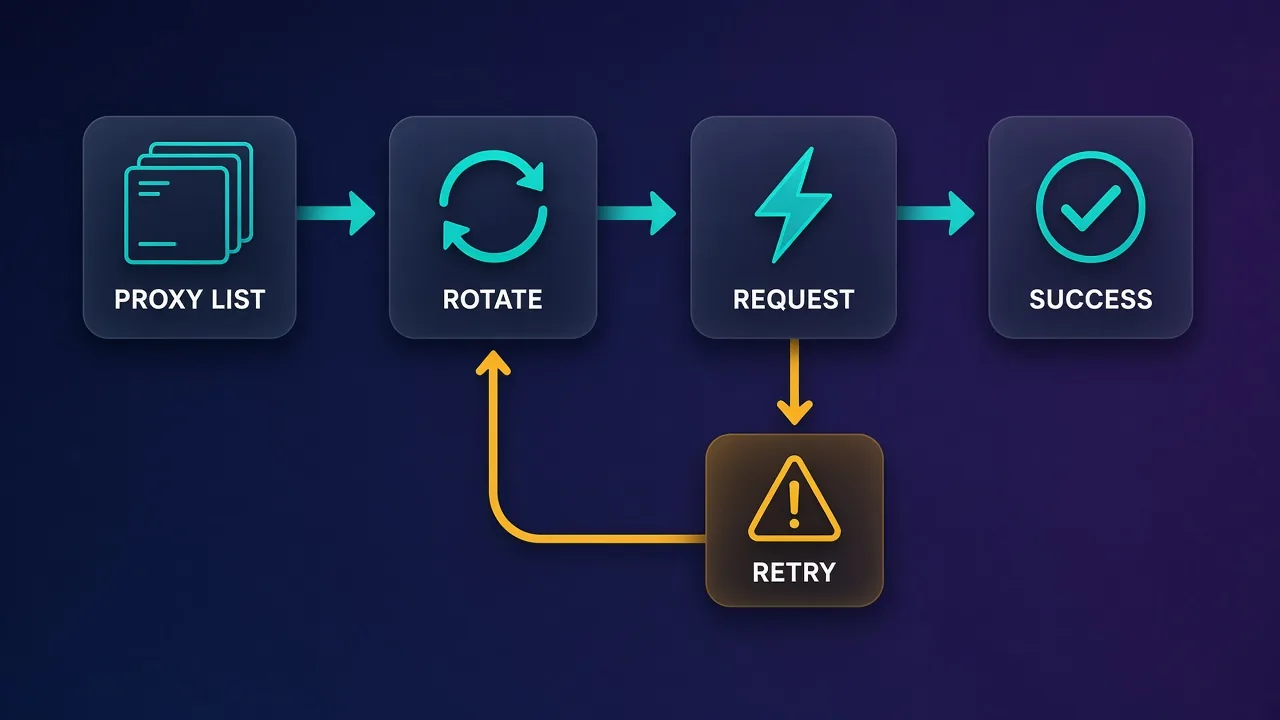
Our explainer on how rotating proxies work covers the gateway model in more depth. For a static list, round-robin with retry-on-failure is a solid baseline:
import { fetch, ProxyAgent } from 'undici';

const proxies = (process.env.PROXY_LIST || '').split(',').filter(Boolean);
// e.g. PROXY_LIST=http://u:p@1.2.3.4:8000,http://u:p@5.6.7.8:8000

// One agent per proxy, created once and reused (keeps connection pooling)
const agents = proxies.map((url) => new ProxyAgent(url));
let i = 0;

function nextAgent() {
  const agent = agents[i % agents.length];
  i += 1;
  return agent;
}

export async function getWithRotation(url, attempts = 3) {
  let lastError;
  for (let n = 0; n < attempts; n++) {
    const dispatcher = nextAgent();
    try {
      const res = await fetch(url, {
        dispatcher,
        signal: AbortSignal.timeout(15000),
      });
      if (res.status === 407) throw new Error('Proxy auth failed (407)');
      if ([403, 429].includes(res.status) || res.status >= 500) {
        lastError = new Error(`HTTP ${res.status}`);
        continue;              // try the next proxy
      }
      return res;
    } catch (err) {
      lastError = err;         // network error, timeout or tunnel failure
    }
  }
  throw lastError;
}
Note what this does and does not retry. Timeouts, tunnel failures, 403, 429 and 5xx responses move on to the next proxy. A 407 is thrown, because it means your credentials or IP whitelist are wrong and every proxy in the list will fail the same way. In a real job, add a short backoff between attempts and temporarily drop proxies that keep failing. If you also write Python scrapers, the same pattern is shown in How to Rotate Proxies in Python.
Keep-alive and rotation
Reused connections are fast, but on a rotating gateway one kept-alive tunnel usually keeps the same exit IP. If you need a new IP per request, check whether your provider rotates per connection or per request, and close or avoid reusing connections if it is per connection.
Handling proxy errors properly
Proxy failures look different from normal HTTP failures, and lumping them together makes debugging painful. Here is how the common ones map to causes, using axios error shapes:
try {
  const res = await client.get(url);
  return res.data;
} catch (err) {
  if (err.response?.status === 407) {
    // Wrong proxy username/password, or your IP is not whitelisted
  } else if (err.code === 'ECONNREFUSED') {
    // Wrong proxy host/port, or the proxy is down
  } else if (err.code === 'ECONNABORTED' || err.code === 'ETIMEDOUT') {
    // Slow proxy or target: retry on another IP
  } else if (err.response?.status === 429 || err.response?.status === 403) {
    // Target is rate-limiting or blocking this IP: back off and rotate
  }
  throw err;
}| Symptom | Usual cause | What to do |
|---|---|---|
407 Proxy Authentication Required | Wrong username or password, unencoded special characters, or IP not whitelisted | Fix credentials; do not retry |
ECONNREFUSED | Wrong host or port, or HTTP port used for SOCKS (or vice versa) | Check the endpoint and protocol |
| Timeout | Slow or overloaded exit IP, or slow target | Retry on another IP with a timeout set |
403 / 429 from the site | Target is blocking or rate-limiting the IP | Back off, rotate, reduce concurrency |
TypeError: fetch failed | Network error, or a global fetch / npm undici version mismatch | Inspect err.cause; import fetch from undici |
Always set a timeout. Without one, a dead proxy can hold a request open far longer than you expect. For fetch, AbortSignal.timeout(ms) is the cleanest option; axios has timeout; got has timeout: { request: ms }. And with undici, log err.cause: the top-level "fetch failed" message hides the real reason.
Verify the proxy is really being used
Before you scale anything up, confirm traffic actually leaves through the proxy. The fastest check is an IP echo service:
// Quick sanity check: the IP printed should be the proxy's, not yours
const res = await client.get('https://api.ipify.org?format=json');
console.log(res.data);
If you see your own IP, the proxy is being bypassed, most often because you configured an https agent but requested an http:// URL, or because environment variables overrode your settings. For speed, anonymity, DNS and WebRTC leak checks beyond this, follow our step-by-step guide on how to test a proxy.
Common mistakes to avoid
- Hard-coding credentials. Proxy passwords end up in Git history and CI logs. Use environment variables or a secret manager.
- Creating an agent per request. It defeats connection pooling and slows everything down. Create agents once per proxy.
- Mixing global fetch with an npm undici dispatcher. Import
fetchandProxyAgentfrom the sameundicipackage. - Forgetting
proxy: falsein axios when you pass an agent, and then being surprised byHTTPS_PROXYfrom the environment. - Using
socks5://when you meantsocks5h://, which resolves DNS locally. - Retrying 407s. They will never succeed; fail fast and fix the credentials.
- Disabling TLS verification (
rejectUnauthorized: false) to "fix" an error. With a normal CONNECT tunnel you should never need it; if you do, find out why.
Scrape responsibly
A proxy changes where your requests come from, not what you are allowed to do. Respect site terms, robots.txt where relevant and data protection law, keep request rates reasonable, and only use proxies whose IPs are sourced with consent.
Beyond HTTP clients: headless browsers
axios, fetch and got download HTML; they do not run JavaScript. If the data you need is rendered client-side or sits behind bot checks that look at browser fingerprints, you will need a headless browser, and the proxy setup is different again: the proxy is configured at browser launch or per context, and authentication works through the browser rather than a Proxy-Authorization header you build yourself. See How to Use Proxies with Puppeteer for Chrome automation in Node, and our roundup of the best proxies for Playwright if you are choosing a provider for browser-based scraping. For HTTP-client scraping at scale, our list of the best proxies for web scraping compares the main options.
Which approach should you use?
- New project, one proxy or a rotating gateway: undici's
fetch+ProxyAgent. Standard API, minimal dependencies. - Existing axios codebase: keep axios and add an
HttpsProxyAgentwithproxy: false. - You want retries, hooks and pagination built in: got with
hpagent. - You need SOCKS5:
socks-proxy-agentwith axios or got; undici'sSocks5ProxyAgentif you accept an experimental API. - You just need an existing script to go through a corporate proxy:
NODE_USE_ENV_PROXY=1withHTTPS_PROXY, no code changes.
Whichever you choose, the pattern is the same: build the proxy URL once from environment variables, create agents once, set timeouts, treat 407 as fatal and 403/429/timeouts as reasons to rotate, and verify your exit IP before you trust the setup.
Frequently asked questions
Pass a proxy object with protocol, host, port and auth to the request config, or create an HttpsProxyAgent from the https-proxy-agent package and pass it as httpsAgent with proxy set to false. The agent approach is easier to reuse across clients and to switch to SOCKS5.
Yes, in two ways. You can pass a dispatcher such as undici's ProxyAgent to fetch, or, on Node v24.5+ and v22.21+, set NODE_USE_ENV_PROXY=1 with HTTPS_PROXY so the built-in fetch uses the proxy from environment variables. The environment option applies one proxy globally and does not rotate.
A common cause is mixing Node's global fetch with a ProxyAgent from a different major version of the npm undici package. Import both fetch and ProxyAgent from the same undici package, and log err.cause to see the underlying error.
Pass an agent object with per-protocol agents, for example agent: { https: new HttpsProxyAgent({ proxy: proxyUrl }) } using the hpagent package. Add an http key too if you request plain HTTP URLs, otherwise those requests bypass the proxy.
For axios and got, create a SocksProxyAgent from the socks-proxy-agent package and pass it as the http and https agent. For undici's fetch there is a Socks5ProxyAgent dispatcher, but Node currently flags it as experimental. Use the socks5h scheme if you want the proxy to resolve DNS.
407 Proxy Authentication Required means the proxy rejected your credentials. Check the username and password, URL-encode special characters in them, and confirm your IP is whitelisted if your provider uses IP authentication. Retrying will not help until the credentials are fixed.
If your provider gives a rotating gateway, use its single endpoint and let it assign new IPs. If you have a static list, create one agent per proxy, pick them round-robin, and move to the next proxy on timeouts, 403, 429 or 5xx responses, while treating 407 as a fatal configuration error.
Request an IP echo service such as api.ipify.org through your configured client and compare the result with your own IP. If you see your real IP, the proxy is being bypassed, often because an http URL has no http agent or environment variables are overriding your settings.