Table of contents
When you buy proxies, vendors usually offer the same IP pool over two wire protocols: HTTP(S) and SOCKS5. The labels look like a minor checkbox in a dashboard, but they change how authentication works, whether TLS is terminated at the proxy, whether UDP is possible, and which clients can speak the protocol natively. Pick the wrong one and your scraper, browser, or torrent client fails in ways that look like “bad proxies” when the real issue is protocol mismatch.
This guide explains what each protocol actually does on the wire, how TLS and CONNECT tunneling fit in, where UDP matters, and when SOCKS5 versus HTTP is the better fit for scraping, browsers, and application-level traffic. For the related choice of IP type (residential, ISP, datacenter), see Residential vs ISP vs Datacenter Proxies.
Quick takeaway
HTTP proxies understand HTTP semantics (methods, headers, CONNECT for HTTPS). SOCKS5 is a generic TCP (and optionally UDP) tunnel that does not parse your application protocol. Both can carry HTTPS; they just get there differently.
What an HTTP proxy actually does
An HTTP proxy sits between your client and the destination and speaks HTTP as its control language. For plain http:// targets, the client sends a normal request to the proxy with an absolute URL (or Host header plus path, depending on the client). The proxy opens a connection to the origin, forwards the request, and relays the response. Along the way it can add or strip headers, enforce ACLs, and log URLs — because it understands the protocol.
For HTTPS, modern clients almost always use the CONNECT method. The client asks the proxy to open a raw TCP tunnel to host:443. After the proxy replies with 200 Connection Established, the client runs TLS end-to-end to the origin through that tunnel. The proxy sees destination host and port, but not the decrypted HTTP inside TLS — unless you deliberately configure TLS interception (common in corporate filters, rare and usually unwanted in commercial scraping proxies).
HTTP proxies typically authenticate with Proxy-Authorization (Basic, and sometimes Digest or vendor-specific schemes). Many residential vendors also encode username/password (and sticky session IDs) in the proxy URL your client passes to libraries like requests, Selenium, or Playwright.
- Understands HTTP — can rewrite headers, block methods, cache (in some deployments).
- CONNECT for HTTPS — tunnels TLS without needing to decrypt it.
- Widely supported — browsers, curl, Python
requests/httpx, most scrapers. - Usually TCP-only — no native UDP; DNS may be resolved by client or proxy depending on setup.
What SOCKS5 actually does
SOCKS5 (RFC 1928) is a circuit-level proxy protocol. Your client opens a TCP connection to the SOCKS server, negotiates authentication (none, username/password per RFC 1929, or other methods), then asks the server to connect to an arbitrary host:port (or to associate a UDP relay). After that, bytes flow opaquely. SOCKS5 does not know or care whether those bytes are HTTP, TLS, SSH, SMTP, or a game protocol.
That opacity is the point. One SOCKS5 endpoint can forward any TCP application. Optional UDP ASSOCIATE support lets some clients send UDP through the proxy — useful for DNS-over-UDP in certain stacks, VoIP experiments, or games — but not every commercial SOCKS5 product implements UDP. Always verify UDP if you need it; many “SOCKS5” residential plans are TCP-only in practice.
- Protocol-agnostic — tunnels any TCP payload after handshake.
- Auth at SOCKS layer — typically username/password before CONNECT-equivalent.
- Optional UDP — powerful when present; often missing on cheap pools.
- Client support varies — browsers need extensions or system proxies; some HTTP-only libraries need wrappers.
TLS, CONNECT, and who terminates encryption
Confusion around “HTTP vs HTTPS proxies” is common. Vendors often label a product “HTTP” or “HTTPS” when they really mean “this endpoint supports CONNECT for HTTPS sites.” Clarifying three ideas helps:
- Proxy scheme in your client URL —
http://user:pass@host:portusually means “talk HTTP proxy protocol to this host,” even when the destination site is HTTPS via CONNECT. - Destination TLS — with CONNECT (HTTP proxy) or a SOCKS5 TCP tunnel, TLS is typically client-to-origin. The proxy forwards ciphertext.
- TLS to the proxy itself — some enterprise proxies accept connections over TLS (sometimes marketed as HTTPS proxies). Consumer/residential products more often expose plaintext proxy ports on the vendor network, with destination TLS still end-to-end.
Do not confuse proxy TLS with site TLS
If your scraper fails with certificate errors, first check whether you accidentally pointed an HTTPS-aware client at a plain HTTP proxy port — or whether a middlebox is intercepting TLS. Commercial rotating residential proxies usually do not MITM your destination HTTPS.
SOCKS5 similarly carries TLS without interpreting it: you CONNECT (in SOCKS terms) to example.com:443, then run the TLS handshake through the tunnel. From the origin’s perspective, the TCP peer is the proxy’s exit IP.
UDP, DNS, and why SOCKS5 sometimes wins
HTTP proxies are built around TCP request/response. They do not proxy arbitrary UDP. DNS resolution might happen on the client (remote DNS disabled) or on the proxy (remote DNS), depending on client settings — but that is still usually DNS-over-TCP or a side channel, not a general UDP pipe.
SOCKS5’s UDP ASSOCIATE is the protocol feature that enables UDP relay. Use cases that care:
- Applications that speak UDP natively (some games, VoIP, custom sensors).
- Workflows where you want the proxy exit to resolve DNS so the origin sees consistent geo/ASN behavior.
- Stacks that bind SOCKS5 at the OS or VPN-shim layer and forward mixed traffic.
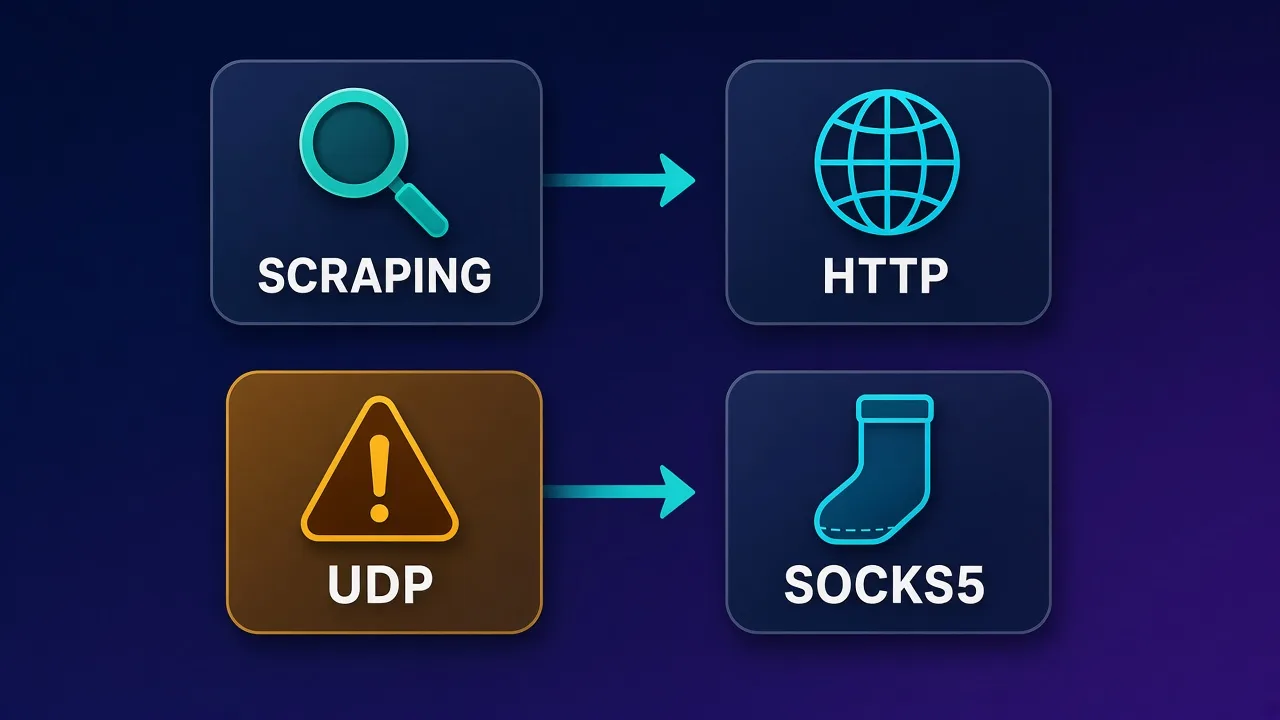
For classic web scraping — HTTP/HTTPS over TCP — UDP support is usually irrelevant. Do not pay a SOCKS5 premium solely for UDP unless your workload needs it and the vendor documents working UDP ASSOCIATE.
Side-by-side comparison
| Dimension | HTTP(S) proxy | SOCKS5 |
|---|---|---|
| Understands HTTP | Yes | No (opaque tunnel) |
| HTTPS to origin | Via CONNECT tunnel | Via TCP CONNECT to :443 |
| Non-HTTP TCP (SSH, SMTP, custom) | Limited / not the design | Yes |
| UDP | No | Optional (UDP ASSOCIATE) |
| Auth style | Proxy-Authorization / URL userinfo | SOCKS auth methods |
| Browser support | Native | OS settings / extensions / pac |
| Typical scraping fit | Excellent default | Excellent when client supports it |
| Header manipulation at proxy | Possible | Not at SOCKS layer |
When HTTP proxies are the better default
Choose HTTP (with CONNECT for HTTPS) when:
- You scrape or monitor websites with
requests,httpx, Scrapy, or similar HTTP clients. - You drive browsers that accept HTTP proxy settings cleanly (Chrome/Firefox proxy flags, Selenium proxy options, Puppeteer args).
- You want the widest library compatibility with the least glue code.
- You do not need UDP or non-HTTP protocols through the same endpoint.
Most residential and datacenter products expose HTTP endpoints first because that is what the majority of scrapers speak. Sticky session parameters are often appended to the username; rotation is per-request or per-session depending on vendor. None of that requires SOCKS5.
When SOCKS5 is worth preferring
Prefer SOCKS5 when:
- Your client or framework already standardizes on SOCKS (some anti-detect browsers, certain mobile automation tools, Tor-adjacent tooling patterns).
- You need one proxy hop for mixed TCP protocols, not only HTTP.
- You have verified UDP ASSOCIATE for a real UDP workload.
- You want the proxy to stay completely application-agnostic (no proxy-level HTTP header rewriting).
Same IPs, different door
On many providers, HTTP and SOCKS5 endpoints front the same residential or ISP pool. Switching protocols does not magically improve “quality.” It changes client compatibility and features (UDP, non-HTTP). Evaluate IP type and ASN quality separately from protocol.
Scraping stacks: practical notes
Python requests / httpx: HTTP proxies are first-class via a proxies= dict or mounts. SOCKS needs extra support (e.g. requests[socks] / PySocks, or httpx SOCKS transports). If your environment forbids extra deps, HTTP is simpler.
Selenium / Playwright / Puppeteer: Chromium accepts HTTP proxies natively via launch args or profiles. SOCKS5 is also supported by Chromium (--proxy-server=socks5://...), but auth UX differs — some teams put an authenticated local forwarder in front. See our Selenium guide for auth and sticky patterns.
curl: -x http://... vs --socks5-hostname host:port (hostname form asks the proxy to resolve DNS). Know which DNS path you want for geo consistency.
Node scrapers: many HTTP agents take proxy URLs directly; SOCKS often needs socks-proxy-agent or similar.
# HTTP proxy with CONNECT for HTTPS destinations
curl -x http://USER:PASS@proxy.example:8000 https://example.com/

# SOCKS5 with remote DNS resolution
curl --socks5-hostname USER:PASS@proxy.example:1080 https://example.com/
Browsers, extensions, and anti-detect setups
Desktop browsers expose HTTP and SOCKS in system or profile proxy settings. Extensions can route per-tab. Anti-detect browsers used for multi-account work often prefer one sticky proxy per profile; protocol choice should match what the browser profile editor documents. Pairing a sticky ISP exit with a consistent fingerprint matters more than whether the wire protocol is HTTP or SOCKS5 — but mismatches (profile set to SOCKS5 while you paste an HTTP endpoint) cause immediate connection failures.
Checklist before you blame the pool:
- Protocol in the profile matches the endpoint type the vendor issued.
- Port matches (HTTP and SOCKS ports are often different).
- Username/password encoding matches vendor docs (session suffixes, geo targeting tokens).
- DNS leak settings match your geo story (local vs remote resolve).
Performance and overhead myths
On modern networks, the handshake overhead difference between HTTP CONNECT and SOCKS5 is usually negligible next to TLS, destination TTFB, and residential hop latency. Claims that “SOCKS5 is always faster” or “HTTP is always slower” are not reliable planning assumptions. Bottlenecks are almost always:
- Exit IP reputation and target anti-bot policy
- Geographic distance and ISP peering
- Concurrency limits and vendor rate limits
- Client retry storms amplifying load
Optimize pool type, session stickiness, and retry logic before chasing protocol microbenchmarks.
Security and privacy boundaries
Neither HTTP nor SOCKS5 is a VPN. A proxy typically covers a specific app or client configuration, not the whole device. DNS, WebRTC, and non-proxied apps can leak your real IP if you only set an application proxy. For device-wide tunnels, use a VPN or system-level tunnel — then compare that model separately from proxy protocol choice.
Trust model reminders:
- The proxy operator sees destination IPs (and for plain HTTP, full URLs and bodies).
- With HTTPS via CONNECT or SOCKS5 to :443, contents stay encrypted to the origin; metadata (dest host/IP, timing, sizes) is still visible to the proxy.
- Free or opaque proxies are a credential-harvesting risk. Prefer reputable paid providers and rotate credentials if a laptop is lost.
Common failure modes (and what they mean)
- 407 Proxy Authentication Required — HTTP proxy rejected credentials; check user/pass and session suffix.
- SOCKS auth failure / general failure — wrong SOCKS user/pass or method not allowed.
- CONNECT tunnel failed / 403 — proxy ACL blocked destination host or port.
- Browser works on HTTP endpoint, SOCKS fails — often wrong port or UDP-only expectation; confirm TCP SOCKS port.
- TLS certificate errors — rare with honest CONNECT; investigate interception, wrong proxy URL scheme, or captive portals.
- “Connection reset” under load — pool congestion or target blocks; not protocol theology.
Compliance still applies
Protocol choice does not change whether you are allowed to access a target. Respect site terms, robots rules where applicable, and local law. Proxies are infrastructure, not permission.
How to choose in one minute
- Is the workload almost entirely HTTP/HTTPS scraping or browser automation? → Start with HTTP.
- Do you need non-HTTP TCP or verified UDP through the same proxy? → SOCKS5 (confirm UDP explicitly).
- Does your anti-detect or mobile tool document one protocol? → Match the tool.
- Are HTTP and SOCKS offered on the same pool? → Pick for compatibility; judge quality by IP type and tests, not by the checkbox label.
If you are still selecting IP type rather than protocol, read the residential vs ISP vs datacenter guide linked above, then return here to wire the matching endpoint into your client.
Who this choice is (and is not) for
Most relevant for: engineers wiring scrapers, SEO/SERP monitors, price trackers, QA teams running geolocated browser checks, and multi-account operators configuring anti-detect profiles.
Less relevant for: people who only need a consumer VPN for whole-device privacy on public Wi-Fi — that is a different product category. Also less relevant if a SaaS scraping API hides protocol details behind an HTTPS API key; you are then choosing an API, not a proxy handshake.
Conclusion
HTTP proxies and SOCKS5 proxies are doors into (often) the same buildings. HTTP speaks web natively and remains the default for scraping and browsers. SOCKS5 is the flexible TCP — and sometimes UDP — tunnel for mixed or specialized clients. Get TLS mental models straight (CONNECT vs tunnel), verify UDP only when you need it, and spend your evaluation time on IP quality, sticky behavior, and target success rates rather than folklore about which protocol is “faster.”
Explore provider pages on Proxyaxis Proxies when you are ready to compare pools; use this article to pick the endpoint type your stack can speak cleanly on day one.
Frequently asked questions
Not universally. SOCKS5 is better when you need a protocol-agnostic TCP tunnel or verified UDP. HTTP proxies are usually better defaults for web scraping and browsers because support is wider and CONNECT handles HTTPS cleanly.
Yes. Clients use the CONNECT method to open a TCP tunnel to the destination on port 443, then run TLS through that tunnel. The proxy typically sees the destination host, not the decrypted page content.
The SOCKS5 specification includes UDP ASSOCIATE, but many commercial proxy products only offer TCP. If you need UDP, confirm the vendor explicitly supports it on your plan before you rely on it.
Often they front the same residential, ISP, or datacenter pool on different ports. Protocol choice is about client compatibility and features, not an automatic quality upgrade. Always check the provider’s docs for your account.
HTTP proxies are the path of least resistance and work well with Chrome launch flags and standard options. Chromium can also use SOCKS5, but authentication and tooling are sometimes awkward—match whatever your stack documents clearly.
No. A proxy usually covers a specific application or browser profile. A VPN typically tunnels most device traffic at the system level. They solve overlapping but different problems around routing and exposure.
That is an HTTP-proxy response meaning credentials were missing or rejected. Verify username, password, and any sticky-session or geo suffixes your provider requires in the username field.
Targets mostly see your exit IP, TLS fingerprint, and behavior—not whether you reached that IP via HTTP CONNECT or SOCKS5. Ban rates track IP reputation and automation patterns far more than the proxy handshake type.