Table of contents
Scrapy is built for crawling at scale, and at scale you will eventually need proxies. Send a few thousand requests from one IP address and many sites start answering with 403s, 429s, CAPTCHAs or quietly altered pages. The good news is that Scrapy already ships with everything you need to route traffic through a proxy: a built-in HttpProxyMiddleware, a proxy key in request.meta, a retry system you can tune, and a middleware framework that lets you add rotation and ban handling in a few dozen lines of Python.
This guide walks you through all of it in the order you will actually need it: a single proxied request, a project-wide proxy, authentication, a custom rotation middleware, retry and ban handling, and the settings that keep a proxied crawl stable. Every setting name, default and class path below was checked against the official Scrapy documentation for Scrapy 2.20 on 8 November 2026. If you run an older version, a few details (noted where relevant) differ.
Quick answer
To send one Scrapy request through a proxy, set meta={"proxy": "http://USER:PASS@HOST:PORT"} on the Request. The built-in HttpProxyMiddleware (enabled by default) reads that key, adds the Proxy-Authorization header and hands the request to the download handler. For rotation, write a small downloader middleware that sets request.meta["proxy"] for every request.
How Scrapy routes a request through a proxy
Before writing any code, it helps to know where proxies fit in Scrapy's architecture, because almost every proxy bug comes down to ordering. When your spider yields a Request, the engine passes it through a chain of downloader middlewares before the download handler actually opens a connection. Each middleware can inspect or change the request on the way out and the response on the way back.
Scrapy's default chain is defined in the DOWNLOADER_MIDDLEWARES_BASE setting. The two entries that matter most for proxy work are:
RetryMiddlewareat order 550, which retries failed downloads such as timeouts, connection errors and certain HTTP status codes.HttpProxyMiddlewareat order 750, which turns theproxymeta key (or thehttp_proxy/https_proxyenvironment variables) into an actual proxy configuration, including credentials.
The process_request() methods run in increasing order (low numbers first, closer to the engine), and process_response() methods run in decreasing order on the way back. That means any middleware you write to pick a proxy must run before 750, so HttpProxyMiddleware sees the value you set. A middleware that reacts to bans should sit above the retry and redirect middlewares (550 and 600) so it sees responses before they do.
The last piece is the download handler. The proxy meta key is honoured by the handler, not by the middleware, and the Scrapy docs are explicit that support is not guaranteed for every handler. The default HTTP/1.1 handler supports HTTP proxies; the optional HTTP/2 handler (H2DownloadHandler) does not support proxies at all. Keep that in mind if you ever switch handlers to chase performance.
Quick start: set request.meta['proxy'] on a single request
The simplest way to use a proxy in Scrapy is to attach it to the request itself. This is ideal for testing a new proxy, or for spiders where only a few requests need to go through one.
import scrapy


class IpCheckSpider(scrapy.Spider):
    name = "ipcheck"

    async def start(self):
        yield scrapy.Request(
            "https://httpbin.org/ip",
            meta={"proxy": "http://USERNAME:PASSWORD@proxy.example.com:8080"},
        )

    def parse(self, response):
        self.logger.info("Exit IP: %s", response.text)
Run it with scrapy runspider ipcheck.py (or scrapy crawl ipcheck inside a project). The httpbin.org/ip endpoint simply echoes the IP it sees, so if the log shows your proxy's exit IP rather than your own, the proxy is working. The async def start() method is the modern way to yield initial requests; on Scrapy versions older than 2.13 use def start_requests(self) instead.
A few behaviours worth knowing, all taken from the HttpProxyMiddleware documentation:
- The value looks like
http://host:portorhttp://username:password@host:port. - A
proxymeta key takes precedence over thehttp_proxy/https_proxyenvironment variables, and it also ignoresno_proxy. - Setting
meta["proxy"] = Noneexplicitly disables the proxy for that request, even if environment variables define one. - Proxy URLs usually use the
http://scheme. Bothhttp://andhttps://proxy URLs can be used for both HTTP and HTTPS target sites. With anhttp://proxy and an HTTPS target, Scrapy opens aCONNECTtunnel so the proxy cannot read your page content.
Using one proxy for the whole project
Adding meta to every request quickly gets repetitive. You have three cleaner options when every request should use the same proxy, which is the common case with a rotating residential gateway that changes the exit IP for you.
Option 1: environment variables
Like Python's urllib.request, HttpProxyMiddleware reads the standard http_proxy, https_proxy and no_proxy environment variables when the crawler starts. This keeps credentials out of your code entirely:
export http_proxy="http://USERNAME:PASSWORD@proxy.example.com:8080"
export https_proxy="http://USERNAME:PASSWORD@proxy.example.com:8080"
scrapy crawl products
Note that https_proxy is the proxy used for HTTPS target URLs; its value is still usually an http:// proxy URL. The variables are read when the middleware is created, so changing them mid-crawl has no effect.
Option 2: a tiny fixed-proxy middleware
If you prefer configuration in settings.py, a five-line middleware that fills in the meta key when it is missing does the job and plays nicely with per-request overrides:
# myproject/middlewares.py
class FixedProxyMiddleware:
    def __init__(self, proxy_url):
        self.proxy_url = proxy_url

    @classmethod
    def from_crawler(cls, crawler):
        return cls(crawler.settings.get("PROXY_URL"))

    def process_request(self, request):
        if self.proxy_url and "proxy" not in request.meta:
            request.meta["proxy"] = self.proxy_url
# myproject/settings.py
import os
PROXY_URL = os.environ.get("PROXY_URL") # keep secrets out of git
DOWNLOADER_MIDDLEWARES = {
"myproject.middlewares.FixedProxyMiddleware": 740, # must run before 750
}PROXY_URL is our own custom setting name, not a built-in Scrapy setting. Scrapy happily passes arbitrary settings through crawler.settings, which is why this pattern works.
Option 3: per-spider settings
When only one spider in a project needs a proxy, put the middleware (and PROXY_URL) in that spider's custom_settings dictionary rather than the global settings file. Other spiders keep connecting directly.
Proxy authentication in Scrapy
Commercial proxies authenticate you in one of two ways: a username and password, or an allowlist of your server's IP addresses. Scrapy handles both, but credentials have a few sharp edges.
Credentials inside the proxy URL
When the proxy URL contains username:password@, HttpProxyMiddleware strips them out, builds a Proxy-Authorization: Basic … header and sends the request to the bare proxy address. You never need to build that header yourself. The middleware URL-decodes the username and password before encoding them, so special characters must be percent-encoded in the URL: @ becomes %40, : becomes %3A, and so on. The simplest safe approach is to let Python do it:
from urllib.parse import quote

user = "customer-abc-country-us"
password = "p@ss:word"
proxy = f"http://{quote(user, safe='')}:{quote(password, safe='')}@proxy.example.com:8080"
The credentials are encoded using the HTTPPROXY_AUTH_ENCODING setting, which defaults to "latin-1". If your provider issues passwords with non-Latin characters, set it to "utf-8".
Changing proxies drops the credentials
If a request already carries credentials for one proxy and you switch request.meta["proxy"] to a different proxy URL without credentials, HttpProxyMiddleware removes the old Proxy-Authorization header so it does not leak to the new proxy. That is a sensible security default, but it means every proxy URL in your rotation list should carry its own credentials (or you should use IP allowlisting).
IP allowlisting
Many providers let you register your server's public IP in their dashboard. Requests from that IP need no credentials, so your proxy URL becomes simply http://gateway.example.com:PORT. This is convenient for fixed servers but breaks when your crawler runs from a laptop, CI runner or autoscaling fleet with changing IPs. For those, stick with username and password.
Provider targeting parameters
Residential and mobile providers often encode options such as country, city or a session ID in the proxy username. The exact syntax differs by provider and changes over time, so copy it from your dashboard rather than from a tutorial. Whatever the format, the same rule applies: percent-encode it and put it in the URL.
Choosing a rotation strategy
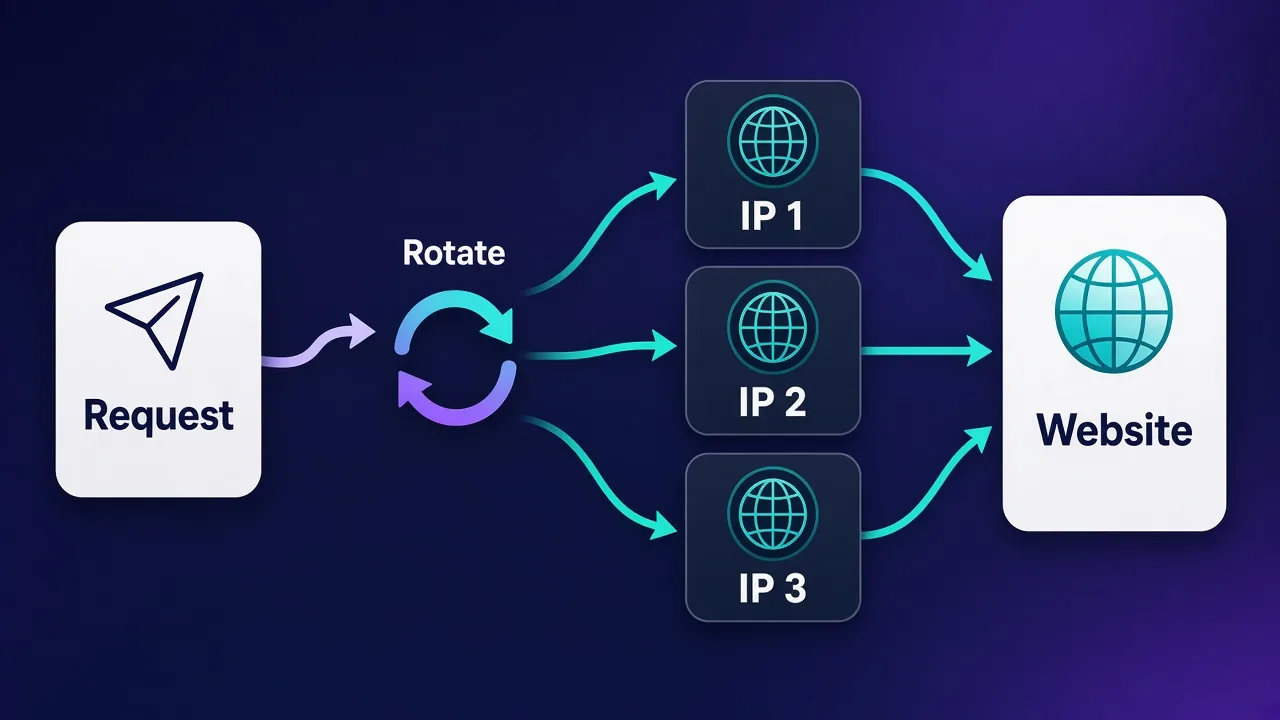
"Rotating proxies" can mean two quite different things in a Scrapy project, and choosing the right one saves you a lot of code. If you are new to the concept, our guide on how to rotate proxies in Python covers the theory; here is how the options map onto Scrapy.
| Approach | How it works in Scrapy | Code you write | Best for |
|---|---|---|---|
| Rotating gateway | One endpoint in meta["proxy"]; the provider assigns a new exit IP per request or per session | A fixed-proxy middleware or env vars | Residential and mobile pools, most large crawls |
| Your own proxy list | A middleware picks a different URL from a list for each request | Rotation middleware plus ban tracking | Datacenter or ISP proxies sold as individual IPs |
| Sticky sessions | Same exit IP kept for a series of requests, usually via a session ID in the username | Middleware that maps a session key to a proxy | Logins, carts, multi-step flows, pagination |
| Managed scraping API | A provider's API or proxy mode handles IPs, retries and ban detection | A plugin or a single proxy endpoint | Hard targets where you do not want to maintain ban logic |
In practice, many teams combine them: a rotating gateway for most traffic, sticky sessions for the few flows that need a stable identity, and a managed API for the handful of domains that resist everything else.
If your provider offers a rotating gateway, try it with a fixed-proxy middleware before writing any rotation logic. You may not need a custom rotator at all, and you avoid the bookkeeping of tracking which individual IPs are healthy.
Building a custom proxy rotation middleware
When you buy a list of individual proxies, you need Scrapy to spread requests across them. The middleware below picks a proxy for every request that does not already have one, keeps track of proxies that recently got banned, and benches them for a cooldown period.
# myproject/middlewares.py
import random
import time


class RotatingProxyMiddleware:
    def __init__(self, proxies, cooldown, stats):
        if not proxies:
            raise ValueError("ROTATING_PROXY_LIST is empty")
        self.proxies = list(proxies)
        self.cooldown = cooldown
        self.stats = stats
        self.benched = {}  # proxy_url -> timestamp when it may be used again

    @classmethod
    def from_crawler(cls, crawler):
        s = crawler.settings
        mw = cls(
            proxies=s.getlist("ROTATING_PROXY_LIST"),
            cooldown=s.getfloat("ROTATING_PROXY_COOLDOWN", 300.0),
            stats=crawler.stats,
        )
        mw.crawler = crawler  # used later for retries
        return mw

    def _available(self):
        now = time.monotonic()
        healthy = [p for p in self.proxies if self.benched.get(p, 0) <= now]
        return healthy or self.proxies  # never stall completely

    def bench(self, proxy_url):
        self.benched[proxy_url] = time.monotonic() + self.cooldown
        self.stats.inc_value("proxy_rotation/benched")

    def process_request(self, request):
        if request.meta.get("proxy") or request.meta.get("dont_rotate_proxy"):
            return None
        proxy = random.choice(self._available())
        request.meta["proxy"] = proxy
        request.meta["rotating_proxy"] = proxy
        self.stats.inc_value("proxy_rotation/assigned")
        return None
# myproject/settings.py
import os
ROTATING_PROXY_LIST = [
line.strip()
for line in open(os.environ["PROXY_LIST_FILE"])
if line.strip()
]
ROTATING_PROXY_COOLDOWN = 300 # seconds a banned proxy sits out
DOWNLOADER_MIDDLEWARES = {
"myproject.middlewares.RotatingProxyMiddleware": 610,
}A few design decisions are worth explaining:
- Order 610. Any value below 750 works for
process_request(), because it only needs to run beforeHttpProxyMiddleware. Placing it afterRetryMiddleware(550) andRedirectMiddleware(600) matters on the way back:process_response()runs in decreasing order, so a ban handler at 610 sees responses before redirects and retries do. - It respects an existing
meta["proxy"]. That lets you pin specific requests to a specific proxy, and it is also why retries need care (more on that below). - It never stalls. If every proxy is benched, it falls back to the full list instead of blocking the crawl.
- Each list entry carries its own credentials, for the reason described in the authentication section.
- Stats. The counters appear in the crawl stats dump at the end of the run, which is the quickest way to see whether rotation and benching are actually happening.
The ROTATING_PROXY_LIST and ROTATING_PROXY_COOLDOWN names are our own. Scrapy 2.14 deprecated requiring a spider argument in downloader middleware methods, which is why the examples omit it; on older versions, write def process_request(self, request, spider) and def process_response(self, request, response, spider).
Sticky sessions and per-domain proxies
Random rotation breaks anything that relies on a consistent identity, such as a logged-in session or a multi-page checkout. The fix is to derive the proxy from a stable key instead of choosing randomly. A simple version hashes a session key you put in meta:
import hashlib


def pick_sticky(proxies, key):
    digest = hashlib.sha256(key.encode()).digest()
    return proxies[int.from_bytes(digest[:4], "big") % len(proxies)]

# in process_request():
#     key = request.meta.get("proxy_session")
#     proxy = pick_sticky(self.proxies, key) if key else random.choice(self._available())
With a rotating residential gateway, you usually get the same effect by adding a session ID to the username in the format your provider documents, then reusing that exact proxy URL for every request in the flow. Remember that Scrapy's CookiesMiddleware keeps one cookie jar per spider by default; if each session also needs its own cookies, set the cookiejar meta key to the same session key.
Handling retries and bans
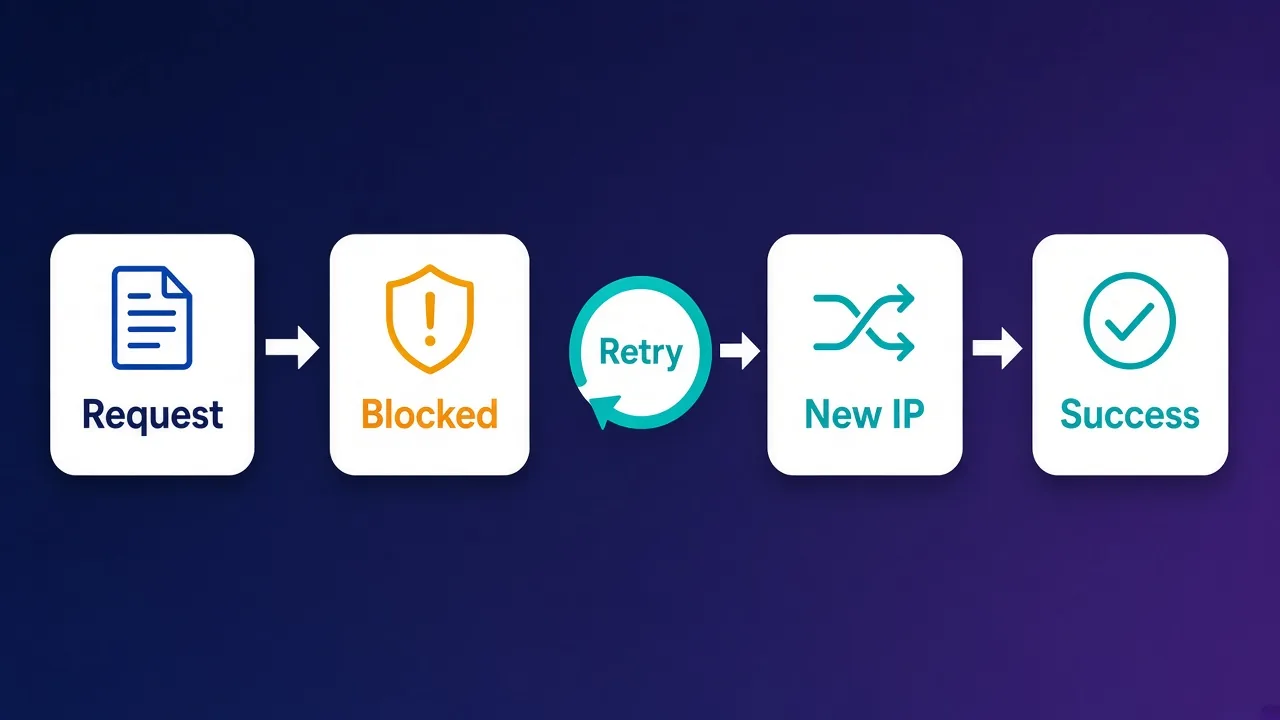
Proxies fail. Some IPs are slow, some are already flagged by the target, and some sites return a 200 page that is really a CAPTCHA. A robust Scrapy setup separates two problems: transient failures, which Scrapy's built-in retry logic handles, and bans, which need a different proxy rather than the same request again.
What RetryMiddleware already does
The built-in RetryMiddleware is enabled by default and is controlled by these settings (defaults from the current docs):
RETRY_ENABLED:True.RETRY_TIMES:2, meaning up to two retries in addition to the first download. You can override it per request with themax_retry_timesmeta key.RETRY_HTTP_CODES:[408, 429, 500, 502, 503, 504, 522, 524].RETRY_EXCEPTIONS: a list that includes download timeouts, refused and lost connections, DNS failures and the HTTP/1.1 handler'sTunnelError, which is what you typically see when a proxy refuses aCONNECTtunnel.RETRY_PRIORITY_ADJUST:-1, so retries are scheduled at lower priority than fresh requests.
Notice that 403 is not in the default list, and neither is 407 (proxy authentication required). That is deliberate: retrying a hard block or a bad password with the same setup usually just wastes bandwidth.
Retries reuse the same proxy
A retried request is a copy of the original, and its meta still contains the proxy key. If your rotation middleware skips requests that already have a proxy, a plain retry goes straight back through the IP that just failed. Clear or replace meta["proxy"] whenever you retry because of a block.
Adding ban detection to the rotation middleware
The cleanest place to detect bans is the rotation middleware itself, because it already knows which proxy each request used. Add the method below to RotatingProxyMiddleware; it uses the crawler reference saved in from_crawler(). If a response looks like a ban, it benches the proxy, strips it from the request, and returns a retry built with Scrapy's own get_retry_request() helper, so the usual retry counters, limits and stats still apply.
# myproject/middlewares.py (additions to RotatingProxyMiddleware)
from scrapy.downloadermiddlewares.retry import get_retry_request

BAN_STATUSES = {403, 429}
BAN_MARKERS = (b"captcha", b"access denied", b"unusual traffic")


def _is_ban(response):
    if response.status in BAN_STATUSES:
        return True
    body = response.body[:20000].lower()
    return response.status == 200 and any(m in body for m in BAN_MARKERS)


# method of RotatingProxyMiddleware
def process_response(self, request, response):
    if not _is_ban(response):
        return response
    proxy = request.meta.get("rotating_proxy")
    if proxy:
        self.bench(proxy)
    retry = get_retry_request(
        request,
        spider=self.crawler.spider,
        reason=f"ban_{response.status}",
    )
    if retry is None:
        return response  # retries exhausted; let the spider see it
    retry.meta.pop("proxy", None)
    retry.meta.pop("rotating_proxy", None)
    return retry
# myproject/settings.py
DOWNLOADER_MIDDLEWARES = {
"myproject.middlewares.RotatingProxyMiddleware": 610,
}
RETRY_TIMES = 4
RETRY_HTTP_CODES = [408, 500, 502, 503, 504, 522, 524] # 429 handled as a banBecause process_response() runs in decreasing order, the middleware at 610 sees each response before RedirectMiddleware (600) and RetryMiddleware (550). Removing 429 from RETRY_HTTP_CODES stops the built-in middleware from retrying rate-limit responses through the same proxy, since your middleware now owns that case. Returning a Request from process_response() halts the chain and reschedules the request, exactly as the Scrapy docs describe, and get_retry_request() returns None once the request has used up its retries.
The marker strings are placeholders. Every target signals blocks differently, so log a few blocked responses and match on something specific to that site, such as a page title or a known element. For a broader look at why sites challenge scrapers and how to reduce it, read our guide on how to avoid CAPTCHAs when scraping.
Retrying from a spider callback
Sometimes you only discover a block while parsing, for example when a product page loads but has no price. You can call the same helper from the callback: get_retry_request(response.request, spider=self, reason="empty") returns a new request, or None once retries are exhausted. Pop the proxy meta key from it before yielding it so it goes out through a different IP.
Settings that keep proxied crawls healthy
Proxies give you more IPs, not unlimited politeness. Concurrency and delay settings still decide how hard you hit each site, and they interact with proxies in ways that are easy to miss. Note that the Scrapy docs list two values for some settings: the value generated by scrapy startproject in settings.py, and the "fallback" built into Scrapy that applies when the setting is absent (for example in a runspider script).
| Setting | Default | Why it matters with proxies |
|---|---|---|
CONCURRENT_REQUESTS | 16 | Global cap on simultaneous requests. Many proxy plans also limit concurrent connections, so keep this at or under your plan's limit. |
CONCURRENT_REQUESTS_PER_DOMAIN | 1 in new projects (fallback 8) | Limits parallel requests per site. Proxies spread IPs, but this is still what the target feels. |
DOWNLOAD_DELAY | 1 in new projects (fallback 0) | Minimum seconds between requests to the same domain slot. |
DOWNLOAD_DELAY_JITTER | 0.5 | Randomises the delay by plus or minus 50% by default, so timing looks less mechanical. Added in Scrapy 2.19. |
AUTOTHROTTLE_ENABLED | False | Adjusts delays based on latency and never lets error responses speed the crawl up. |
DOWNLOAD_TIMEOUT | 180 | Seconds before a download times out. Slow proxies can hold slots for minutes; a lower value fails fast and lets retries move on. |
Two points deserve emphasis. First, Scrapy groups requests into download slots by target domain, not by proxy, so DOWNLOAD_DELAY and per-domain concurrency still apply even when every request uses a different IP. That is usually what you want, because the site sees the aggregate load. Second, AutoThrottle (start delay 5 seconds, maximum 60 seconds and a target concurrency of 1.0 by default) is designed so that non-200 responses cannot decrease the delay. When a proxied crawl starts drawing errors, that behaviour slows you down instead of hammering harder, which tends to reduce bans.
# A reasonable starting point for a proxied crawl; tune per target.
CONCURRENT_REQUESTS = 16
CONCURRENT_REQUESTS_PER_DOMAIN = 4
DOWNLOAD_DELAY = 1
DOWNLOAD_TIMEOUT = 30
AUTOTHROTTLE_ENABLED = True
AUTOTHROTTLE_TARGET_CONCURRENCY = 2.0
RETRY_TIMES = 4
These values are a starting point, not a benchmark result. Watch the stats at the end of each run, especially retry counts, response status counts and your own proxy_rotation/benched counter, and adjust one setting at a time.
SOCKS5 and HTTPS proxies in Scrapy
This is where many older tutorials are out of date, so it is worth being precise about what the current docs say.
- HTTP proxies (
http://URLs) work with the default HTTP/1.1 handler for both HTTP and HTTPS targets. This is what almost every provider gives you, and it is the right choice for most Scrapy projects. - HTTPS proxies (
https://proxy URLs, where the connection to the proxy itself is encrypted) are also accepted. The docs describe them as the rarer case. - SOCKS proxies are not supported by the default handler. According to the Scrapy 2.20 docs, the built-in handler that supports them is
HttpxDownloadHandler, which supports SOCKS5. It requires thehttpxextra and must be enabled explicitly.
pip install "scrapy[httpx]"# settings.py
DOWNLOAD_HANDLERS = {
"http": "scrapy.core.downloader.handlers._httpx.HttpxDownloadHandler",
"https": "scrapy.core.downloader.handlers._httpx.HttpxDownloadHandler",
}
# then, per request or in your rotation middleware:
# request.meta["proxy"] = "socks5://USERNAME:PASSWORD@proxy.example.com:1080"Be aware of the caveats the docs list for this handler: it is marked experimental and not yet recommended for production, it requires asyncio support, and it creates a separate connection pool for each proxy URL, which can raise resource usage when you rotate through many proxies. Unless a provider only offers SOCKS5, the HTTP endpoint is the safer option in Scrapy. If you want the protocol background, our cURL proxy guide is a quick way to test a SOCKS5 endpoint outside Scrapy first.
Testing and debugging your proxy setup
When a proxied crawl misbehaves, isolate the proxy from the spider before changing any code.
- Test the proxy outside Scrapy. A single cURL or Python Requests call against an IP-echo endpoint tells you whether the credentials and port are right. Our guide to proxies with Python Requests has copy-paste checks.
- Test it in the Scrapy shell. Run
scrapy shell, thenfetch(scrapy.Request("https://httpbin.org/ip", meta={"proxy": "http://USER:PASS@host:port"}))and inspectresponse.text. - Turn on debug logging with
LOG_LEVEL = "DEBUG"for a short run and confirm which middlewares are enabled. Scrapy logs the active downloader middlewares at startup, so you can check that yours appear and in which order. - Read the stats dump. High
retry/reason_count/…values point to the failure type; timeouts suggest slow proxies, while tunnel errors usually mean the proxy rejected the connection.
Common errors and what they usually mean
- 407 Proxy Authentication Required: wrong credentials, credentials not percent-encoded, or a proxy URL in your rotation list that lacks credentials.
TunnelError: the proxy refused to open aCONNECTtunnel to an HTTPS site. Check the port, the plan's allowed targets, and authentication.- Timeouts: overloaded or distant proxies. Lower
DOWNLOAD_TIMEOUT, reduce concurrency, or choose a closer location. - Your real IP in the response: the proxy middleware is running after 750, the meta key was overwritten with
None, or you switched to a download handler that ignores proxies. - Plenty of 200s but empty data: soft blocks. Add a content check in your
process_response()hook or callback, as shown above.
Proxy providers that work well with Scrapy
Any HTTP proxy works with the code in this guide, but the provider decides how much of the rotation and ban handling you have to build yourself. Here are three options worth considering for Scrapy projects; for a wider comparison, see our roundup of the best proxies for web scraping.
Decodo: rotating residential gateway with simple setup
Decodo (formerly Smartproxy) is a good fit when you want a rotating residential or datacenter gateway that drops straight into a fixed-proxy middleware. Location targeting and sticky sessions are configured through the endpoint and username, so most Scrapy projects need no custom rotation code at all. It suits teams that want broad coverage without enterprise-style onboarding.

Decodo
Decodo offers the best price-to-performance ratio in the industry. It delivers roughly 90% of what the enterprise leaders provide — high success rates, a large clean pool, sticky sessions, an unblocker — at a fraction of their cost. The dashboard is the friendliest of any major provider, the 14-day money-back guarantee removes the risk of trying it, and support actually responds. The main gaps are enterprise-grade compliance tooling and the very deepest targeting, neither of which most teams need. For startups, solo developers, and any team that wants professional results without enterprise pricing, Decodo is our top value pick and an easy recommendation.
Oxylabs: large pools and enterprise support
Oxylabs is the pick when your crawl is large or business-critical and you value account management and documentation. Its residential, datacenter and ISP proxies work through standard HTTP endpoints, so the rotation and ban-handling middlewares above apply unchanged, and its scraper APIs are an option for targets where raw proxies struggle.

Oxylabs
Oxylabs is the enterprise provider that gets the fundamentals right. The network is huge and well-maintained, the scraper APIs are genuinely best-in-class, and the documentation and SDKs make integration faster than almost any competitor. What sets it apart from Bright Data is service: dedicated account managers, responsive support, and cleaner tooling mean less time fighting the platform and more time shipping. The cost is higher entry pricing, and the deepest discounts favor high-volume commitments. For serious commercial data operations that can justify the spend, Oxylabs is a top-two choice and frequently the one teams stay with long-term.
Zyte: from the team behind Scrapy
Zyte (formerly Scrapinghub) is the company where Scrapy was created, and it remains closely involved in maintaining it. Rather than selling a plain IP list, Zyte API handles IP selection, retries and ban avoidance for you. It offers an official scrapy-zyte-api plugin, and a proxy mode at api.zyte.com:8011 that you can use like any authenticated HTTP proxy, with your API key as the username. It makes the most sense for hard targets where maintaining your own ban logic costs more than paying per successful request.

Zyte
Zyte API is the most complete scraping-as-a-service offering from the most credible engineering lineage in the space (they wrote Scrapy). Automatic ban handling, escalation, and rendering behind a success-priced API genuinely deletes the proxy-ops workload. It is not a general-purpose proxy — account management and browser-based workflows need conventional providers — and heavy scraping teams with anti-bot expertise can beat its per-request economics. For developer teams whose product is the data, not the infrastructure, it is the benchmark.
Check each provider's current pricing and acceptable-use terms before you commit, and confirm that the sites you scrape allow the access you plan. Prices and plans change frequently, which is why the cards above pull live data rather than quoting numbers here.
Putting it all together
A production-ready proxied Scrapy project usually ends up with the same small set of pieces. Start with request.meta["proxy"] to confirm your proxy works. Move to a fixed-proxy middleware or environment variables when every request should use a rotating gateway. Add a rotation middleware only when you manage your own list of IPs, and give it a process_response() hook that benches bad proxies and retries through a fresh one using get_retry_request(). Finally, tune RETRY_TIMES, RETRY_HTTP_CODES, concurrency, delay and AutoThrottle so the crawl backs off instead of burning through IPs.
Keep the middleware order in mind: anything that sets a proxy must run below 750, and anything that inspects responses for bans should run above the retry and redirect middlewares. Get that right, keep credentials in environment variables, and watch your crawl stats, and Scrapy's proxy support is both simple and remarkably robust.
Frequently asked questions
Pass the proxy in the request meta, for example meta={"proxy": "http://user:pass@host:port"}. The built-in HttpProxyMiddleware, which is enabled by default, reads that key and adds the Proxy-Authorization header for you. For a project-wide proxy, use the http_proxy and https_proxy environment variables or a small downloader middleware that sets the meta key.
No. Scrapy applies whatever proxy you set on each request but has no built-in rotation. You either use a provider's rotating gateway, which changes the exit IP for you behind one endpoint, or write a downloader middleware that picks a different proxy URL from a list for every request.
The most common causes are a custom middleware that sets the proxy after HttpProxyMiddleware (order 750) has already run, a proxy meta key that was set to None, or a download handler that ignores proxies, such as the HTTP/2 handler. Give your proxy middleware an order below 750 and test against an IP-echo endpoint.
Put the credentials in the proxy URL as http://username:password@host:port and HttpProxyMiddleware will build the Proxy-Authorization header. Percent-encode special characters such as @ and : in the username or password. Alternatively, allowlist your server's IP in the provider dashboard and use the proxy URL without credentials.
Not with the default HTTP/1.1 download handler. According to the current Scrapy docs, the built-in HttpxDownloadHandler supports SOCKS5 proxies; it needs the httpx extra (pip install "scrapy[httpx]") and must be enabled in DOWNLOAD_HANDLERS. The docs mark that handler as experimental, so an HTTP proxy endpoint is usually the safer choice.
RetryMiddleware retries HTTP 408, 429, 500, 502, 503, 504, 522 and 524 responses, plus connection-level problems such as timeouts, refused or lost connections, DNS failures and proxy tunnel errors. By default each request is retried up to 2 times after the first attempt, controlled by RETRY_TIMES. 403 and 407 are not retried by default.
Detect the block in a downloader middleware's process_response() or in your callback, then build the retry with scrapy.downloadermiddlewares.retry.get_retry_request(). Remove the proxy key from the new request's meta before returning it so your rotation middleware assigns a fresh proxy. Otherwise the retry is sent through the same IP that was just blocked.
Yes. Zyte API has a proxy mode at api.zyte.com:8011 that accepts your Zyte API key as the proxy username, and Zyte also maintains the scrapy-zyte-api plugin for deeper integration. Zyte is the company where Scrapy was created. Check Zyte's documentation for current setup steps and pricing.