Table of contents
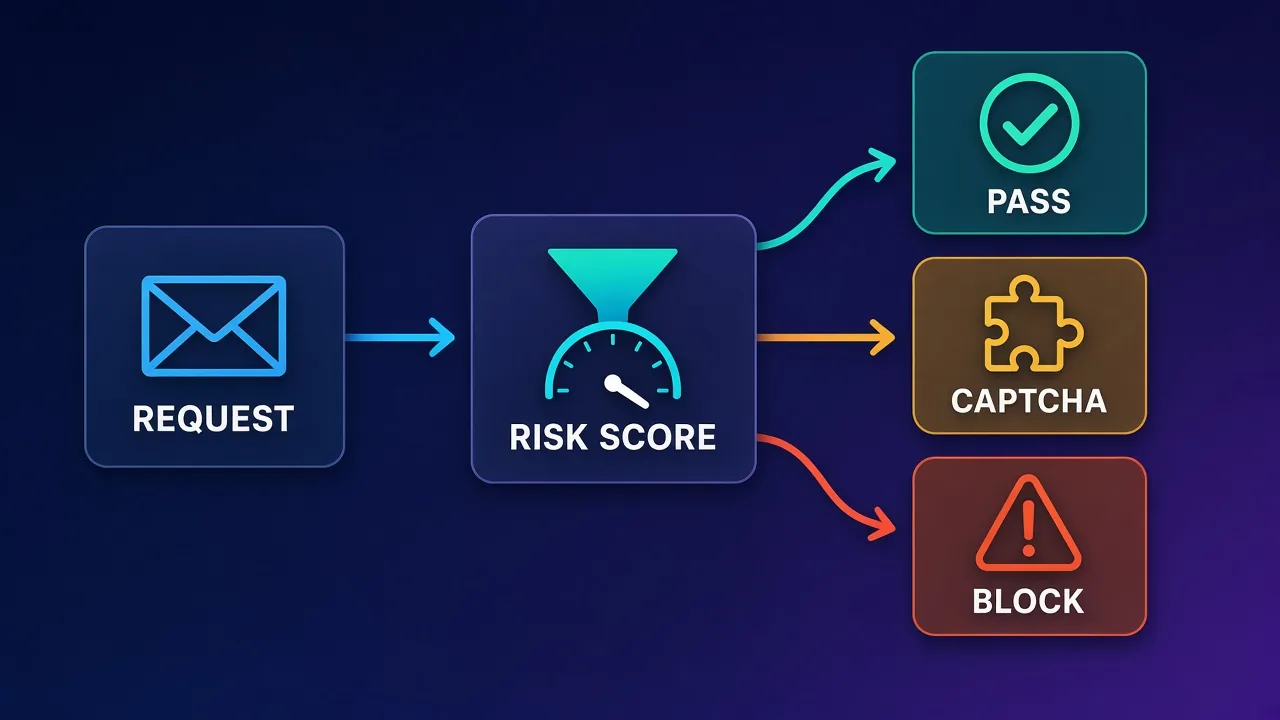
A CAPTCHA in the middle of a scraping job is rarely bad luck. It is a site telling you, as politely as it can, that something about your traffic looks automated. The challenge itself is only the visible end of a scoring system that has been watching your IP address, your request pattern, your TLS handshake and your browser fingerprint for every request you have sent. If you want fewer CAPTCHAs, the most reliable fix is not a faster solver. It is sending traffic that never earns a low score in the first place.
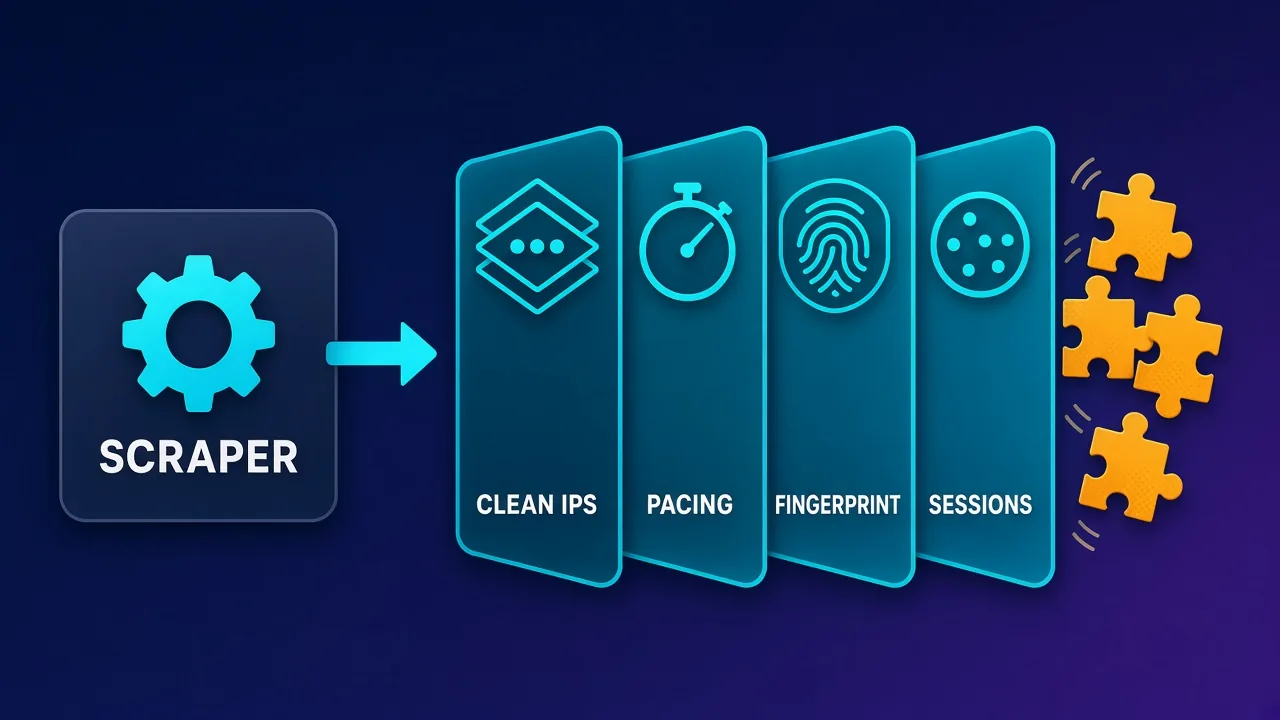
This guide explains why CAPTCHAs trigger, which signals matter most, and the practical levers you can pull: IP quality and rotation, pacing, headers and fingerprints, session handling, and when it makes more sense to hand the whole problem to a scraping API. It is written for people collecting public data responsibly. If a site clearly forbids automated access, a CAPTCHA is part of how it enforces that choice, and the right move is to respect it or ask for an official data feed.
The short version
CAPTCHAs are a symptom of a risk score. Lower the score by using clean, appropriately typed IPs, pacing requests like a real user, keeping headers and fingerprints consistent, and reusing sessions sensibly. Treat solvers as a last resort, and consider a managed unblocker when your targets run heavy bot protection.
Why websites show CAPTCHAs at all
Modern bot protection works in layers. Before a page is served, the site or its content delivery network evaluates the request and assigns it some notion of risk. Low-risk traffic sails through. High-risk traffic is blocked outright. The large grey zone in between gets a challenge: a checkbox, an image grid, an invisible JavaScript test or an interstitial page that runs code in the browser before letting it continue.
That grey zone is where most scrapers live. You are usually not obviously malicious, but you are not obviously human either. Several things push a request into the challenge bucket:
- The IP address. Its reputation, the network it belongs to, and how much traffic the site has recently seen from it or its neighbours.
- Request behaviour. Speed, regularity, the order pages are visited in, and whether assets like images and scripts are ever loaded.
- Client identity. HTTP headers, the TLS and HTTP/2 handshake, and in a browser, the full JavaScript fingerprint.
- Session state. Cookies the site set earlier, tokens from previous challenges, and whether the client behaves consistently across requests.
We cover the detection side in more depth in how websites detect bots. Here the focus is on what you can change.
The signals that matter most, ranked
Not every signal carries the same weight, and the order varies by site and vendor. In practice, most teams find the following rough ranking useful when diagnosing a CAPTCHA problem.
| Signal | What the site sees | Typical fix | Effort |
|---|---|---|---|
| IP type and reputation | Datacenter ASN, abused ranges, shared IPs hammered by others | Residential, ISP or mobile IPs from a reputable provider | Low to medium |
| Request rate and rhythm | Bursts, perfectly even intervals, too many requests per IP | Concurrency limits, jittered delays, per-IP budgets | Low |
| Header consistency | Missing or mismatched headers, default library user agents | Realistic, consistent header sets per session | Low |
| TLS and HTTP/2 fingerprint | A handshake that matches a scripting library, not the browser you claim | Clients that impersonate real browser handshakes, or real browsers | Medium |
| JavaScript fingerprint | Headless flags, missing APIs, inconsistent screen and GPU data | Hardened browsers, stealth tooling, or a managed browser service | Medium to high |
| Session behaviour | Cookies dropped every request, impossible navigation paths | Cookie jars, sticky sessions, realistic page flows | Medium |
The practical lesson is to fix the cheap, high-impact items first. Many CAPTCHA problems disappear once the IP pool and request rate are sensible, long before you need to touch browser fingerprints.
Lever 1: use the right IP type for the target
IP reputation is the single biggest factor for most targets. Datacenter IPs are fast and cheap, but they come from hosting networks that ordinary home users do not browse from, and many protection systems weight that heavily. Residential IPs belong to consumer internet connections, ISP proxies are static addresses registered to consumer ISPs but hosted in data centres, and mobile IPs come from carrier networks where many real users share the same address.
A sensible approach is to match the IP type to how hard the target is:
- Lightly protected sites (many public catalogues, documentation, small sites) often work fine with good datacenter IPs and polite pacing.
- Moderately protected sites (larger e-commerce, travel, classifieds) usually reward rotating residential IPs.
- Heavily protected sites may need residential or mobile IPs plus a real or well-hardened browser, or a managed unblocker that handles all of it.
If you are unsure what the differences are, our guides to residential proxies and residential vs ISP vs datacenter proxies go deeper. Provider quality matters too. Two residential pools can behave very differently depending on how the IPs are sourced, how heavily they are shared, and how quickly abused addresses are retired. Our guide to why proxies get blocked covers the warning signs.
Cheap IPs can cost more
A pool that triggers CAPTCHAs on half your requests is not cheap once you count retries, solver fees and engineering time. Measure success rate per target before judging a provider on price per gigabyte or per IP.
Lever 2: rotate and pace like a person, not a cannon
Even a clean IP becomes suspicious if it sends hundreds of requests a minute. Protection systems track volume per IP, per subnet and per session, and they notice when requests arrive at perfectly regular intervals.
Set per-IP budgets
Decide how many requests a single IP should make to a single site in a given window, and rotate before you hit it. The right number depends entirely on the target, so start conservatively and raise it while watching your challenge rate. Rotating on every request is not always best. Some sites expect a visitor to load several pages from the same address, and an IP that appears for one request and vanishes forever can look odd.
Add jitter and limit concurrency
Use randomised delays rather than a fixed sleep, and cap concurrent connections per domain. Spread work across time instead of trying to finish a crawl in minutes. If your job can run overnight in the target's time zone at a modest pace, it will usually meet far fewer challenges than a burst at peak hours.
Back off when you see warning signs
Status codes like 403 and 429, sudden redirects to challenge pages, or responses that are much smaller than normal are early warnings. Slow down, switch IPs and retry later rather than retrying immediately from the same address.
import random
import time
import requests

PROXY = "http://USERNAME:PASSWORD@gateway.example-proxy.com:8000"

def looks_challenged(resp):
    text = resp.text.lower()
    return resp.status_code in (403, 429) or "captcha" in text

def fetch(url, session, max_tries=4):
    for attempt in range(max_tries):
        resp = session.get(url, proxies={"http": PROXY, "https": PROXY}, timeout=30)
        if not looks_challenged(resp):
            return resp
        # exponential backoff with jitter before trying again on a new IP
        wait = (2 ** attempt) + random.uniform(0, 1.5)
        time.sleep(wait)
        session.cookies.clear()
    raise RuntimeError(f"Still challenged after {max_tries} tries: {url}")

session = requests.Session()
session.headers.update({
    "User-Agent": "Mozilla/5.0 (Windows NT 10.0; Win64; x64) AppleWebKit/537.36 "
                  "(KHTML, like Gecko) Chrome/126.0 Safari/537.36",
    "Accept-Language": "en-US,en;q=0.9",
})

for url in ["https://example.com/page/1", "https://example.com/page/2"]:
    page = fetch(url, session)
    time.sleep(random.uniform(2.0, 6.0))  # human-ish pacing between pages
The proxy gateway in the example is a placeholder. Most rotating residential providers give you a single gateway address that assigns a new exit IP per request or per sticky session, which is what makes the "retry on a new IP" step work.
Lever 3: make headers and fingerprints consistent
Default HTTP library settings are easy to spot. A request that claims to be Chrome in its user agent but omits headers Chrome always sends, or sends them in an unusual order, is a mismatch. Mismatches matter more than any single value.
- Pick one coherent identity per session. The user agent, accept headers, language and client hints should all describe the same browser and platform.
- Keep the identity stable within a session. Changing user agents mid-session while keeping the same cookies looks more suspicious than a single consistent profile.
- Mind the TLS layer. Some protection systems fingerprint the TLS and HTTP/2 handshake. A Python client claiming to be Chrome still shakes hands like Python unless you use a library or tool that reproduces a browser handshake.
- Align geography. If your IP is in Germany, an
Accept-Languageof only Japanese and a US time zone in the browser can stand out.
Headless browsers need extra care
When a site requires JavaScript, you will probably use a headless browser such as Puppeteer or Playwright. Out of the box, these expose tell-tale signs: automation flags, missing plugins, unusual screen sizes and default WebGL values. Stealth plugins and careful configuration close many of these gaps, but it is an ongoing arms race. Our Puppeteer proxy guide shows how to wire proxies in correctly, which is the foundation for everything else.
Lever 4: handle sessions and cookies deliberately
Real visitors accumulate state. They receive cookies on the first page, send them back on the next, and sometimes carry a token proving they passed a challenge earlier. Scrapers that throw away cookies on every request look like a stream of brand-new visitors from the same IP, which is unusual.
- Use a cookie jar per logical session and keep it paired with the same exit IP using sticky sessions where your provider supports them.
- Follow plausible navigation paths. Landing directly on deep pages thousands of times without ever loading a category or search page is a pattern some sites watch for.
- Retire a session cleanly when it starts drawing challenges, rather than continuing to push it.
The balance is different for logged-in scraping, where account-level signals also come into play. For public pages, short sticky sessions of a few pages each are a reasonable starting point to test.
Lever 5: consider a managed scraping API or unblocker
At some point, maintaining your own IP rotation, browser hardening and retry logic for heavily protected targets stops being a good use of time. Managed scraping APIs and unblockers take a URL and return the page, handling proxy selection, retries, browser rendering and many challenges internally. Many of them bill per successful request, which aligns their incentives with yours.
The trade-off is control. You usually cannot plug these services into your own browser workflow, and at very high volumes on easy targets, raw proxies can be cheaper. They tend to shine when targets are hard, volumes are moderate, and your team would rather spend time on the data than the infrastructure.
Zyte API
Zyte, the company behind the Scrapy framework, offers an API that bundles ban handling, automatic escalation between IP types and optional headless rendering. It suits Python and Scrapy teams who want to stop managing proxies for difficult sites.

Zyte
Zyte API is the most complete scraping-as-a-service offering from the most credible engineering lineage in the space (they wrote Scrapy). Automatic ban handling, escalation, and rendering behind a success-priced API genuinely deletes the proxy-ops workload. It is not a general-purpose proxy — account management and browser-based workflows need conventional providers — and heavy scraping teams with anti-bot expertise can beat its per-request economics. For developer teams whose product is the data, not the infrastructure, it is the benchmark.
ScraperAPI
ScraperAPI is a straightforward "send a URL, get the page" service with retries, rotation and JavaScript rendering handled for you. It is a sensible starting point for developers who want to prototype quickly and pay for successful requests rather than bandwidth.

ScraperAPI
ScraperAPI nails the "I just want the data" use case. You send a URL, it handles proxies, anti-bot, CAPTCHAs, and rendering, and you get the page back — no infrastructure to maintain. Billing per successful request is genuinely fair, the free tier is generous, and the structured endpoints for Google and Amazon save real work. The trade-off is flexibility: you give up direct IP control, and at very high volumes buying bandwidth directly can be cheaper. For developers who value time over fine-grained control, ScraperAPI is one of the easiest and most reliable ways to scrape at scale.
Bright Data
Bright Data covers both sides of the decision: large residential, ISP and mobile proxy networks with fine-grained targeting if you want to run your own stack, and unblocking and scraping products if you would rather outsource the challenge handling. It suits teams with demanding targets and budgets to match.
Bright Data
Bright Data remains the most complete data-collection platform money can buy. No competitor matches its combination of network scale, targeting granularity, and compliance tooling — and for enterprise teams whose revenue depends on reliable data, that completeness justifies the premium. The trade-offs are real: it is one of the priciest providers per gigabyte, the interface overwhelms newcomers, and KYC verification adds friction before you can route a single request. Smaller projects will get better value from Decodo or IPRoyal. But if you need city-level residential targeting at scale, a managed unblocker for the hardest targets, and audit-ready compliance, Bright Data is the default — and our highest-rated proxy provider overall.
For a broader comparison of raw proxy providers versus unblockers by target difficulty, see our roundup of the best proxies for web scraping.
What about CAPTCHA-solving services?
Solving services, whether they rely on human workers or automated models, can get you past a challenge once it appears. They have a place, but they are a poor primary strategy:
- They treat the symptom. If your traffic keeps getting challenged, it will keep getting challenged after each solve, and your costs grow with every page.
- They add latency. Waiting for a solve slows each request considerably compared with a request that passes cleanly.
- Passing a challenge does not fix your score. Some systems escalate to harder challenges or blocks when they see repeated solves from suspicious clients.
- They raise ethical and legal questions. Deliberately defeating an access control can breach a site's terms and, in some jurisdictions and contexts, carry legal risk. Get advice if you are unsure.
Respect clear signals
If a site's terms forbid scraping, if data sits behind a login you are not authorised to use, or if challenges keep escalating despite polite behaviour, stop and reconsider. Look for an official API, a licensed dataset, or permission from the site owner.
A step-by-step plan to cut your CAPTCHA rate
- Measure first. Log status codes, response sizes and challenge detections per target, per IP type and per hour. You cannot improve a rate you are not tracking.
- Slow down. Halve your concurrency and add jittered delays. Re-measure. This alone often makes a visible difference.
- Fix headers. Replace library defaults with a coherent browser identity per session.
- Upgrade the IP type for targets that still challenge heavily, moving from datacenter to residential or ISP, and test more than one provider.
- Introduce sessions. Pair cookie jars with sticky IPs for short, realistic page flows.
- Move to a browser only for targets that genuinely require JavaScript, and harden it.
- Evaluate an unblocker for the targets that remain expensive, comparing its cost per successful page with your current all-in cost.
- Keep solvers for edge cases, and only where your use is clearly permitted.
Common mistakes that summon CAPTCHAs
- Retrying instantly from the same IP after a challenge, which confirms the site's suspicion.
- Rotating user agents randomly on every request while keeping the same cookies and IP.
- Using a residential pool but ignoring rate limits, which burns through good IPs and gets them flagged for everyone.
- Running headless browsers with default settings on sites with advanced bot protection.
- Scraping during the target's peak hours when anomaly thresholds may be tighter and your traffic stands out against real load.
- Ignoring geography, for example sending traffic from many countries to a site that only serves one market.
Costs and trade-offs to weigh
Every lever has a cost. Residential and mobile IPs cost more than datacenter addresses, slower pacing means jobs take longer, real browsers consume far more CPU and memory than plain HTTP clients, and managed APIs charge a premium for convenience. The useful metric is cost per successful page, including retries, solver fees and the engineering hours spent keeping the system working. A setup that looks expensive per request can be the cheapest overall if it rarely meets a challenge.
It also helps to separate targets by difficulty. Run easy sites on cheap infrastructure and reserve the premium stack for the few targets that need it, rather than paying premium prices for everything.
Who needs which approach
- Hobbyists and small projects scraping a handful of public pages can usually avoid CAPTCHAs with polite pacing, consistent headers and, if needed, a modest residential plan.
- Growing data teams with several moderately protected targets benefit from a solid rotating residential provider plus disciplined session and rate management.
- Teams facing heavy bot protection at scale should compare the all-in cost of hardened browsers and premium IPs with a managed unblocker or scraping API.
Conclusion
Avoiding CAPTCHAs is mostly about not looking like a bot in the ways that matter: where your traffic comes from, how fast and how regularly it arrives, whether your client identity hangs together, and whether you behave like a returning visitor. Fix those, measure the results, and reserve solvers and premium tooling for the targets that truly need them. Above all, scrape responsibly. A site that keeps challenging polite, well-behaved traffic is telling you something, and an official data source is often the better path.
Frequently asked questions
CAPTCHAs appear when a site's bot protection gives your traffic a borderline risk score. The usual causes are low-reputation or datacenter IPs, too many requests too quickly, default library headers, headless browser tells, and sessions that drop cookies on every request.
They usually reduce them on moderately protected sites, because residential IPs look like ordinary home connections. They do not fix aggressive request rates or inconsistent fingerprints, so you still need sensible pacing and coherent headers.
Not always. Per-request rotation suits large crawls of independent pages, but some sites expect a visitor to view several pages from one address. Short sticky sessions paired with a cookie jar often look more natural.
There is no universal number because every site sets its own thresholds. Start with low concurrency and randomised delays of a few seconds between pages, measure your challenge rate, and increase speed gradually while it stays low.
They can help with occasional challenges, but they treat the symptom, add latency and cost per page, and may breach a site's terms. Reducing how often challenges appear is cheaper and more reliable, and solvers should only be used where your access is clearly permitted.
Default headless setups expose automation flags and unusual fingerprint values that protection systems can detect. Hardened configurations, stealth tooling or managed browser services reduce these signals, but plain HTTP clients are simpler when a site does not need JavaScript.
A proxy only changes the IP your requests come from, so you still handle headers, pacing, browsers and retries yourself. A scraping API or unblocker takes a URL and handles proxy selection, retries, rendering and many challenges internally, usually billing per successful request.
It depends on the jurisdiction, the data and the site's terms, and deliberately defeating access controls can carry legal risk. Scraping public data politely is a different matter from forcing past challenges on sites that forbid automation, so get legal advice if you are unsure.