Table of contents
Python's requests library makes routing traffic through a proxy look like a one-line change, and for a quick test it is. In production the details start to matter: which key in the proxies dictionary maps to which traffic, how credentials with special characters get parsed, why a stray environment variable silently overrides your session settings, and what to do when the proxy itself times out or answers with a 407. This guide walks through every piece of a working setup, from the first proxied GET to a resilient session with retries, SOCKS5 support and an IP check you can trust.
Everything below uses the standard requests API plus urllib3's retry helper, which ships with it. If you are automating a real browser instead, our guide to using proxies with Selenium covers that side, and rotating proxies in Python goes deeper on pool management once the basics here are in place.
Quick take
Pass a proxies dict with both http and https keys, put credentials in the proxy URL (URL-encoded), always set a timeout, and verify the exit IP against an echo service before you trust the setup. Use socks5h:// when you want DNS resolved on the proxy side.
How Proxies Work in Python Requests
When you call requests.get(url, proxies=...), the library looks at the scheme of the target URL, picks the matching entry from your proxies dictionary, and opens its TCP connection to that proxy instead of the target host. What happens next depends on the target scheme.
- Plain HTTP targets: requests sends the full request line (including the absolute URL) to the proxy, and the proxy fetches the page on your behalf. The proxy can see and modify everything.
- HTTPS targets: requests first sends an HTTP
CONNECT host:443to the proxy, which opens a raw tunnel. TLS is then negotiated end to end between your script and the target, so the proxy only sees the hostname and the volume of encrypted traffic, not the content. - SOCKS targets: with the optional SOCKS extra installed, requests speaks the SOCKS protocol to the proxy, which relays a TCP stream for any scheme.
This is why the most common confusion in proxy setups is the https key. The key names the scheme of the site you are visiting; the value names the scheme of the proxy itself. Most commercial HTTP proxies accept CONNECT over a plain HTTP connection, so the value for the https key usually still begins with http://.
Your First Proxied Request
The minimal working example routes both HTTP and HTTPS targets through the same proxy and prints the IP address the target saw:
import requests

proxy = "http://203.0.113.10:8080"
proxies = {
    "http": proxy,
    "https": proxy,
}

resp = requests.get("https://httpbin.org/ip", proxies=proxies, timeout=15)
print(resp.status_code, resp.json())
The address 203.0.113.10 is a documentation placeholder; swap in the host and port your provider gives you. If the printed origin IP is the proxy's address rather than your own, routing works. If you only set the http key, HTTPS requests will bypass the proxy entirely and go out from your real IP, which is a classic silent failure.
Routing per host
The proxies dictionary also accepts more specific keys. A key such as "https://example.com" applies only to that host, and "all://"-style catch-alls can be expressed with the all key. Specific keys win over generic ones, which lets you send one domain through a residential exit and everything else through a cheaper datacenter proxy without maintaining two clients.
Anatomy of a Proxy URL
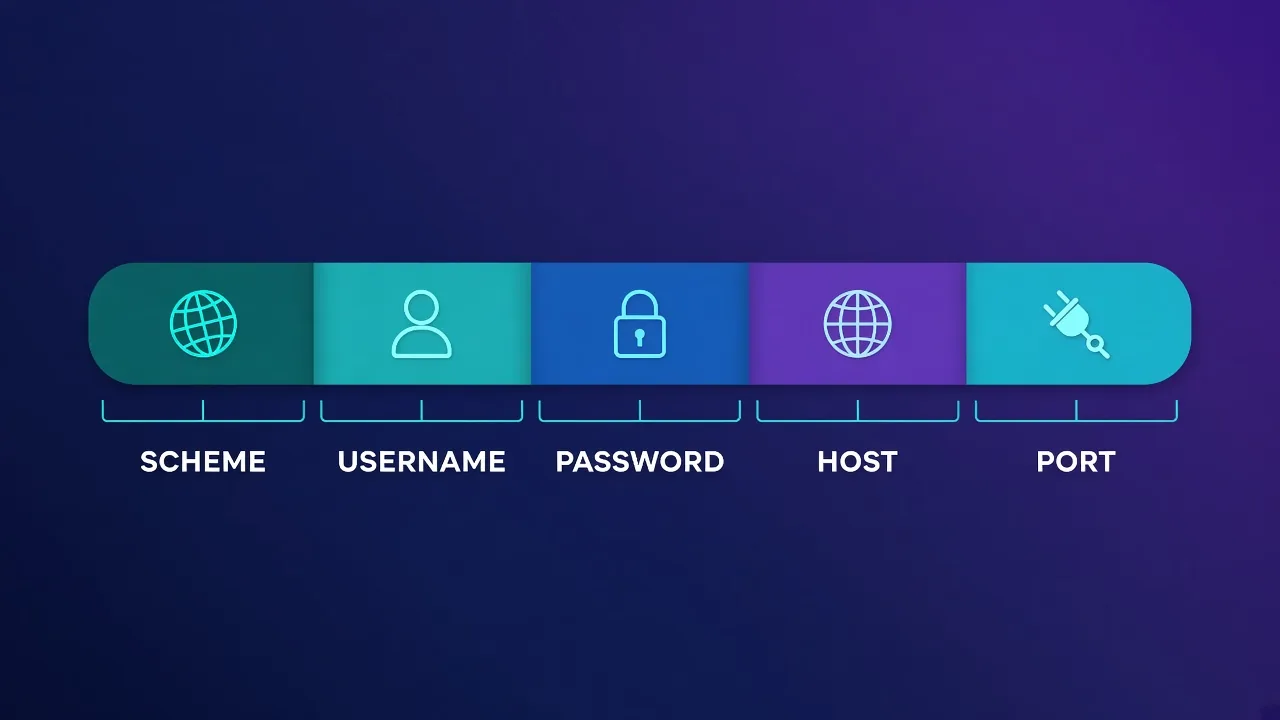
Every proxy value is a URL with up to five parts: scheme, username, password, host and port. Understanding each part saves a lot of debugging.
| Part | Example | What it controls |
|---|---|---|
| Scheme | http://, socks5://, socks5h:// | The protocol requests uses to talk to the proxy |
| Username | user or user-country-us | Your account; many providers also encode targeting or session options here |
| Password | s3cret | Account secret; must be URL-encoded if it contains reserved characters |
| Host | proxy.example.com | The gateway or individual proxy server |
| Port | 8080 | Often selects protocol or session type on rotating gateways |
Rotating residential gateways frequently use the username as a control channel. Webshare's documentation, for example, shows country and city targeting appended to the username (in the form username-us-city_los_angeles) against a single gateway host. Other providers use similar conventions for sticky session IDs. Check your provider's dashboard for the exact syntax rather than guessing; a malformed username usually produces a 407 rather than a helpful error.
Authenticated Proxies
There are two common authentication models, and requests handles both.
Username and password in the URL
Put credentials directly in the proxy URL. requests extracts them and sends a Proxy-Authorization header for you:
from urllib.parse import quote
import requests

user = "my_user"
password = quote("p@ss:word/with#chars", safe="")
proxy = f"http://{user}:{password}@proxy.example.com:8080"

proxies = {"http": proxy, "https": proxy}
resp = requests.get("https://httpbin.org/ip", proxies=proxies, timeout=15)
The quote(..., safe="") call matters. Characters like @, :, / and # have structural meaning inside a URL; left unencoded, they make the parser split the string in the wrong place and you get an authentication failure that looks like a bad password.
IP allowlisting
Many providers let you register your server's public IP in their dashboard instead of using credentials. In that case the proxy URL is just http://host:port. Allowlisting is convenient on fixed servers, but it breaks the moment your egress IP changes, for example on a laptop, a CI runner or an autoscaling container fleet. Credentials travel with the code; allowlists travel with the machine.
Keep credentials out of source code
Load proxy usernames and passwords from environment variables or a secrets manager, not string literals. Proxy credentials are billable access to someone's bandwidth, and leaked keys in public repositories get abused quickly.
Using SOCKS5 Proxies
requests does not speak SOCKS out of the box. Install the optional extra, which pulls in PySocks:
pip install "requests[socks]"
Then use a SOCKS scheme in the proxy URL:
proxy = "socks5h://user:pass@proxy.example.com:1080"
proxies = {"http": proxy, "https": proxy}
resp = requests.get("https://httpbin.org/ip", proxies=proxies, timeout=15)
The difference between socks5:// and socks5h:// is where DNS happens. With socks5://, your machine resolves the hostname and sends the proxy an IP address, which means your local resolver (and possibly your ISP) sees every domain you visit. With socks5h://, the hostname is passed to the proxy and resolved there. For privacy and for geo-accurate DNS answers, socks5h is usually what you want. Our SOCKS5 vs HTTP proxies comparison explains when SOCKS is worth it at all; for most web scraping, an HTTP proxy with CONNECT does the same job with fewer moving parts.
Sessions, Environment Variables and Precedence
For anything beyond a one-off request, use a requests.Session. It reuses TCP connections (including the tunnel to the proxy), keeps cookies, and lets you set defaults once:
import os
import requests

session = requests.Session()
session.proxies.update({
    "http": os.environ["PROXY_URL"],
    "https": os.environ["PROXY_URL"],
})
session.headers.update({"User-Agent": "my-crawler/1.0 (+contact@example.com)"})

resp = session.get("https://httpbin.org/ip", timeout=15)
The environment-variable trap
requests also honors the standard HTTP_PROXY, HTTPS_PROXY, ALL_PROXY and NO_PROXY environment variables, because Session.trust_env is True by default. That is handy for configuring tools without code changes, but it creates a precedence surprise: when requests merges settings, a proxy passed directly to the request call wins, environment variables come next, and values set on session.proxies come after them. So a forgotten HTTPS_PROXY in a Docker image or CI config can quietly override the proxy you set on the session.
Two reliable fixes:
- Pass
proxies=...on each request call (or wrap the session in a helper that does), which always wins. - Set
session.trust_env = Falsewhen you want the session's configuration to be the only source of truth. Note that this also disables reading.netrccredentials and environment CA bundle settings.
NO_PROXY is the flip side: hosts listed there (comma-separated, such as localhost,127.0.0.1,.internal.example) bypass the proxy. It is useful for keeping internal API calls off your paid bandwidth.
Timeouts, Errors and Retries
requests has no default timeout. Without one, a dead proxy can hang a worker indefinitely. Always pass timeout, ideally as a tuple of (connect, read) seconds, for example timeout=(5, 30): a short connect timeout fails fast on unreachable proxies, while the read timeout allows slow pages to finish.
Exceptions you will actually see
| Exception or status | Usual cause | What to do |
|---|---|---|
ProxyError | Proxy unreachable, refused the tunnel, or closed the connection | Check host and port; retry on a different proxy |
| HTTP 407 | Missing or wrong proxy credentials, or a malformed username option | Re-check credentials and URL encoding; do not retry blindly |
ConnectTimeout | Proxy slow to accept connections or overloaded | Retry with backoff; drop the proxy if it repeats |
ReadTimeout | Target slow, or proxy stalled mid-response | Retry once; raise the read timeout for heavy pages |
SSLError | TLS interception or a misconfigured proxy scheme | Confirm the proxy URL scheme; avoid disabling verification |
| HTTP 403 or 429 | Target blocked or rate-limited the exit IP | Slow down, rotate the IP, or move to a higher-trust IP type |
Automatic retries with backoff
Mount an HTTPAdapter configured with urllib3's Retry to handle transient failures without hand-written loops:
import requests
from requests.adapters import HTTPAdapter
from urllib3.util.retry import Retry

retry = Retry(
    total=3,
    backoff_factor=0.5,
    status_forcelist=[429, 500, 502, 503, 504],
    allowed_methods=["GET", "HEAD"],
)
adapter = HTTPAdapter(max_retries=retry)

session = requests.Session()
session.mount("http://", adapter)
session.mount("https://", adapter)
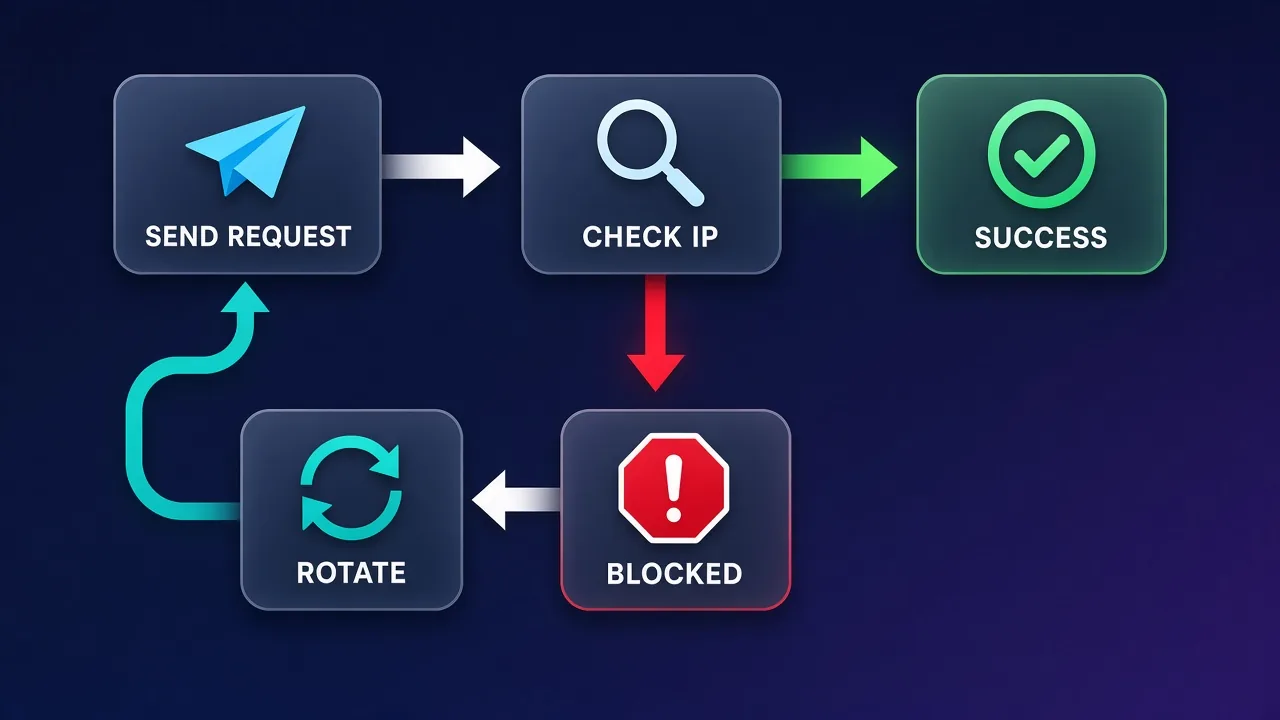
This retries the same proxy, which is right for brief network blips. For blocks (403, CAPTCHA pages, repeated 429s), retrying through the same exit rarely helps; you want a fresh IP, which is where rotation comes in.
Rotating Proxies with Requests
There are two ways to get a new IP per request or per task.
- Gateway rotation. Rotating residential products typically give you one hostname that assigns a different exit IP per connection, or keeps the same exit for a sticky window when you add a session ID to the username. Your code stays simple: one proxy URL, and the provider handles the pool.
- Client-side rotation. With a list of static proxies (datacenter or ISP), you choose one per request yourself:
import random
import requests

POOL = [
    "http://user:pass@198.51.100.11:8080",
    "http://user:pass@198.51.100.12:8080",
    "http://user:pass@198.51.100.13:8080",
]

def fetch(url, attempts=3):
    last_exc = None
    for _ in range(attempts):
        proxy = random.choice(POOL)
        try:
            r = requests.get(url, proxies={"http": proxy, "https": proxy},
                             timeout=(5, 30))
            if r.status_code in (403, 429):
                continue
            return r
        except requests.exceptions.RequestException as exc:
            last_exc = exc
    raise RuntimeError(f"all attempts failed: {last_exc}")
Real pools need more than random.choice: health tracking, cooldowns for IPs that just got blocked, and per-domain concurrency limits. Our proxy rotation guide builds that out. Remember that rotation fights the wrong problem on login flows; if a site expects one user to keep one IP for a session, use sticky sessions instead, as covered in sticky sessions explained.
Verifying Your Proxy Is Actually Working
A setup that returns 200 is not necessarily a setup that uses the proxy. Build a small check into your startup code:
import requests

def exit_ip(proxies=None):
    r = requests.get("https://api.ipify.org?format=json",
                     proxies=proxies, timeout=(5, 15))
    r.raise_for_status()
    return r.json()["ip"]

direct = exit_ip()
proxied = exit_ip({"http": PROXY, "https": PROXY})
assert direct != proxied, "proxy not applied"
print("direct:", direct, "proxied:", proxied)
Compare the direct and proxied IPs. If they match, something is bypassing the proxy (a missing https key, NO_PROXY, or trust_env settings). For location-sensitive jobs, also check the proxied IP against a geolocation lookup and confirm the country matches what you paid for, especially on rotating gateways where a typo in the targeting username can silently fall back to a random country.
Pre-flight checklist
Both http and https keys set, credentials URL-encoded, timeout on every call, exit IP differs from your own, geo matches the plan, and environment proxy variables either intentional or disabled.
Requests vs httpx for Proxied Workloads
requests is synchronous: each request blocks a thread until it completes. That is fine for scripts and modest crawlers, but high-concurrency scraping through slow residential exits benefits from async I/O. The httpx library offers a very similar API with both sync and async clients. In current httpx versions, a single proxy is passed with the proxy= argument (older releases used a proxies= mapping), and per-scheme routing is done with mounts:
import httpx

with httpx.Client(proxy="http://user:pass@proxy.example.com:8080",
                  timeout=15) as client:
    print(client.get("https://httpbin.org/ip").json())
| Need | requests | httpx |
|---|---|---|
| Simple scripts, huge ecosystem | Best fit | Works |
| Async concurrency | Needs threads | Native AsyncClient |
| HTTP/2 to targets | No | Optional extra |
| SOCKS support | requests[socks] | httpx[socks] |
| Retry adapters | urllib3 Retry | Transport retries (connect only) or your own logic |
If your bottleneck is waiting on network round-trips, moving to an async client usually buys more throughput than adding more proxies.
Choosing a Proxy Type for Requests-Based Scrapers
The library does not care what kind of IP sits behind the proxy URL, but the target site does. Match the IP type to how defended the target is:
- Datacenter proxies are fast and cheap, and work well on APIs, public datasets and sites with light bot protection. Their ASN reveals a hosting provider, so heavily defended sites block them more readily.
- ISP (static residential) proxies carry consumer ISP registration with server-grade stability, a good fit for logged-in sessions and long-lived identities.
- Rotating residential proxies draw from large pools of household IPs, billed by bandwidth, and handle tougher anti-bot systems at a higher cost per gigabyte.
Our residential vs ISP vs datacenter breakdown covers the trade-offs in depth. Two providers that pair well with a requests-based stack are below.
Webshare: self-service datacenter and residential
Webshare suits developers who want to start immediately: a genuinely free tier for testing, a plan builder that lets you buy exact proxy counts, and HTTP and SOCKS5 endpoints that drop straight into a proxies dict.

Webshare
Webshare is the developer's self-service favorite. Instant activation, a free tier that is actually free, and the cheapest fast datacenter proxies in the market make it the easiest provider to just start using. The custom plan builder — pick your IP count, bandwidth, and threads — is a genuinely good model that lets you avoid paying for capacity you do not need. The residential pool is newer and less battle-tested than specialists, and support is thin on the lower tiers. For datacenter proxies, API-driven workflows, and anyone who wants to try before paying, Webshare is one of the best-value options around.
IPRoyal: pay-as-you-go with SOCKS5 everywhere
IPRoyal fits intermittent scrapers. Residential traffic you buy does not expire, and SOCKS5 is supported across its product range, which is convenient if you standardize on socks5h://.

IPRoyal
IPRoyal is the best pure pay-as-you-go deal in proxies. Non-expiring traffic is a genuinely customer-friendly policy that no major rival matches — buy what you need, use it whenever, lose nothing. The pool is smaller than the premium networks and success rates can soften on the most heavily defended targets, so high-volume enterprise scraping is not its strength. The dashboard is also fairly basic. For intermittent scraping, account work, and sneaker copping on a predictable budget, IPRoyal is an easy recommendation and one of the best value picks for occasional users.
Common Mistakes to Avoid
- Setting only the
httpkey. HTTPS traffic then skips the proxy and leaks your real IP. - Using
https://as the proxy scheme by habit. Unless your provider explicitly offers TLS to the proxy, the value should start withhttp://even for HTTPS targets. - No timeout. One dead proxy can freeze a worker pool.
- Disabling certificate verification to make errors go away.
verify=Falseexposes you to interception and hides real configuration bugs. Fix the scheme or CA bundle instead. - Retrying blocks on the same IP. Retries are for transient errors; blocks need a new exit or a slower pace.
- Ignoring site rules. A proxy changes your IP, not your obligations. Respect robots directives where relevant, terms of service and rate limits, and avoid collecting personal data you do not need.
Conclusion
Getting proxies working in Python Requests comes down to a handful of habits: a complete proxies dictionary, URL-encoded credentials, explicit timeouts, deliberate handling of environment variables, retries for transient errors and fresh IPs for blocks, plus an exit-IP check before every serious run. With those in place, swapping between datacenter, ISP and residential providers becomes a one-line configuration change rather than a debugging session. When your crawler outgrows a single proxy, move on to structured rotation and pick the IP type that matches how hard your targets push back.
Frequently asked questions
Pass a proxies dictionary to the request call, for example requests.get(url, proxies={'http': proxy_url, 'https': proxy_url}, timeout=15). The keys are the schemes of the sites you visit and the values are the proxy URLs. Set both keys so HTTPS traffic does not bypass the proxy.
The key refers to the target site's scheme, while the value describes how requests talks to the proxy. Most HTTP proxies tunnel HTTPS traffic with the CONNECT method over a plain HTTP connection, so the value normally starts with http:// even for HTTPS targets.
Include the username and password in the proxy URL, such as http://user:pass@host:port, and requests will send the Proxy-Authorization header for you. URL-encode the password with urllib.parse.quote if it contains characters like @, :, / or #, otherwise the URL is parsed incorrectly.
Yes, after installing the optional extra with pip install requests[socks], which adds PySocks. Use socks5:// to resolve DNS locally or socks5h:// to have the proxy resolve hostnames, which avoids leaking DNS lookups to your local resolver.
When trust_env is on, which is the default, HTTP_PROXY and HTTPS_PROXY environment variables take precedence over values set on session.proxies. Pass proxies directly on each request call, which always wins, or set session.trust_env = False so only your code's settings apply.
Request an IP echo service such as api.ipify.org or httpbin.org/ip once directly and once through the proxy, then compare the two addresses. If they match, something is bypassing the proxy, often a missing https key or a NO_PROXY entry.
Requests has no default timeout, so always set one. A tuple like timeout=(5, 30) gives a short connect timeout that fails fast on dead proxies and a longer read timeout for slow pages, especially through residential exits.
Requests is ideal for scripts and moderate crawls thanks to its simplicity and ecosystem. If you need high concurrency through slow proxies, httpx offers a similar API with a native async client, which usually improves throughput more than adding extra proxies.