Table of contents
Datacenter proxies are the oldest, fastest and usually cheapest kind of proxy you can buy, and they're also the kind that gets blocked first on well-defended sites. That combination confuses a lot of buyers. Some people write them off entirely after one bad experience on a strict target; others overpay for residential traffic on jobs a datacenter IP would have handled perfectly well.
This guide explains what a datacenter proxy actually is, how websites recognise one, and the real difference between shared and dedicated plans. By the end you should be able to tell, before you spend anything, whether a datacenter pool fits your workload and which flavour of it to buy.
What is a datacenter proxy?
A datacenter proxy is an intermediary server, hosted in a commercial data center, that forwards your requests using an IP address owned by a hosting company or cloud network rather than by a consumer internet provider. When your scraper, browser or bot connects through it, the target website sees the proxy's IP instead of yours.
The key phrase is not tied to a home connection. Residential proxies borrow IPs that an ISP assigned to a real household; mobile proxies ride on carrier networks; ISP (static residential) proxies are hosted in data centers but announced under a consumer ISP's name. A datacenter IP makes no such pretence. It belongs to a block registered to a hosting provider, and anyone who looks it up can see that.
That honesty is both the weakness and the appeal. Because the provider controls the hardware and the uplink, datacenter proxies tend to be fast, stable and plentiful. Because the IP range is obviously commercial, sites that care about bot traffic can treat it with suspicion. If you want the wider map of proxy categories first, our guide to types of proxies and how to choose covers the full landscape.
How datacenter proxies work
Under the hood the flow is simple. You point your client at a proxy endpoint (a host and port), authenticate with a username and password or by whitelisting your own IP, and the proxy server opens a new connection to the destination on your behalf. Responses come back the same way.
Where the IPs come from
Providers lease or own blocks of IPv4 (and sometimes IPv6) addresses and bind them to servers in one or more facilities. Some run their own hardware; others rent capacity from larger hosts. The addresses are registered in regional internet registries under the provider's or host's organisation, and they're announced to the internet by an autonomous system that belongs to that hosting company.
Static by default, rotation optional
Most datacenter plans sell you a fixed list of IPs that stay the same for your billing period. That's ideal when you need a stable identity, such as a whitelisted IP for an API or a long-lived session. If you want rotation, you either cycle through your list in code or use a rotating gateway that hands out a different IP from the pool per request or per interval.
Protocols
HTTP and HTTPS proxying is universal. SOCKS5 support varies by provider: some datacenter specialists offer HTTP(S) only, so check before you buy if your tool needs SOCKS5. Our SOCKS5 vs HTTP proxies explainer covers when that difference matters.
Shared vs dedicated datacenter proxies
This is the decision that changes your results more than almost anything else on a datacenter plan, and it's worth understanding precisely what you're paying for.
Shared (semi-dedicated) proxies
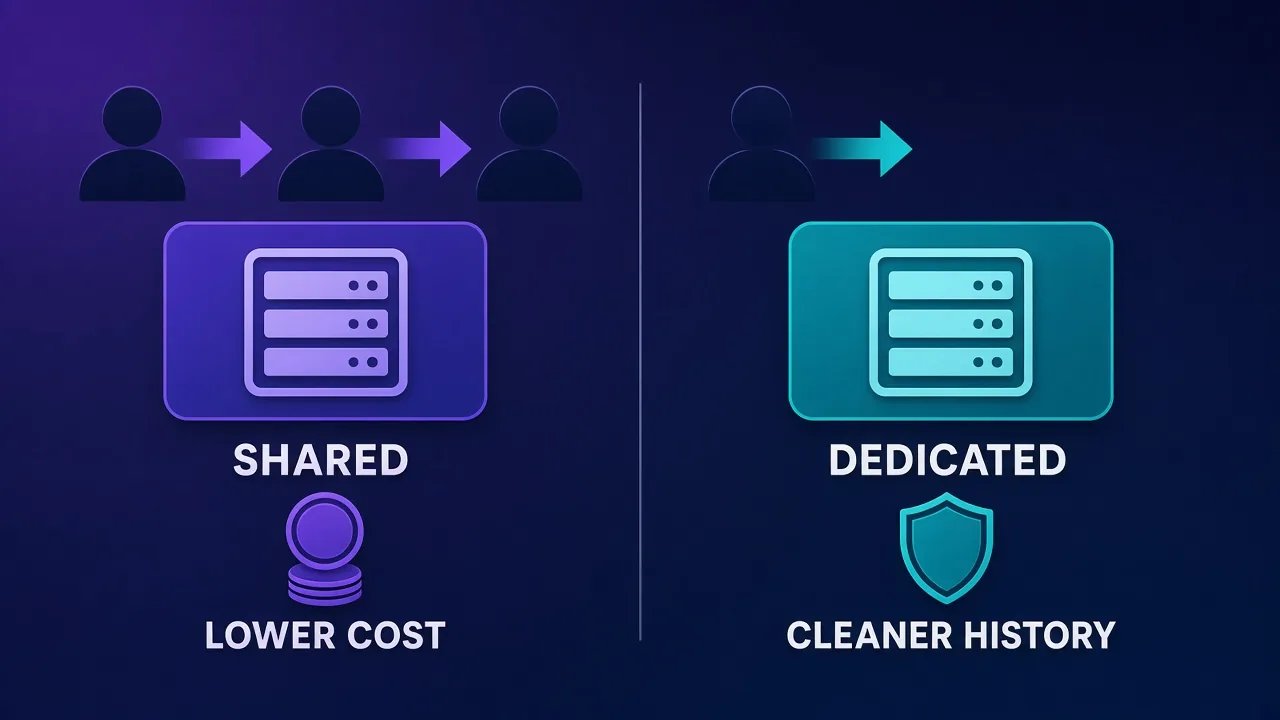
A shared proxy is an IP that the provider sells to more than one customer at the same time. Some providers cap it at a small number of users per IP and call it semi-dedicated; others pool more heavily. You get the same IP list, but other people's traffic flows through those addresses too.
The upside is cost, because the provider spreads the price of each address across several buyers. The downside is that you inherit your neighbours' behaviour. If another customer hammers a site and gets the IP flagged, your requests from that IP inherit the flag. You also can't be sure which sites the IP has already been burned on.
Dedicated (private) proxies
A dedicated proxy is assigned to you alone for the length of your plan. Nobody else sends traffic through it, so its reputation is mostly a product of what you do with it, plus whatever history the address carried before it reached you.
Dedicated IPs cost more per address, but they're far more predictable. They're the right choice when you log into accounts, when you need a consistent identity for a whitelist, or when one ban on a shared IP would cost you more than the price difference.
Ask what "dedicated" means
Some providers use "private" or "dedicated" loosely. Before you buy, check whether the IP is exclusive to you for the whole term, whether it was recently used by someone else, and whether you can request a replacement if it arrives already flagged on your target.
Comparison: shared vs dedicated vs other proxy types
Here is how the two datacenter options stack up against each other and against the main alternatives. Treat it as a qualitative guide; real results always depend on the specific provider and target.
| Factor | Shared datacenter | Dedicated datacenter | ISP (static residential) | Rotating residential |
|---|---|---|---|---|
| Typical cost | Lowest | Low to moderate | Moderate to high | Usually billed per GB |
| Billing model | Per IP or per bandwidth | Per IP | Per IP | Per GB of traffic |
| Speed and stability | High, varies with load | High | High | Variable |
| Detectability as a proxy | Easy (hosting ASN) | Easy (hosting ASN) | Harder (consumer ISP ASN) | Hardest |
| Reputation control | Low, shared with others | High, yours alone | High | Low, pool rotates |
| Best for | Bulk tolerant targets | Accounts, whitelists, SEO tools | Strict sites needing a stable IP | Protected targets at scale |
If you're torn between a datacenter plan and the more expensive options, our head-to-head on residential vs ISP vs datacenter proxies goes deeper on the trade-offs.
Why websites can spot datacenter IPs
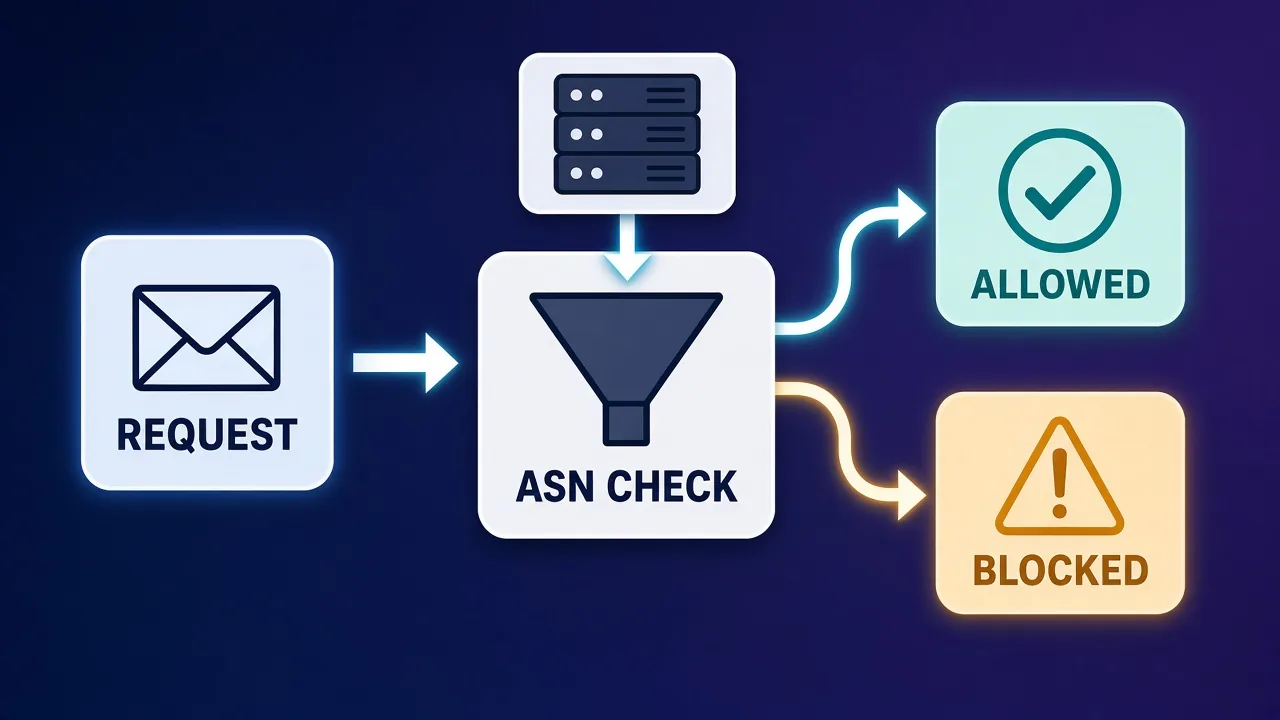
Detection isn't magic. The most common signal is the network an IP belongs to, identified by its autonomous system number (ASN). Every block of addresses on the internet is announced by an autonomous system, and commercial IP intelligence databases label those systems by type: consumer ISP, mobile carrier, business, hosting or cloud.
When a request arrives, a site's bot-protection layer can look up the IP, see that it belongs to a hosting network, and adjust its response. That doesn't always mean an instant block. Many sites simply apply stricter rate limits, ask for a CAPTCHA, or score the request as riskier and combine that with other signals like browser fingerprint and behaviour.
Other signals stack on top of the ASN check:
- Subnet clustering. If many requests arrive from consecutive IPs in the same /24 range, that pattern looks automated even if each IP is clean.
- Reputation history. Blocklists and abuse databases remember addresses that were used for spam or aggressive scraping, and shared IPs accumulate history fastest.
- Header and fingerprint mismatches. A datacenter IP paired with a desktop browser user agent but no matching browser fingerprint is an easy tell.
- Request rate. Fast, uniform request timing from a single address is a red flag regardless of IP type.
We break down the ASN side in detail in What Is an ASN?, and the wider picture in why proxies get blocked.
Where datacenter proxies win
Datacenter proxies aren't a lesser product; they're a different tool. They're often the smartest buy when:
- The target doesn't fight bots hard. Plenty of public sites, catalogues, government portals and smaller e-commerce stores don't run aggressive bot protection. Paying residential rates there is wasted money.
- You need speed and throughput. Price monitoring, uptime checks and large crawls of tolerant sites benefit from the low latency and high bandwidth datacenter networks typically offer.
- You need a fixed, whitelistable IP. APIs, partner portals and internal tools that allow-list specific addresses work naturally with a dedicated datacenter IP.
- Your costs need to be predictable. Per-IP plans, especially those with unlimited or generous bandwidth, make heavy-traffic jobs far easier to budget than per-GB billing.
- You're running SEO and rank tools. Many SEO tools are built around lists of private datacenter IPs, and several providers sell packages tuned for them.
Where datacenter proxies struggle
Be realistic about the limits. Datacenter IPs tend to struggle on:
- Major social networks and marketplaces that treat hosting ranges as high-risk by default.
- Sneaker and ticketing sites during high-demand releases, where retailers aggressively filter commercial IPs.
- Sites behind enterprise bot-management services, where an ASN flag combined with a weak fingerprint usually means a challenge or a block.
- Anything that needs an IP to look like a real household in a specific city, since datacenter geo coverage is usually limited to the locations where the provider has servers.
Don't judge a whole category by one target
If datacenter IPs fail on one strict site, that tells you about that site, not about every job you run. Many teams keep a cheap datacenter pool for tolerant targets and buy residential or ISP traffic only for the hard ones.
Datacenter proxy providers worth knowing
These providers all sell datacenter proxies and take noticeably different approaches. The cards below pull live details from our directory, so check them for current pricing and features rather than relying on any figure quoted in an article.
Webshare: self-service and a free starting tier
Webshare is one of the most popular choices for developers who want to try datacenter proxies without a sales call. Its datacenter network is its strongest product, plans are highly configurable (you pick IP count, bandwidth and threads), and it offers a forever-free plan with 10 datacenter proxies and a small monthly bandwidth allowance, no card required. It's a good way to test whether a target tolerates datacenter IPs at all. Our Webshare pricing guide walks through the plans.

Webshare
Webshare is the developer's self-service favorite. Instant activation, a free tier that is actually free, and the cheapest fast datacenter proxies in the market make it the easiest provider to just start using. The custom plan builder — pick your IP count, bandwidth, and threads — is a genuinely good model that lets you avoid paying for capacity you do not need. The residential pool is newer and less battle-tested than specialists, and support is thin on the lower tiers. For datacenter proxies, API-driven workflows, and anyone who wants to try before paying, Webshare is one of the best-value options around.
Rayobyte: unlimited bandwidth and automatic refreshes
Rayobyte (formerly Blazing SEO) built its reputation on datacenter proxies. Its datacenter plans include unlimited bandwidth, IPs span more than two dozen countries, and it offers free automatic IP replacements every 30 days to keep the pool fresh. It also sells residential, ISP and mobile products if you later need to step up.

Rayobyte
Rayobyte is a dependable, transparent US provider that does the basics very well. Its unlimited-bandwidth datacenter proxies are the highlight — predictable costs for heavy scraping, backed by a responsive US-based support team. The ethical residential sourcing program is a genuine plus for compliance-minded teams, even if the pool is mid-sized rather than enormous. The interface is functional rather than polished, and datacenter country coverage is narrower than some. For SEO tooling, high-volume datacenter scraping, and anyone who values support and transparency, Rayobyte is a solid, no-drama choice.
MyPrivateProxy: veteran dedicated and shared IPs
MyPrivateProxy has sold dedicated and shared datacenter proxies since 2011. It runs its own hardware in US and EU data centers, includes unlimited bandwidth and instant activation, refreshes IPs monthly on request, and offers packages tuned for SEO tools, social platforms and sneaker sites. It's datacenter-only and HTTP(S)-only, so look elsewhere if you need SOCKS5 or residential IPs.

MyPrivateProxy
MyPrivateProxy is the establishment pick for dedicated datacenter proxies: fourteen-plus years of consistent service, fast owned hardware, instant activation, and responsive support. Within its category it is about as low-risk as it gets. The category itself is the constraint — datacenter IPs no longer pass on protected platforms, and MPP offers no residential ladder to climb. For SEO tools, tolerant targets, and workflows that specifically want clean dedicated DC IPs, it remains a benchmark.
InstantProxies: bare-bones private IPs you can test first
InstantProxies has kept the same minimalist model since 2013: private HTTP(S) datacenter proxies with US and EU locations and a ping check in the order form so you can confirm the proxies respond before paying. There's no SOCKS5, no API and little geo granularity, but for simple jobs on tolerant targets that's the point.

InstantProxies
InstantProxies is honest minimalism: about a dollar per IP, a pre-purchase test button that actually reduces buyer risk, and instant delivery. As disposable DC capacity for tolerant tooling, it does the job. Expect variable subnet hygiene, zero features, and no path to residential-grade trust. For $10-scale experiments and undemanding automation it earns a place; for anything sensitive it is the wrong shelf.
How to choose and set up a datacenter proxy plan
A short, methodical process saves most of the money people waste on proxies.
- Test the target first. Use a free plan or a handful of IPs and send a realistic volume of requests. If success rates are high, you probably don't need anything pricier.
- Decide shared or dedicated by consequence. If a flagged IP only means a retry, shared is fine. If it means a locked account or a broken whitelist, buy dedicated.
- Size the pool to your concurrency. Spread requests across enough IPs that no single address sends traffic at a rate that looks automated on your target.
- Ask for subnet diversity. IPs spread across several subnets look less like one bot farm than a contiguous block.
- Check protocol and authentication. Confirm HTTP(S) or SOCKS5 support, and whether you'll use username and password or IP whitelisting.
- Read the replacement policy. Know whether you can swap IPs that arrive flagged, and how often the provider refreshes them.
- Monitor and rotate. Track success rates per IP and per subnet, rest addresses that start failing, and add pacing and realistic headers.
Our buyer's guide to choosing a proxy provider has a fuller checklist, including the trust and sourcing questions worth asking.
Costs and trade-offs
Datacenter pricing is usually quoted per IP per month, sometimes with a bandwidth cap and sometimes with unlimited bandwidth under a fair-use policy. Rotating datacenter pools are occasionally sold per GB instead. Each model suits a different traffic shape.
- Per-IP with unlimited bandwidth is the most predictable for heavy, steady traffic: the bill doesn't move when your crawl gets bigger.
- Per-IP with a bandwidth cap is often cheaper up front but can surprise you if a job pulls large pages or media.
- Per-GB rotating suits spiky or low-volume workloads where you want many IPs but light traffic.
The hidden cost is failure. A cheap shared IP that gets blocked a third of the time can end up more expensive per successful request than a dedicated IP or even residential traffic. Always compare cost per successful result, not cost per IP.
A practical hybrid
Many scraping teams route easy targets through datacenter IPs and fall back to residential or ISP proxies only when a request is challenged. That keeps the bulk of traffic on the cheapest network that works.
Who datacenter proxies are (and aren't) for
Good fit: developers and data teams crawling tolerant sites at volume, SEO and rank-tracking tools, price and stock monitoring on smaller retailers, QA and uptime testing, and anyone who needs a fixed whitelisted IP.
Poor fit: multi-account work on major social platforms, high-demand retail drops, heavily protected targets, and use cases where the IP must look like a real household in a specific city. For those, look at ISP or residential options instead; our guide to what a residential proxy is is a good next read.
The bottom line
Datacenter proxies are fast, affordable and easy to reason about, and their one big weakness, a hosting ASN that sites can see, is irrelevant on a large share of real-world targets. Start by testing your target with a small or free datacenter allowance. Choose shared IPs when a block is cheap to recover from and dedicated IPs when it isn't. Only pay for residential or ISP traffic once you've proven that a datacenter pool can't do the job.
Frequently asked questions
A datacenter proxy routes your traffic through an IP address owned by a hosting company or cloud network rather than a consumer ISP. The target site sees the proxy's IP instead of yours. These IPs are usually fast and inexpensive, but they're easy to identify as commercial.
A shared proxy IP is sold to several customers at once, so you split the cost but also inherit other users' behaviour and any bans they trigger. A dedicated proxy is assigned to you alone for your plan, which costs more per IP but keeps its reputation under your control.
Yes, often. Websites can look up the autonomous system (ASN) an IP belongs to and see that it's a hosting network. Many sites then apply stricter rate limits or CAPTCHAs rather than blocking outright, and the outcome also depends on your headers, fingerprint and request rate.
They're excellent for scraping sites with light bot protection, where speed and low cost matter most. On heavily protected targets they tend to get challenged or blocked, so many teams use datacenter IPs for easy targets and residential or ISP proxies only for hard ones.
Choose shared if a blocked IP only costs you a retry and budget is the priority. Choose dedicated if you log into accounts, need a whitelisted IP, or a single ban would be expensive to recover from.
Most are sold per IP per month, sometimes with unlimited bandwidth under a fair-use policy and sometimes with a bandwidth cap. Rotating datacenter pools are occasionally billed per GB. Compare cost per successful request rather than cost per IP.
It depends on the provider. HTTP and HTTPS are universal, but some datacenter specialists offer HTTP(S) only. Check SOCKS5 support on the specific product before buying if your tool requires it.
Switch when datacenter IPs keep failing on your target, such as major social networks, sneaker or ticketing drops, or sites with enterprise bot management. ISP proxies give you a stable consumer-registered IP, while rotating residential proxies give the most natural-looking diversity.