Table of contents
cURL is the fastest way to find out whether a proxy actually works. One command tells you if the proxy accepts your credentials, which IP the target site sees, how long the connection takes and where it breaks when it fails. This guide gives you copy-paste cURL commands for HTTP, HTTPS and SOCKS5 proxies, explains the flags that matter, and walks through the errors you are most likely to hit, from 407 Proxy Authentication Required to silent DNS leaks.
Every command below was checked against the official curl documentation (the curl man page and the Everything curl book maintained by the curl project). Replace proxy.example.com, the port and the credentials with the values from your provider's dashboard.
Quick answer
The core pattern is curl -x http://USER:PASS@HOST:PORT https://target.com. Swap http:// for socks5h:// to use a SOCKS5 proxy that also resolves DNS for you, or for https:// if your provider offers a TLS-encrypted proxy endpoint.
How cURL talks to a proxy
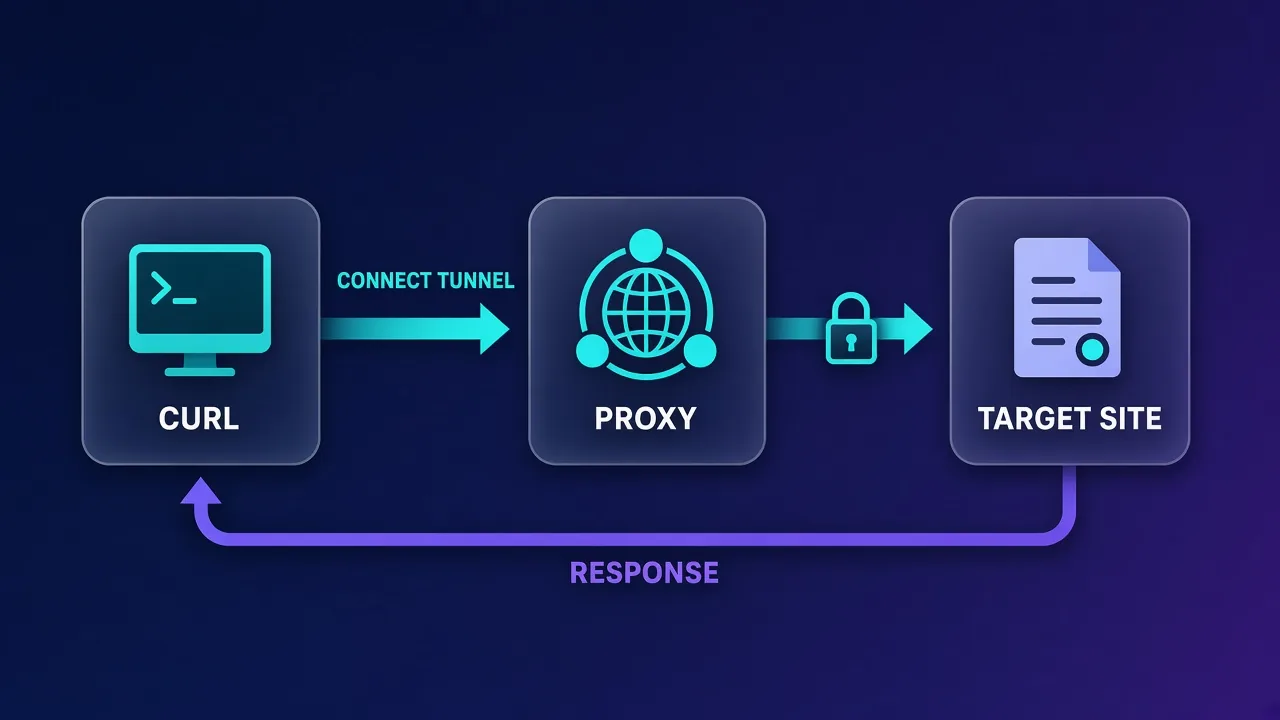
When you pass a proxy to cURL, it no longer connects to the website directly. It opens a connection to the proxy and asks the proxy to fetch the page on its behalf. What happens next depends on the proxy type and on whether the target URL is HTTP or HTTPS.
- HTTP proxy, plain HTTP target: cURL sends the full request (including the full URL) to the proxy, and the proxy forwards it. The proxy can read and even modify the traffic.
- HTTP proxy, HTTPS target: cURL sends a
CONNECTrequest asking the proxy to open a tunnel to the target on port 443. After that, TLS runs end to end between cURL and the website, so the proxy only sees the hostname and the amount of data, not the content. - SOCKS proxy: the proxy relays raw TCP connections. It does not understand HTTP at all, which is why SOCKS works for almost any protocol.
- HTTPS proxy: the connection between cURL and the proxy itself is encrypted with TLS, so nobody on your local network can read your proxy credentials or the
CONNECTrequest.
If the HTTP versus SOCKS distinction is new to you, our explainer on SOCKS5 vs HTTP proxies covers it in depth. For cURL, the practical difference comes down to which scheme you put in front of the proxy address.
The basic command: -x and --proxy
The -x flag (long form --proxy) is all you need for most jobs. The format is [protocol://]host[:port].
curl -x http://proxy.example.com:8080 https://httpbin.org/ip
curl --proxy http://proxy.example.com:8080 https://httpbin.org/ip
Both lines do the same thing. A few defaults are worth remembering because they explain a lot of confusing failures:
- If you leave off the scheme, cURL assumes an HTTP proxy.
- If you leave off the port, cURL assumes port 1080, for historical reasons. Most commercial proxies use a different port (often 8080, 3128, 7777 or a provider-specific gateway port), so always include it.
- For an
https://proxy with no port, the default is 443. - A
-xvalue on the command line overrides any proxy set in environment variables.
The endpoint https://httpbin.org/ip simply echoes back the IP address it sees, which makes it a handy first test. If the response shows your proxy's exit IP instead of your own, the proxy is working. You can use any similar IP-echo service; the point is to compare the result with and without -x.
Adding proxy authentication
Paid proxies almost always require a username and password (or an IP allowlist). cURL gives you two ways to pass credentials.
Option 1: credentials inside the proxy URL
curl -x http://USERNAME:PASSWORD@proxy.example.com:8080 https://httpbin.org/ipOption 2: the -U / --proxy-user flag
curl -U USERNAME:PASSWORD -x proxy.example.com:8080 https://httpbin.org/ip
curl --proxy-user USERNAME:PASSWORD -x proxy.example.com:8080 https://httpbin.org/ip
Keep -U (proxy credentials) separate in your head from -u (credentials for the target website). Mixing them up is one of the most common reasons for a 407 error.
Special characters in passwords
cURL URL-decodes the username and password in a proxy string. That means characters such as @, :, # or % in your password will break parsing unless you percent-encode them. Use %40 for @ and %3A for a colon:
# password is p@ss:word
curl -x "http://user:p%40ss%3Aword@proxy.example.com:8080" https://httpbin.org/ip
Many providers put targeting parameters (country, city, session ID) inside the username, separated by dashes or underscores. Those work fine as long as you quote the whole proxy string so your shell does not interpret any characters. Check your provider's documentation for the exact username syntax, since it differs between networks.
Non-Basic authentication schemes
By default cURL uses Basic authentication with the proxy. Some corporate proxies expect something else, and the Proxy-Authenticate header in the 407 response tells you which. cURL supports --proxy-digest, --proxy-ntlm and --proxy-negotiate, or you can let it pick with --proxy-anyauth (at the cost of an extra round trip).
curl -U user:pass -x proxy.example.com:8080 --proxy-anyauth https://example.comKeep passwords out of your shell history
Anything you type after -U lands in your shell history and can show up in the process list. For shared machines, put credentials in a config file with tight permissions (see the .curlrc section below) or in an environment variable loaded from a protected file.
Using SOCKS5 proxies with cURL
cURL supports SOCKS4, SOCKS4a, SOCKS5 and SOCKS5-hostname. You choose the version with the scheme in the -x value or with a dedicated flag.
# SOCKS5, DNS resolved locally by curl
curl -x socks5://user:pass@proxy.example.com:1080 https://httpbin.org/ip
curl --socks5 proxy.example.com:1080 https://httpbin.org/ip

# SOCKS5-hostname, DNS resolved by the proxy
curl -x socks5h://user:pass@proxy.example.com:1080 https://httpbin.org/ip
curl --socks5-hostname proxy.example.com:1080 https://httpbin.org/ip
socks5 vs socks5h: the DNS detail that matters
The single letter h changes who looks up the target's hostname:
| Scheme | Who resolves the hostname | IPv6 support | When to use it |
|---|---|---|---|
socks4:// | cURL (your machine) | No | Legacy proxies only |
socks4a:// | The proxy | No | Legacy proxies that need remote DNS |
socks5:// | cURL (your machine) | Yes | When you deliberately want local DNS |
socks5h:// | The proxy | Yes | Default choice for privacy and geo-targeting |
With plain socks5://, your machine asks your own DNS resolver for the target's IP address. That lookup goes to your ISP or local resolver, which can reveal which sites you visit, and it can also return a server in your own region rather than the proxy's region, which matters for geo-specific content. With socks5h://, the hostname travels to the proxy and the proxy resolves it from its own location.
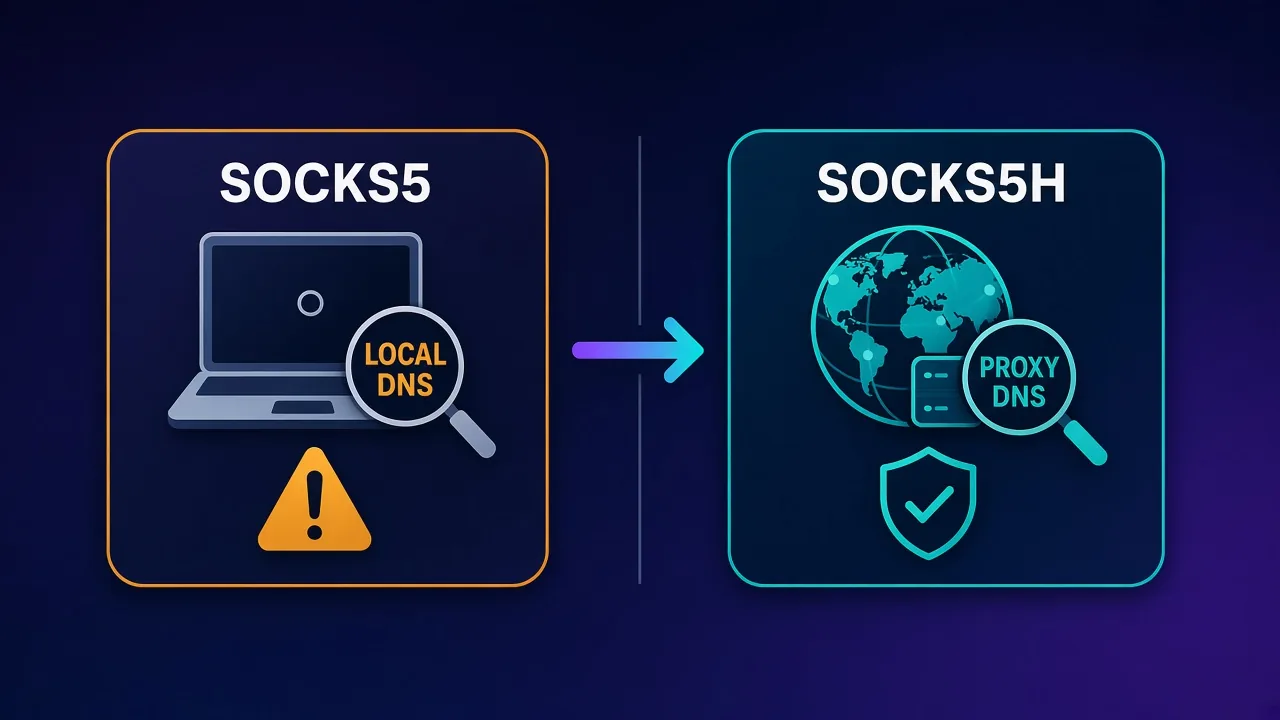
If you are not sure which one your workflow needs, use socks5h://. The only common reason to choose socks5:// is when the target hostname only exists in your local network or hosts file.
HTTPS proxies and TLS options
An "HTTPS proxy" is not the same as using an HTTP proxy to reach HTTPS sites. It means the hop between cURL and the proxy is itself encrypted. Without it, HTTP and SOCKS proxy traffic between you and the proxy is sent in clear text, including Basic auth credentials. Only use the https:// scheme if your provider actually exposes a TLS endpoint; pointing it at a plain HTTP port will fail during the handshake.
curl -x https://user:pass@proxy.example.com:443 https://httpbin.org/ipUseful related flags:
--proxy-cacert FILEtrusts a custom CA certificate for the proxy, which is common with corporate or self-hosted proxies.--proxy-insecureskips verification of the proxy's certificate. Use it only for short local tests, never in production scripts.--proxy-http2asks cURL to try HTTP/2 when talking to an HTTPS proxy. By default it uses HTTP/1.1.
Setting proxies with environment variables
If you run many commands through the same proxy, environment variables save typing. cURL reads them automatically before each run.
export http_proxy="http://user:pass@proxy.example.com:8080"
export https_proxy="http://user:pass@proxy.example.com:8080"
export NO_PROXY="localhost,127.0.0.1,.internal.example.com"

curl https://httpbin.org/ip
A few rules from the curl documentation catch people out:
http_proxyonly works in lowercase. cURL deliberately ignoresHTTP_PROXYbecause CGI scripts receive anHTTP_PROXYvariable from any incoming request that carries aProxy:header, which historically caused security problems. Other variables, such asHTTPS_PROXY, work in either case.- The variable is named after the target scheme, not the proxy type.
https_proxyis used for HTTPS URLs, even if the proxy itself is a plain HTTP proxy. ALL_PROXYcovers every protocol, but a protocol-specific variable takes precedence when both exist.NO_PROXYtakes a comma-separated list. A leading dot matches a whole domain, a single*disables proxying, and since cURL 7.86.0 you can use CIDR ranges such as192.168.0.0/16.
To ignore an environment proxy for a single command, use --noproxy "*" or pass an empty proxy with -x "".
Saving proxy settings in .curlrc
For a persistent setup that does not leak into other tools, put the proxy in a cURL config file. cURL reads a default config automatically, checking $CURL_HOME/.curlrc, then $XDG_CONFIG_HOME/curlrc, then $HOME/.curlrc on Linux and macOS.
# ~/.curlrc
proxy = "http://proxy.example.com:8080"
proxy-user = "user:pass"
noproxy = "localhost,127.0.0.1"
connect-timeout = 15
Lock the file down with chmod 600 ~/.curlrc. You can also keep separate profiles and load one explicitly with -K (--config), for example curl -K ~/proxies/us.conf https://example.com. Run curl -q when you need to bypass the default file for a single command; -q must be the first argument.
Tip for rotating proxies
Keep one small config file per proxy location or session type. Switching between them with -K is far less error-prone than editing long command lines.
Verifying and timing a proxy with cURL
Once the proxy responds, cURL can show you exactly what happened. These are the checks we run first:
# 1. Which IP does the target see?
curl -s -x http://user:pass@proxy.example.com:8080 https://httpbin.org/ip

# 2. Full handshake details (proxy connect, CONNECT response, TLS)
curl -v -x http://user:pass@proxy.example.com:8080 https://example.com -o /dev/null

# 3. Timing breakdown
curl -s -o /dev/null -x http://user:pass@proxy.example.com:8080 \
  -w "connect: %{time_connect}s  tls: %{time_appconnect}s  total: %{time_total}s  code: %{http_code}\n" \
  https://example.com
The verbose output (-v) shows whether cURL connected to the proxy, what the proxy answered to CONNECT, and whether the TLS handshake with the target succeeded. The -w format string prints timing variables so you can compare proxies or locations side by side. For a fuller testing routine covering anonymity and leak checks, see our guide on how to test a proxy.
Sending headers only to the proxy
Some providers accept options through custom headers. A normal -H header goes to the target site; --proxy-header goes only to the proxy, including on the CONNECT request:
curl --proxy-header "X-Example-Option: value" -x proxy.example.com:8080 https://example.comTroubleshooting common cURL proxy errors
When a proxy command fails, read the cURL exit code and the first lines of -v output together. Here is what the usual suspects mean:
| Symptom | Likely cause | What to try |
|---|---|---|
| Exit code 5, "Could not resolve proxy" | Typo in the proxy hostname, or DNS cannot resolve the gateway | Check the hostname against your dashboard; try the gateway IP if the provider lists one |
| Exit code 7, "Failed to connect" | Wrong port, proxy down, or a firewall blocking outbound traffic to that port | Confirm the port; test from another network; check whether your IP must be allowlisted |
407 Proxy Authentication Required | Missing or wrong credentials, unencoded special characters, or using -u instead of -U | Percent-encode the password, use -U, try --proxy-anyauth |
| Exit code 28, "Operation timed out" | Slow or overloaded exit node, or a blocked route | Add --connect-timeout 15 --max-time 60, rotate to a new session, try another location |
| Exit code 97, "Proxy handshake error" | SOCKS handshake failed, often a wrong scheme or SOCKS credentials | Make sure the port really is SOCKS, check the scheme (socks5h:// vs http://) |
| Target returns 403 or a CAPTCHA | The proxy works, but the site distrusts the IP or your request pattern | Try a residential or mobile IP, slow down, send realistic headers |
| IP check shows your real IP | An environment variable or .curlrc is overriding, or NO_PROXY matches the host | Run with -v and -q, unset proxy variables, check NO_PROXY |
Don't "fix" errors with -k
-k (--insecure) disables certificate checks for the target site and --proxy-insecure does the same for the proxy. Neither fixes a proxy problem, and leaving them in scripts lets anyone in the middle read or alter your traffic.
Practical recipes
Rotate through a list of proxies
while read -r p; do
  printf '%s -> ' "$p"
  curl -s --max-time 20 -x "$p" https://httpbin.org/ip || echo "failed"
done < proxies.txt
Each line in proxies.txt holds one full proxy URL, such as http://user:pass@host:port or socks5h://user:pass@host:port.
Download a file through a proxy and retry on failure
curl -x socks5h://user:pass@proxy.example.com:1080 \
  --retry 3 --retry-delay 5 --connect-timeout 15 \
  -L -o report.pdf https://example.com/report.pdf
Use different proxies for different requests in one command
The --next (-:) flag resets options between URLs, so each URL can get its own proxy:
curl -x http://us.proxy.example.com:8080 https://httpbin.org/ip \
  --next -x http://de.proxy.example.com:8080 https://httpbin.org/ip
When to move beyond cURL
cURL is ideal for testing a proxy, debugging an integration and running small scripted jobs. It is less comfortable when you need to parse responses, manage cookies across many requests, handle retries with backoff, or run thousands of requests concurrently. At that point, most teams move the same proxy settings into a programming language. If Python is your tool of choice, our guide to using proxies with Python Requests shows how the same HTTP and SOCKS5 URLs translate directly into code.
Keep cURL around even then. When a scraper starts failing, reproducing a single request with curl -v -x ... is usually the quickest way to tell whether the problem is the proxy, the credentials or the target site.
Responsible use
A proxy changes where your requests come from; it does not change what you are allowed to do. Respect each site's terms and robots rules, keep request rates reasonable, and avoid collecting personal data you have no legal basis to process. Choose proxy providers that are transparent about how they source their IPs, especially for residential and mobile networks.
Final thoughts
Most proxy setups in cURL come down to one flag: -x with the right scheme. Use http:// for standard HTTP proxies, socks5h:// for SOCKS5 with remote DNS, and https:// only when your provider offers an encrypted proxy endpoint. Pass credentials with -U or inside the URL with special characters encoded, remember that http_proxy is lowercase-only, and lean on -v and -w whenever something looks wrong. With those habits, cURL becomes the quickest way to test any proxy before you trust it with real work.
Frequently asked questions
Pass the proxy with the -x or --proxy flag, for example curl -x http://host:port https://example.com. Add credentials inside the URL as user:pass@host:port or with the -U flag. If you omit the scheme, cURL treats the proxy as an HTTP proxy.
If you don't specify a port, cURL assumes port 1080 for HTTP and SOCKS proxies, and 443 for https:// proxies. Most commercial proxy gateways use a different port, so always include the port from your provider's dashboard.
With socks5://, cURL resolves the target hostname on your own machine and sends the IP to the proxy. With socks5h://, the hostname is sent to the proxy and resolved there. socks5h avoids leaking DNS lookups to your local resolver and gives geo-accurate results, so it is usually the better default.
Either embed them in the proxy URL, such as http://user:pass@host:port, or use -U user:pass (also written --proxy-user). Percent-encode special characters in the password, for example %40 for @ and %3A for a colon, because cURL URL-decodes proxy credentials.
cURL only accepts the lowercase http_proxy variable. The uppercase HTTP_PROXY is ignored on purpose because CGI environments create it from an incoming Proxy request header, which has caused security issues. Other variables such as HTTPS_PROXY and ALL_PROXY work in either case.
Check that the username and password match your provider's dashboard, percent-encode any special characters, and make sure you used -U for the proxy rather than -u, which is for the target site. If the proxy needs a scheme other than Basic, try --proxy-anyauth or the specific --proxy-digest or --proxy-ntlm flag.
Request an IP-echo endpoint such as https://httpbin.org/ip with and without -x and compare the addresses. Add -v to see cURL connect to the proxy and the proxy's reply to the CONNECT request. If your real IP still appears, check for a .curlrc file, environment variables or a NO_PROXY entry that matches the host.
Yes. Set proxy and proxy-user lines in your default config file, usually ~/.curlrc, or export http_proxy and https_proxy in your shell profile. Use --noproxy "*" or curl -q to skip the proxy for a single command when you need a direct connection.