Table of contents
Instagram is one of the hardest platforms on the web to automate or manage at scale. It's built mobile-first, it links accounts aggressively, and it acts quickly when behaviour looks automated. For agencies, social media managers and marketers running more than one account, the proxy you choose often decides whether accounts stay healthy or get locked within days. This guide explains how Instagram detects linked and automated accounts, why mobile proxies are the standard choice, how many accounts to run per IP, how to warm accounts up, and the best proxies for Instagram in 2026 — along with the terms-of-service reality you should know before you start.
Read this first: what Instagram allows
Instagram's terms prohibit accessing the service through unauthorised automated means, and Meta enforces this with action blocks, verification challenges, suspensions and permanent bans. Managing several accounts you legitimately own is allowed, and Instagram lets you switch between them in the app — but bots that like, follow, comment or message automatically outside official tools break the rules, no matter how good your proxies are.
If your goal is business automation — scheduling posts, reading insights, managing comments and messages for a business or creator account — the sanctioned route is the official Instagram API (part of Meta's Graph API) and the Meta-approved scheduling tools built on it. Those don't need proxies at all. Proxies matter for the rest: agencies running many client accounts, teams managing accounts from one office, and anyone who needs accounts not to be linked to each other. Everything below is about doing that as safely as possible, not about evading the rules.
How Instagram links and flags accounts
Instagram looks at far more than a password. It builds a picture of every account from several signals:
- IP address and network. Many accounts logging in from the same IP — especially a data-centre IP — are an obvious link. The network owner behind the IP matters too (see what an ASN is).
- Device identity. In the app that means device identifiers; in a browser it means the fingerprint. Several accounts on one device or one browser profile are linked.
- Behaviour. Instant actions, perfectly regular timing, sudden spikes in follows or likes, and activity around the clock all read as automation.
- Location consistency. An account that normally logs in from one city and suddenly appears on another continent triggers a security check.
When accounts are linked, action against one can spill onto the others. That's why the goal of a good setup is simple: each account should look like a separate person on a separate device on a consistent network.
Why mobile proxies are the standard for Instagram
Instagram is primarily a mobile app, so traffic from mobile carrier networks is exactly what it expects to see. Mobile IPs also have a structural advantage. Carriers use carrier-grade NAT (CGNAT), which puts many real subscribers behind the same public IP at the same time. Because blocking one mobile IP could lock out a large number of genuine users, platforms are reluctant to ban carrier IPs aggressively. That makes 4G and 5G mobile proxies the most trusted option for Instagram, and why most experienced account managers use them. Our explainer on why mobile proxies cost more covers the mechanics.
Proxy types ranked for Instagram
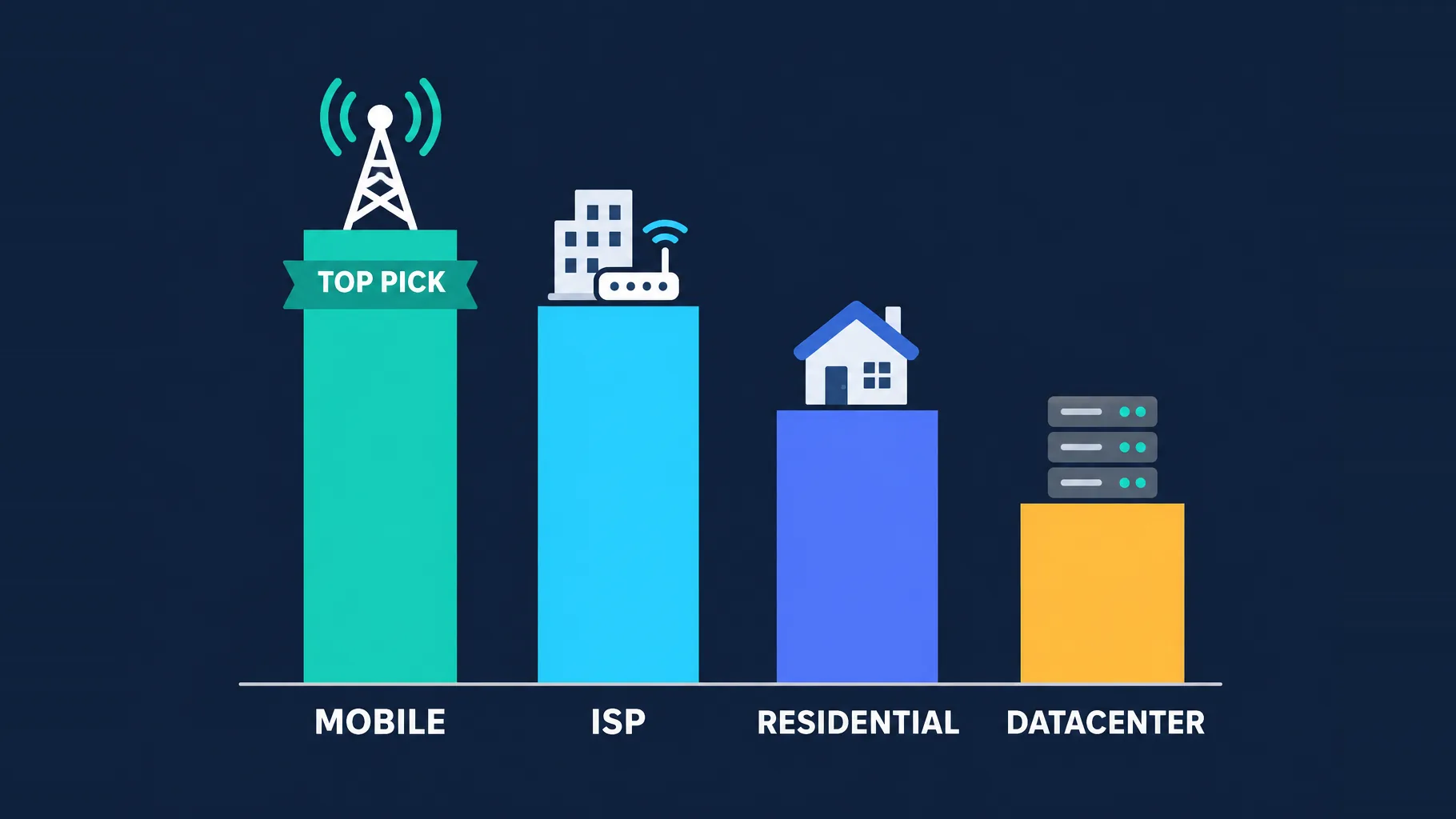
| Proxy type | Instagram suitability | Why |
|---|---|---|
| 4G/5G mobile | Best | Carrier IPs shared by many real users; matches Instagram's mobile-first traffic |
| ISP (static residential) | Good | Stable, trusted consumer-ISP IP that stays the same across logins |
| Rotating residential | Risky | Trusted IPs, but rotation can change the IP mid-session and look like account hijacking |
| Datacenter | Avoid | Hosting-network IPs are easy to identify and quickly flagged |
A note on residential proxies: they aren't bad for Instagram, but only when configured as sticky sessions that hold the same IP for a long time. An account that appears from a different IP on every request looks like it's being accessed from all over the place — one of the signals Instagram associates with compromised accounts.
How many accounts per proxy?
There's no official number, and anyone quoting a precise safe limit is guessing. The principle is what matters: the more accounts share an IP, the more easily they're linked. The safest setup is one account per dedicated IP, which is realistic with ISP proxies or dedicated mobile modems. With mobile proxies, operators commonly run a small handful of accounts per IP, because CGNAT makes shared mobile IPs look normal — but keep it small, and keep each account on the same IP over time rather than bouncing between addresses. Never put many accounts on one residential or ISP IP; that pattern doesn't occur naturally.
Consistency beats rotation
For Instagram, a stable IP that stays the same account after account, day after day, is worth more than a fresh IP every session. Pick a proxy location that matches the account's audience, then keep that account on it.
The best proxies for Instagram in 2026
The Social Proxy — dedicated 4G/5G modems in real cities
Sells dedicated mobile modems on real SIM-backed hardware in named cities, with unlimited data and on-demand IP rotation. Having a whole modem to yourself is ideal for keeping a small group of accounts on a consistent, high-trust mobile identity.
The Social Proxy
For high-value social accounts, a dedicated modem is the gold standard, and The Social Proxy executes it properly: real SIM hardware in named cities, unlimited data, API rotation, and an identity no other customer can poison. The economics only work when the accounts justify ~$90/month per identity cluster, and the finite city list constrains geo-sensitive plans. If your Instagram or TikTok operation loses real money when an account dies, this is what the premium buys.
SOAX — mobile pool with carrier targeting
A large mobile and residential network with filtering by country, city and carrier, useful for matching accounts to the right market and holding them on consistent carrier IPs.

SOAX
SOAX is the targeting specialist. City- and ISP-level selection on every plan — not locked behind premium tiers — is genuinely rare, and the continuously cleaned pool keeps success rates high where it matters. It is not the fastest network, the interface could use a refresh, and SOCKS5 coverage is uneven. Those are real but minor gripes against a provider that nails the fundamentals of precision and reliability. For ad verification, localized market research, and social-media work that depends on appearing in an exact location, SOAX is one of the best mid-market options available.
ProxyEmpire — mobile, ISP and rollover data
Offers mobile and static ISP proxies alongside residential, with city- and ISP-level targeting, sticky sessions and rollover data so unused bandwidth doesn't expire at month end.

ProxyEmpire
ProxyEmpire wins on flexibility. Rollover data is a genuinely rare, customer-friendly policy — unused traffic carries forward instead of evaporating at month end — and the targeting reaches city and ISP level on a network that covers 170+ countries. The pool is smaller than the market leaders and speeds are solid rather than spectacular, so very high-volume operations may want a bigger network. SOCKS5 support and sticky sessions round out a capable feature set. For individuals and mid-sized teams who want fair, flexible, ethically sourced proxies, ProxyEmpire is a strong value pick.
NodeMaven — quality-filtered IPs with long sticky sessions
Filters IPs for reputation in real time and lets you hold them for hours, a good fit when you need residential IPs that stay stable across an account's working session.

NodeMaven
NodeMaven's quality-filtered pool is a genuinely different pitch in a market obsessed with pool size, and it works: the IPs you get are noticeably cleaner, and holding one for a day makes account workflows far more stable than typical 10–30 minute sticky windows. You pay more per gigabyte than at budget providers, and raw-volume scrapers should look elsewhere — this is a precision tool. For multi-accounting through anti-detect browsers and any workflow where one flagged IP costs you an account, NodeMaven justifies its premium.
Decodo — strong value across mobile and residential
Competitive pricing on residential and mobile proxies with an easy dashboard, a sensible choice for agencies scaling up the number of accounts they manage.

Decodo
Decodo offers the best price-to-performance ratio in the industry. It delivers roughly 90% of what the enterprise leaders provide — high success rates, a large clean pool, sticky sessions, an unblocker — at a fraction of their cost. The dashboard is the friendliest of any major provider, the 14-day money-back guarantee removes the risk of trying it, and support actually responds. The main gaps are enterprise-grade compliance tooling and the very deepest targeting, neither of which most teams need. For startups, solo developers, and any team that wants professional results without enterprise pricing, Decodo is our top value pick and an easy recommendation.
IPRoyal — budget-friendly mobile and ISP
Affordable mobile and static ISP options that are easy to get started with, suitable for smaller teams or for testing a workflow before committing to dedicated modems.

IPRoyal
IPRoyal is the best pure pay-as-you-go deal in proxies. Non-expiring traffic is a genuinely customer-friendly policy that no major rival matches — buy what you need, use it whenever, lose nothing. The pool is smaller than the premium networks and success rates can soften on the most heavily defended targets, so high-volume enterprise scraping is not its strength. The dashboard is also fairly basic. For intermittent scraping, account work, and sneaker copping on a predictable budget, IPRoyal is an easy recommendation and one of the best value picks for occasional users.
Pair proxies with separate browser profiles or devices
A proxy only covers the network signal. If five accounts share one browser or one phone, Instagram can still link them through the device. For browser-based management, use an antidetect browser that gives each account its own isolated profile — separate fingerprint, cookies and storage — with its own proxy assigned. On mobile, use separate devices or well-configured emulators, one per account or small group. Set each profile's timezone and language to match its proxy's location so nothing contradicts. Our guides to the best antidetect browsers for social media management and why antidetect browsers need proxies cover this setup in detail.
Warm-up and pacing
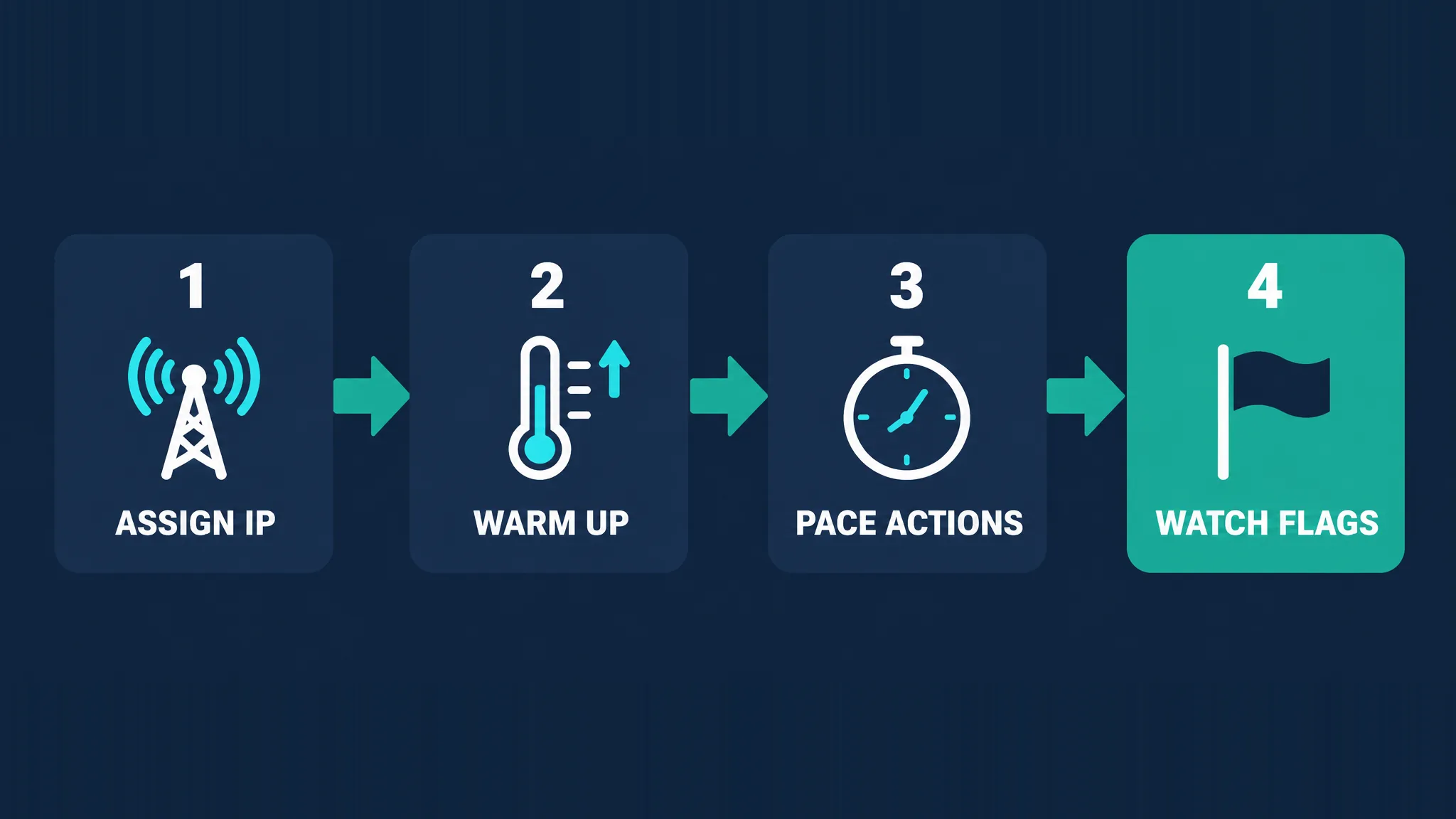
New accounts and accounts moving to a new IP are watched closely. A careful routine reduces the chance of an early action block:
- Assign a stable IP to the account before its first login, in a location that matches its audience.
- Warm up gradually — browse, watch stories, like a few posts and complete the profile over several days before doing anything heavy.
- Pace actions like a person: irregular timing, reasonable daily totals, and quiet periods overnight.
- Watch for flags such as "try again later" messages, verification prompts or reach dropping, and back off immediately when they appear.
Warning signs your account is flagged
- Action blocks — "Try again later" or "We restrict certain activity" messages when you like, follow or comment.
- Verification challenges asking for a code by email or SMS, or for identity confirmation.
- Sudden reach drops where posts stop appearing in hashtags or feeds.
- Forced logouts or repeated "suspicious login attempt" alerts.
When any of these appear, stop automated activity, keep the account on the same IP, and let it rest. Changing IPs in a panic usually makes things worse.
Choosing the right proxy location
Pick each account's proxy location based on where its real audience and its history are, not on what's cheapest. A brand account aimed at London customers should sit on a UK mobile or ISP IP, ideally in or near the city it claims to be in. An account that has always been managed from one country shouldn't suddenly move to another, because a location jump is one of the strongest triggers for a verification challenge. If you take over an existing account, start it on a proxy in the same region it was last used from, and only change location gradually if you must.
Web or app: where are you managing accounts?
How you manage accounts changes what you need alongside the proxy. In a browser, the proxy pairs with an antidetect browser profile per account, and both the IP and the fingerprint need to be consistent. In the mobile app, each account is tied to a device, so the proxy is set at the device or network level and each account needs its own phone or emulator. App traffic on a mobile proxy looks the most natural to Instagram, but it's harder to scale; browser management scales more easily but depends on a well-configured antidetect setup. Many agencies use the browser for day-to-day management and reserve real devices for their most valuable accounts.
What does it cost?
Prices change, so check the live figures on the cards above rather than numbers quoted in an article. The pattern is consistent, though. Dedicated mobile modems cost the most per IP but give you a stable, high-trust identity with unlimited data. Shared mobile and residential plans are usually billed per gigabyte, which is manageable for account management because browsing Instagram uses far less data than scraping. Static ISP proxies are billed per IP and suit one-account-per-IP setups. Weigh the cost against what a lost account is worth to you: for client or revenue-generating accounts, the more trusted option is usually cheaper in the long run.
Common mistakes
- Using datacenter proxies, which are cheap but among the first things Instagram flags.
- Rotating IPs on every request, which makes accounts look hijacked.
- Many accounts on one IP or one browser profile, linking them together.
- Mismatched location — a US audience account on an Asian IP with a European timezone.
- Going from zero to heavy activity on a brand-new account.
- Free proxies, which are shared, slow and often already burned (see why proxies get blocked).
No proxy makes an account ban-proof
Good proxies remove one of the easiest ways to link accounts, but Instagram weighs device, behaviour and content too, and can act on terms violations regardless of IP quality. Be sceptical of anyone promising unbannable accounts, keep automation within what the platform allows, and never risk accounts you can't afford to lose.
How to choose
- A few high-value accounts that must stay safe? Dedicated mobile modems from The Social Proxy.
- Many accounts across different markets? SOAX or ProxyEmpire for mobile IPs with carrier and city targeting.
- Browser-based management with long sessions? NodeMaven or static ISP proxies.
- Scaling on a budget? Decodo or IPRoyal.
Browse the full proxy directory to compare current plans and pricing.
The bottom line
For Instagram, the proxy question has a clear answer: mobile IPs first, static ISP IPs second, sticky residential with care, and datacenter never. What matters as much as the proxy type is consistency — one account on one stable IP, in its own browser profile or device, with a location that matches its audience and a warm-up routine that looks human. The Social Proxy is the pick for dedicated mobile identities, SOAX and ProxyEmpire cover mobile at scale with deep targeting, NodeMaven suits long browser sessions, and Decodo and IPRoyal keep costs down. Just keep the platform's rules in view: proxies reduce the risk of accounts being linked, but they don't make prohibited automation safe.
Frequently asked questions
Mobile 4G/5G proxies are the best choice for Instagram. Carriers share each IP among many real subscribers through CGNAT, so Instagram is reluctant to block them, and mobile traffic matches the app's mobile-first design. Static ISP proxies are a good second choice, while datacenter proxies are best avoided.
There's no official limit, and the safest setup is one account per dedicated IP. With mobile proxies, many operators run a small handful of accounts per IP because shared carrier IPs look normal, but keep the number small and keep each account on the same IP over time. Avoid putting many accounts on one residential or ISP IP.
Mobile proxies are generally safer because they carry the highest trust and match Instagram's mobile traffic. Residential proxies can work well if you use sticky sessions that keep the same IP for a long time. Rotating residential IPs that change every request are risky, because frequent IP changes look like account hijacking.
No proxy guarantees that. A good proxy stops accounts from being linked through a shared or low-trust IP, but Instagram also looks at devices, behaviour and content, and can act on terms-of-service violations regardless of your IP. Proxies reduce risk; they don't remove it.
Instagram prohibits accessing the service through unauthorised automated means, so bots that like, follow, comment or message automatically outside official tools break its terms. Managing multiple accounts you own is allowed, and the official Instagram API and Meta-approved scheduling tools are the sanctioned way to automate publishing and insights for business accounts.
Use static or sticky IPs. Instagram expects an account to log in from a consistent network, and an IP that changes constantly looks like the account is being accessed from many places. Keep each account on one stable IP in a location that matches its audience.
It's strongly discouraged. Free proxies are shared by many users, often already flagged by Instagram, slow and sometimes unsafe, since some log or tamper with traffic. Using one can get an account challenged or blocked quickly, which costs far more than a modest paid mobile or ISP proxy.
If you manage several accounts in a browser, yes. A proxy only changes the IP, while Instagram can still link accounts that share one browser fingerprint. An antidetect browser gives each account an isolated profile with its own fingerprint and cookies, and you assign each profile its own proxy. On phones, the equivalent is separate devices or emulators.