Table of contents
Ad verification is the unglamorous job of checking that an ad actually ran where, when and how it was paid for. It sounds simple until you remember that the ad you see depends on who the ad server thinks you are. A campaign targeted at mobile users on a specific carrier in Chicago will never show up on a laptop in an office in Bengaluru, and a fraudster who cloaks a landing page will happily show a clean version to anything that looks like a crawler. To see what real users see, verification teams need IP addresses that look like those users. That is what proxies for ad verification are for.
This guide explains what ad verification needs from a proxy network, which IP types work best, and how four widely used providers (Bright Data, Oxylabs, Decodo and IPRoyal) compare for the job. Prices below were checked on each provider's official pricing page on 9 November 2026; they change often, so treat them as a snapshot and confirm before you buy.
Why ad verification needs proxies at all
Every modern ad stack decides what to serve in a fraction of a second, using signals about the visitor. The IP address is one of the strongest of those signals because it reveals a rough location, the network type (home broadband, mobile carrier, data center) and the network operator behind it. Ad servers, supply-side platforms and fraudsters all read the same signal.
That creates three problems for anyone auditing ads from a single office connection:
- You only see your own market. Geo-targeted campaigns, local pricing in ads and region-specific creatives are invisible outside the target area.
- Data center traffic gets treated differently. Many ad platforms and almost every bad actor filter obvious server IPs. Verification bots on cloud IPs often get a sanitized experience.
- Repeated checks from one IP stand out. If you load the same publisher page hundreds of times a day from one address, you get rate-limited, frequency-capped or flagged.
A proxy network solves this by routing each check through an IP in the location and network type you need. The ad server sees a plausible local visitor, and your verification tool records what that visitor would have seen.
What ad verification typically checks
Placement (did the ad appear on the agreed site and position), geo and device targeting, brand safety (what content the ad sat next to), creative integrity (was the right creative and landing page served), and fraud signals such as cloaking, redirect chains, hidden ads and affiliate hijacking.
What to look for in an ad verification proxy
Ad verification is not the same as bulk scraping. You usually need fewer gigabytes but far more precision. These are the criteria that matter most.
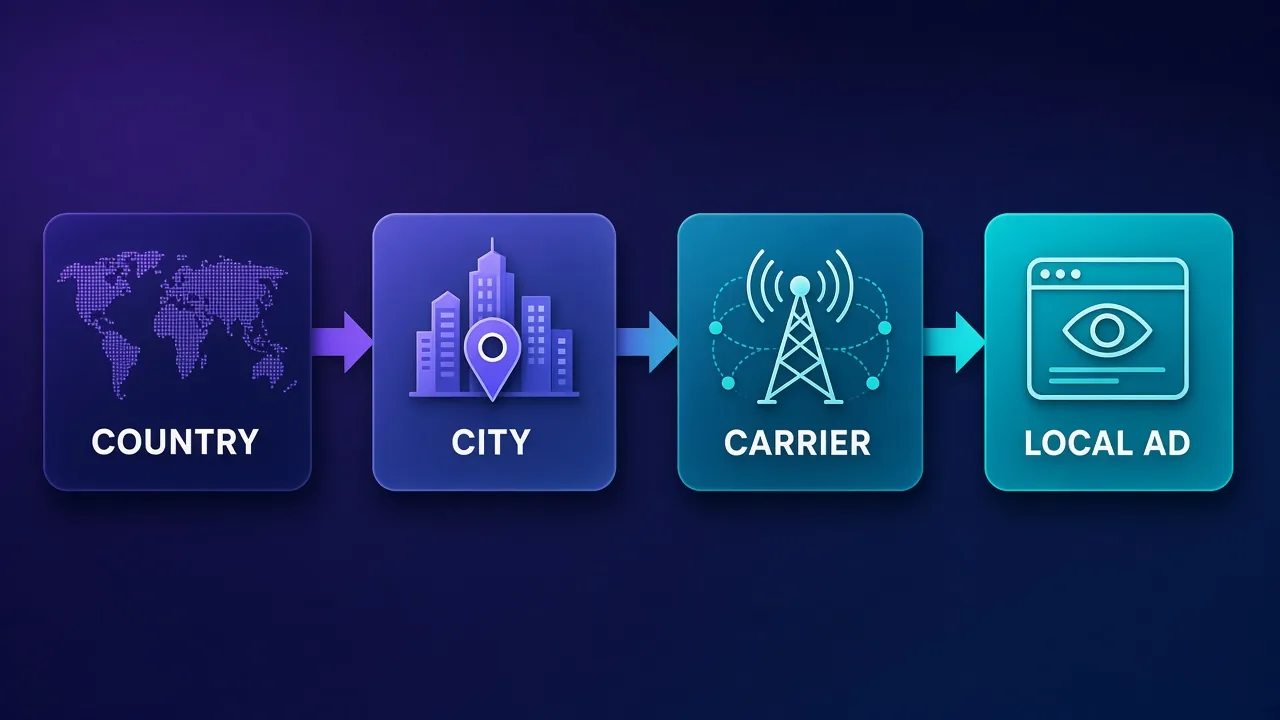
Geo-targeting depth
Country targeting is the bare minimum. Most real campaigns target states, metro areas or cities, and some target postal codes. A provider that only offers country-level exits will miss much of what local advertisers run. If geo-targeting is new to you, our explainer on geo-targeting in proxies covers how providers map IPs to locations and why the mapping is never perfect.
ASN and carrier targeting
An ASN (autonomous system number) identifies the network that owns an IP range, such as a specific broadband ISP or mobile carrier. Ad campaigns are sometimes targeted by carrier or ISP, and fraud patterns often cluster on particular networks. Being able to pick the ASN lets you reproduce those conditions. Our guide to what an ASN is explains how it works and why ad platforms care.
IP type
Residential and mobile IPs are the default for ad verification because they look like ordinary consumers. ISP (static residential) IPs are useful when you need the same identity for a longer session. Data center IPs are cheap but are the first thing cloaking scripts filter out, so they are rarely the right primary choice.
Session control
Some checks need a fresh IP per request (sampling many placements quickly). Others need a sticky session so you can follow a click through redirects to the final landing page from one consistent identity. Look for both rotating and sticky modes, and know how long sticky sessions can last.
Pool quality and sourcing
A huge pool is useless if many of its IPs are already flagged in fraud databases, because flagged IPs get filtered just like data center ones. Sourcing also matters ethically: residential IPs come from real devices, and you should be comfortable with how the provider obtained consent.
Compliance and acceptable use
Enterprise-focused providers often require a KYC (know your customer) check before you can use residential or mobile IPs, and some block certain categories of targets. That adds friction, but it is also a sign the network is policed.
Quick comparison: four providers for ad verification
The table summarizes what each provider published on its residential pricing page on 9 November 2026. Per-GB prices are for residential traffic; mobile and ISP products are priced separately.
| Provider | Advertised residential pool | Targeting listed on pricing page | Residential price (published) | Best fit |
|---|---|---|---|---|
| Bright Data | 400M+ monthly IPs, 195 countries | Country, state, city, ZIP and ASN | Pay as you go $8/GB list; monthly plans from $499 (a 50% promo code was advertised on the day) | Enterprise verification at scale, compliance-heavy teams |
| Oxylabs | Not stated on pricing page | Free geo-targeting | $6/GB at low volume, falling to $4/GB up to 125 GB and $2.5/GB at 1K+ GB, via credit plans from $15/month | Teams that want one credit balance across proxies and scraping tools |
| Decodo | 115M+ IPs, 195+ locations | Continent, country, state, city, ZIP and ASN | $3.75/GB (3 GB) down to $2.75/GB (100 GB); enterprise $2.50 to $2/GB; pay as you go $4/GB | Best value for mid-size verification workloads |
| IPRoyal | 64M+ IPs, 195+ countries | Country and city-level targeting | $7/GB (1 GB) to $5.25/GB (10 GB); custom from $1.75/GB at 10 TB; traffic does not expire | Irregular or bursty audits on a small budget |
None of these numbers tells you how well a network performs against a specific ad stack. Run a short pilot on your own targets before committing a large budget.
Bright Data: the deepest targeting for enterprise programs
Bright Data is the provider most often associated with enterprise ad verification, and its residential pricing page makes the case clearly: it lists 400M+ monthly residential IPs in 195 countries, with country, state, city, ZIP code and ASN-level targeting included at no extra charge. Its own FAQ names verifying ads as one of the uses for its shared proxies. For a verification team that needs to reproduce carrier- or ISP-specific campaigns across many markets, that combination of depth and breadth is hard to beat.
The trade-offs are cost and process. On 9 November 2026 the pay-as-you-go rate was listed at $8/GB before discounts, with monthly plans starting at $499 and a 50% coupon advertised for the first three months. Before you can use residential or mobile IPs, Bright Data runs a KYC process that can include a short video call. Larger teams usually see that as a positive, because it keeps abusive users off the same network.
Bright Data
Bright Data remains the most complete data-collection platform money can buy. No competitor matches its combination of network scale, targeting granularity, and compliance tooling — and for enterprise teams whose revenue depends on reliable data, that completeness justifies the premium. The trade-offs are real: it is one of the priciest providers per gigabyte, the interface overwhelms newcomers, and KYC verification adds friction before you can route a single request. Smaller projects will get better value from Decodo or IPRoyal. But if you need city-level residential targeting at scale, a managed unblocker for the hardest targets, and audit-ready compliance, Bright Data is the default — and our highest-rated proxy provider overall.
Oxylabs: flexible credits for mixed verification and scraping
Oxylabs now sells most products through a single credit subscription. On the day we checked, plans were listed at $15, $100 and $500 per month, plus enterprise offers from $2,500 per month, and residential traffic was deducted at $6/GB for the smallest volumes, $5/GB up to 20 GB, $4/GB up to 125 GB and $2.5/GB above 1,000 GB. Geo-targeting is included, along with sticky sessions, flexible rotation and HTTP(S), HTTP3 and SOCKS5 support.
The credit model suits verification teams that also run scrapers or unblocking tools, because one balance covers everything. Two cautions apply. Unused credits expire at the end of each billing cycle, and Oxylabs publishes a list of target categories that are restricted on its residential network (including some Google domains, streaming, ticketing and banking sites). Check that list against your publisher and ad-network targets before you sign up.

Oxylabs
Oxylabs is the enterprise provider that gets the fundamentals right. The network is huge and well-maintained, the scraper APIs are genuinely best-in-class, and the documentation and SDKs make integration faster than almost any competitor. What sets it apart from Bright Data is service: dedicated account managers, responsive support, and cleaner tooling mean less time fighting the platform and more time shipping. The cost is higher entry pricing, and the deepest discounts favor high-volume commitments. For serious commercial data operations that can justify the spend, Oxylabs is a top-two choice and frequently the one teams stay with long-term.
Decodo: precise targeting at a mid-market price
Decodo (formerly Smartproxy) is the value pick here. Its residential page lists 115M+ IPs in 195+ locations with continent, country, state, city, ZIP code and ASN-level targeting on every plan, which covers almost everything an ad verification workflow needs. Monthly plans ran from $3.75/GB on 3 GB down to $2.75/GB on 100 GB on 9 November 2026, with enterprise tiers at $2.50/GB (250 GB) and $2/GB (1 TB) and a pay-as-you-go option at $4/GB.
Sessions can rotate on every request or stay sticky for up to 30 minutes, which is enough to follow most click-through chains. New users can test with a 3-day trial that includes 100 MB, or rely on the 14-day money-back terms (the two cannot be combined). For agencies and in-house teams that need ASN-level checks without enterprise minimums, Decodo is the easiest place to start.

Decodo
Decodo offers the best price-to-performance ratio in the industry. It delivers roughly 90% of what the enterprise leaders provide — high success rates, a large clean pool, sticky sessions, an unblocker — at a fraction of their cost. The dashboard is the friendliest of any major provider, the 14-day money-back guarantee removes the risk of trying it, and support actually responds. The main gaps are enterprise-grade compliance tooling and the very deepest targeting, neither of which most teams need. For startups, solo developers, and any team that wants professional results without enterprise pricing, Decodo is our top value pick and an easy recommendation.
IPRoyal: non-expiring traffic for occasional audits
IPRoyal's residential pricing page listed $7/GB for 1 GB, $5.95/GB for 2 GB and $5.25/GB for 10 GB on 9 November 2026, with custom plans from $1.75/GB once you reach 10 TB. Its pool is advertised as 64M+ IPs in 195+ countries with city-level targeting, sticky sessions of up to 7 days and auto-rotation every 1, 10 or 30 minutes.
The feature that matters most for verification is that purchased traffic never expires. Many ad audits are bursty: a big launch week, then little until the next campaign. Paying once and spending the gigabytes when you need them can work out cheaper than a monthly plan that resets. IPRoyal does not list ASN targeting on its residential pricing page, so if carrier-level checks are core to your work, confirm that with support or pair it with a provider that does.

IPRoyal
IPRoyal is the best pure pay-as-you-go deal in proxies. Non-expiring traffic is a genuinely customer-friendly policy that no major rival matches — buy what you need, use it whenever, lose nothing. The pool is smaller than the premium networks and success rates can soften on the most heavily defended targets, so high-volume enterprise scraping is not its strength. The dashboard is also fairly basic. For intermittent scraping, account work, and sneaker copping on a predictable budget, IPRoyal is an easy recommendation and one of the best value picks for occasional users.
How IPRoyal sources its residential IPs (and the abuse reports)
Residential IPs have to come from real home connections, and IPRoyal's pool relies on people sharing bandwidth through an app. Security firm GreyNoise describes Pawns.app as a "direct partner" of IPRoyal that supplies proxy nodes, and says it appears to be a rebrand of "IPRoyal Pawns" owned by the same people. That model has been abused. GreyNoise reported an actor that compromised edge devices and installed Pawns.app under the attacker's payout account. AhnLab's ASEC team has documented similar cases: droppers spread through adware that installed IPRoyal Pawns without permission, and attacks on poorly managed MS-SQL servers that installed it alongside other proxyware.
None of these reports says IPRoyal installed the software itself. In the reported cases, criminals put it on devices they did not own and collected the payouts. GreyNoise notes that the Pawns binaries "are not necessarily malware unless installed without consent." IPRoyal's sourcing policy says suppliers must show that device owners gave informed consent, and that it checks its pool against public abuse databases. For ad verification this matters twice over: you want ethically sourced exits, and you want IPs that are not already sitting in fraud databases. More detail is in IPRoyal pricing explained.
Sourcing is a due-diligence item for every provider
Ask any residential or mobile provider how it proves consent and how it removes abused exits before you commit large spend. A low price per GB does not tell you how each IP was obtained.
Residential, mobile, ISP or data center: which IP type to use
Most verification programs end up mixing IP types. Each one answers a different question.
| IP type | Looks like | Strengths for ad checks | Weaknesses |
|---|---|---|---|
| Residential (rotating) | A home broadband user | Wide geo coverage, hard to filter, good for sampling many placements | Per-GB cost, variable speed |
| Mobile | A phone on a carrier network | Essential for in-app and mobile-web campaigns, carrier targeting | Most expensive, fewer locations |
| ISP / static residential | A stable home connection | Long sessions, consistent identity for multi-step checks | Smaller pools, fewer cities |
| Data center | A cloud or hosting server | Cheap and fast for non-sensitive checks such as tag presence | Commonly filtered by cloakers and ad platforms |
Mobile matters more than many teams expect. A large share of programmatic spend now runs on phones, and carrier-targeted campaigns can only be verified from carrier IPs. If mobile inventory is a big part of your audit, read our roundup of the best mobile proxies alongside this one. If you want a refresher on the underlying technology, see what a residential proxy is.
How cloaking works and how proxies help expose it
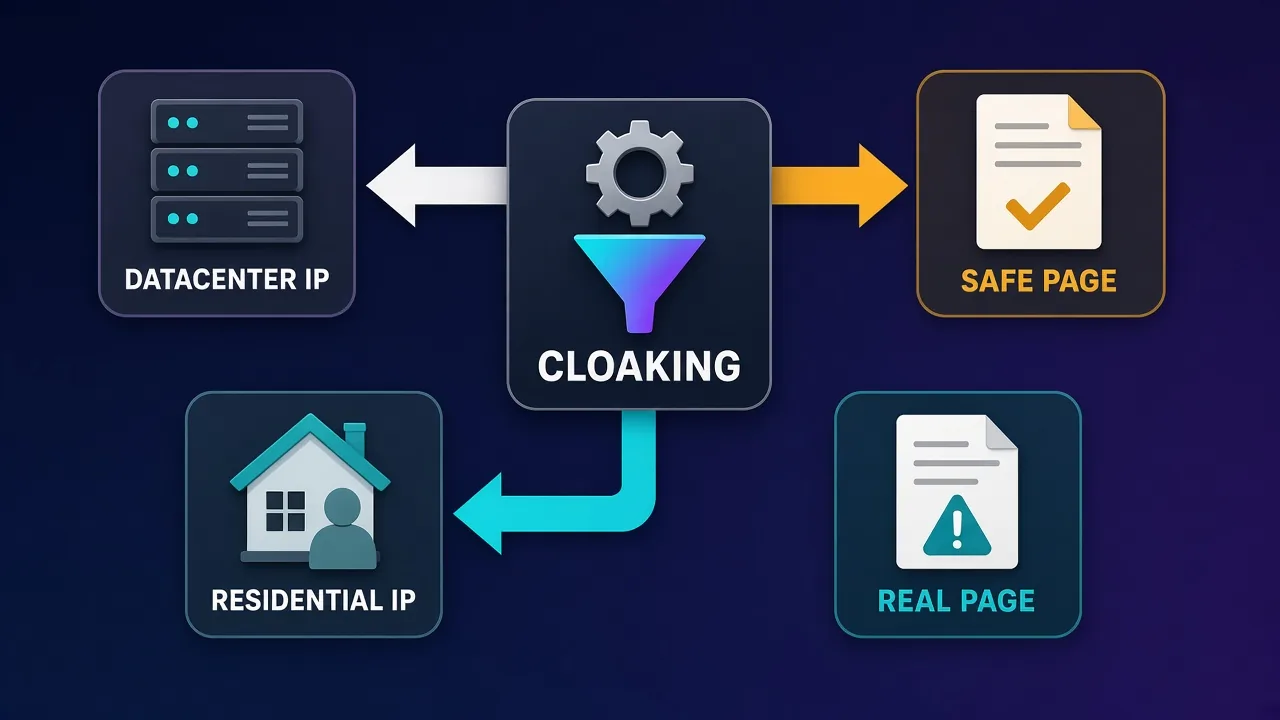
Cloaking is one of the main reasons ad verification needs residential and mobile IPs. A malicious advertiser submits a harmless landing page for review, then uses a filtering script to decide, per visitor, which page to show. Visitors who look like reviewers, crawlers or security tools get the clean page. Visitors who look like ordinary consumers in the target market get the scam, the malware download or the policy-violating offer.
The filters usually check several signals together: whether the IP belongs to a data center or a known security vendor, whether the location matches the targeting, whether the browser fingerprint looks automated, and whether the visit came through the expected ad click. A verification check from a cloud server fails the first test immediately.
Proxies do not defeat cloaking on their own, but they remove the easiest giveaway. A sound approach is to:
- Load the ad and landing page from a residential or mobile IP in the targeted city or carrier.
- Load the same URLs from a data center IP or a different region.
- Compare the final URL, redirect chain, page content and screenshots between the two.
- Flag any campaign where the consumer-like view differs from the reviewer-like view.
Pair the proxy with a realistic browser environment. A residential IP attached to a headless browser that leaks automation flags can still be filtered, so many teams run checks through real browser builds with consistent time zones, languages and screen sizes that match the exit location.
Building an ad verification workflow with proxies
The provider is only part of the setup. This is a practical sequence that works for most teams.
- List what you are verifying. Campaigns, target geographies, devices, carriers and the publishers or apps involved. This tells you which locations and IP types you actually need.
- Map targets to proxy settings. For each campaign, record the country, region or city, and ASN or carrier if relevant. Decide whether checks need rotating or sticky sessions.
- Pilot on a small budget. Use a trial or the smallest plan to confirm the provider has enough IPs in your target cities and that your targets are not blocked by its acceptable use policy.
- Match the browser to the IP. Set time zone, language and device profile to match the exit location. Mismatches are a common reason checks get filtered.
- Capture evidence. Store screenshots, the full redirect chain, final URLs, timestamps and the exit IP and location for every check. Evidence is what turns a suspicion into a refund or a takedown.
- Schedule and sample. Run checks at different times of day, because many campaigns are dayparted and many fraud schemes only switch on outside business hours.
- Review IP quality. Track how often checks fail or return obviously filtered pages, and rotate away from providers or regions where the pool is noisy.
Tip: keep a control lane
Run a small share of checks from a known data center IP on purpose. When the control lane and the residential lane return different pages for the same ad, you have a strong cloaking signal.
Common mistakes to avoid
- Trusting country-level checks for local campaigns. A national IP does not tell you what a city-targeted campaign shows.
- Ignoring mobile. Verifying only desktop traffic misses a large part of where fraud and misplacement happen.
- Using sticky sessions for sampling. If you need to see many placements, a single long-lived IP quickly gets frequency-capped and stops seeing new ads.
- Burning bandwidth on heavy pages. Ad pages are full of video and scripts. Block what you do not need for the check, or budget for it.
- Skipping the acceptable use policy. Some providers restrict certain domains on residential networks. Find out before your audit fails halfway through.
- Treating the IP as the whole disguise. Browser fingerprints, cookies and behavior give automated checks away as easily as an IP does.
Estimating cost for ad verification
Verification usually costs less bandwidth than scraping, but each check can be heavier because you load full pages with creatives, scripts and video. A rough way to budget:
- Measure the average page weight of a full check (ad page plus landing page) in your own browser tools.
- Multiply by the number of checks per day across all campaigns and locations.
- Add a margin for retries, redirects and failed loads.
Small agencies checking a handful of campaigns may stay well inside a few gigabytes a month, where pay-as-you-go or IPRoyal's non-expiring traffic makes sense. Programs verifying hundreds of campaigns across many cities move into the tens or hundreds of gigabytes, where Decodo's monthly tiers, Oxylabs' credit plans or a Bright Data plan become more economical. Enterprise programs with carrier-level coverage in many markets typically negotiate custom pricing. Mobile proxies cost more per GB than residential, so separate the two in your budget.
Who needs ad verification proxies (and who does not)
They are a strong fit for:
- Brands and in-house marketing teams auditing their own spend across markets.
- Agencies proving campaign delivery to clients.
- Ad networks and SSPs screening advertisers for cloaking and malicious landing pages.
- Affiliate programs checking for brand bidding, hijacking and compliance violations.
- Ad-fraud and brand-safety vendors building verification products.
They are probably overkill if you run a single-country campaign through one platform that already provides third-party verification, or if you only need to confirm that a tracking tag fires. In that case a data center proxy or a simple VPN may be enough.
Stay on the right side of the line
Use proxies to observe what ads are served, not to generate fake impressions or clicks. Inflating traffic through proxies is ad fraud itself, breaks every provider's terms and can expose you to legal action.
Bottom line
Ad verification needs proxies that look like real local users, with targeting precise enough to reproduce the campaigns you are auditing. Bright Data offers the deepest targeting and the largest advertised pool for enterprise programs. Oxylabs fits teams that want one credit balance for verification and scraping, provided their targets are not on its restricted list. Decodo gives ASN- and ZIP-level targeting at a mid-market price and is the easiest starting point for most agencies. IPRoyal suits occasional audits thanks to non-expiring traffic, with the sourcing questions above worth asking first. Whatever you choose, pilot on your real targets, pair the IP with a matching browser profile, and keep evidence of every check.
Frequently asked questions
Ad servers decide what to show based on the visitor's IP, location and network. Without proxies you only see ads targeted at your own location and connection type. Proxies let you check ads as a real local user in each target market would see them.
Residential proxies are the usual default because they cover many locations and look like home users. Mobile proxies are essential for in-app and mobile-web campaigns or anything targeted by carrier. Many teams use residential for broad sampling and mobile for carrier-specific checks.
They can handle simple checks such as confirming a tag fires, but cloaking scripts and many ad platforms filter data center IPs. That means you may see a sanitized page instead of what consumers get. They work best as a control lane to compare against residential results.
An ASN identifies the network that owns an IP range, such as a specific ISP or mobile carrier. Some campaigns are targeted by carrier or ISP, and some fraud clusters on particular networks. ASN targeting lets you reproduce those conditions when you verify ads.
Cloakers show a clean page to visitors that look like reviewers or bots and a different page to ordinary consumers. By loading the same ad from a residential or mobile IP in the target area and from a data center IP, you can compare the results. A mismatch is a strong sign of cloaking.
It depends on how many checks you run and how heavy the pages are, since ad and landing pages often load video and scripts. Measure the weight of one full check in your browser tools, multiply by your daily checks and add a margin for retries. Small agencies may need only a few gigabytes a month, while large programs use far more.
It depends on scale and budget. Bright Data offers the deepest targeting for enterprise programs, Oxylabs suits teams that want one credit balance for several tools, Decodo gives ZIP and ASN targeting at a mid-market price, and IPRoyal's non-expiring traffic suits occasional audits. Run a short pilot on your own targets before committing.
Observing which ads are served is a common and legitimate practice used by brands, agencies and ad networks. Using proxies to create fake impressions or clicks is ad fraud and is not legitimate. Always follow your provider's acceptable use policy and the terms of the platforms you check.