Table of contents
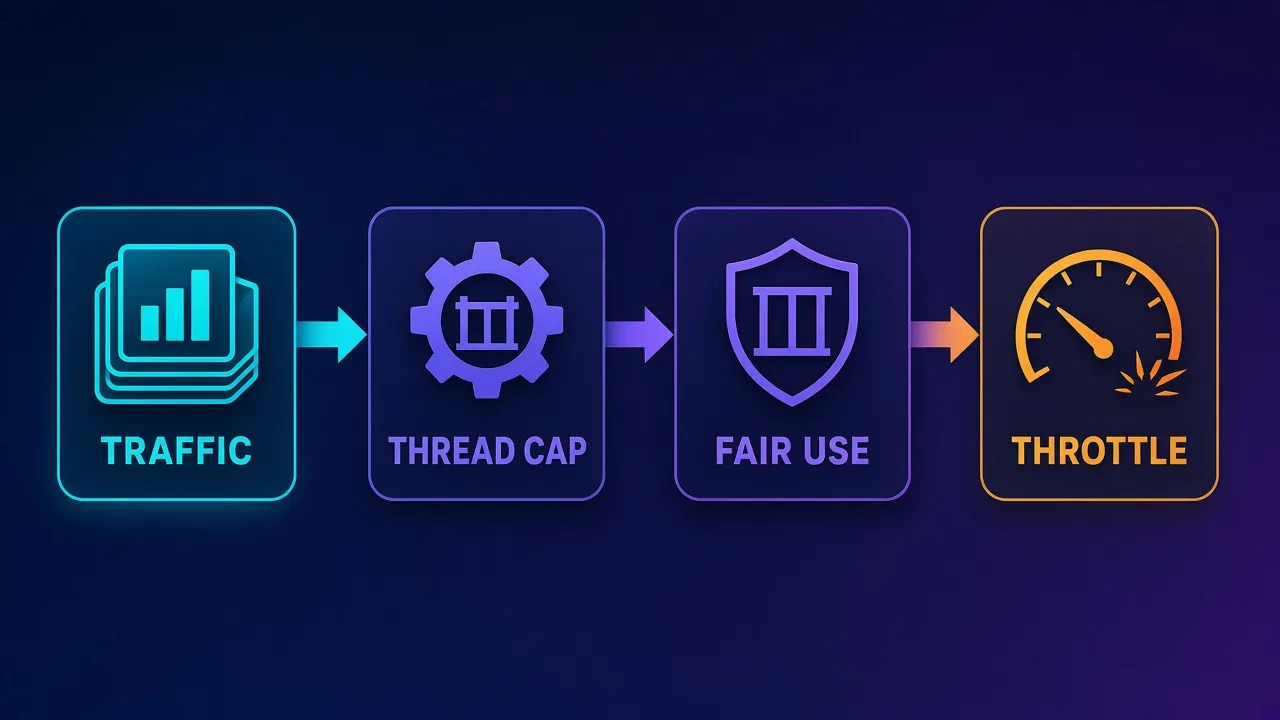
"Unlimited bandwidth" is one of the most attractive phrases on a proxy pricing page, and one of the most misunderstood. It usually means you pay per IP, per port or per thread instead of per gigabyte, so a heavy scraping job doesn't produce a surprise bill. It almost never means infinite throughput with no rules attached. Every plan in this guide comes with a fair-use policy, a connection (thread) limit, or both.
This guide compares six providers that sell genuinely unmetered or flat-rate plans, explains where the hidden limits sit, and shows when per-GB residential traffic is still the smarter buy. Prices and plan terms below were checked on each provider's official site on 13 November 2026; they change often, so confirm at checkout.
The short version
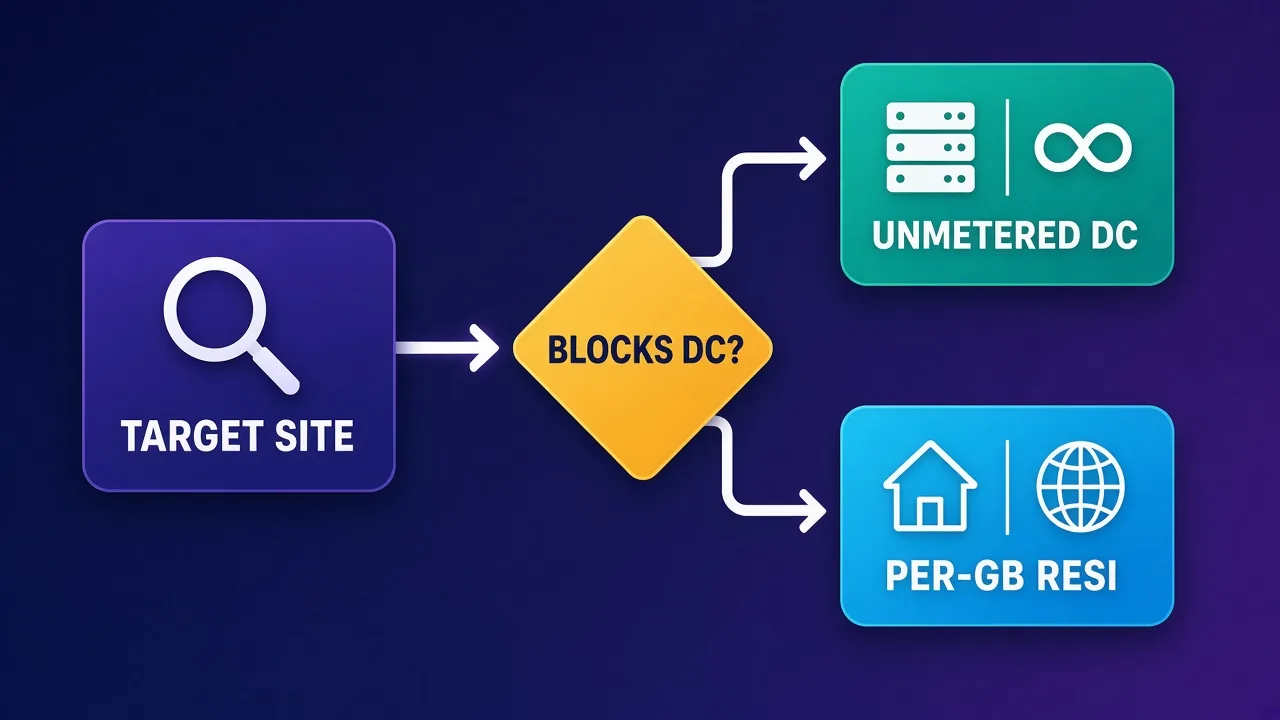
Unmetered plans are almost always datacenter, ISP (static residential) or rotating-gateway products billed by IP or by thread. They are the cheapest way to move a lot of traffic to targets that accept datacenter IPs. If your target blocks datacenter ranges, per-GB residential is still the right tool, and no "unlimited" plan fixes that.
What "unlimited bandwidth" actually means on a proxy plan
Proxy providers bill in one of three ways:
- Per GB: you pay for traffic. This is standard for rotating residential and mobile proxies, because the provider's own cost is tied to bytes moving through real household or carrier connections.
- Per IP (or per port): you rent a fixed address for a month. Traffic through it is usually unmetered, subject to fair use. This is how most datacenter and ISP proxies are sold.
- Per thread: you rent a number of simultaneous connections to a rotating gateway. Traffic is unmetered, but your concurrency is capped. Storm Proxies' backconnect plans work this way.
"Unlimited bandwidth" describes the second and third models. The provider is betting that most customers won't saturate their allocation, and it protects itself with a fair-use policy that kicks in when someone does. That's a reasonable trade, but it means the real ceiling on your plan is written in the FAQ or terms rather than on the pricing card.
If you're new to the infrastructure side, our explainer on datacenter proxies covers why datacenter IPs are cheap to run and why some sites distrust them.
The hidden limits: fair use, threads and throttling
Before you compare prices, compare the limits. These are the ones that matter, with examples from the providers' own published terms.
Fair-use bandwidth thresholds
Webshare is unusually transparent here. Its Fair Usage Policy (updated August 2026) says Proxy Server and Static Residential plans with unlimited bandwidth are guaranteed 10 TB before throttling is enforced, with a formula that scales the guaranteed amount with what you spend (1 TB per $10 of plan for the first $1,000, then 1 TB per $20). Above the threshold, it says speeds may drop from the normal 300–400 Mbps to 100 Mbps and gradually as low as 10 Kbps.
Proxy-Seller states on its IPv4 page that, by default, each IPv4 proxy includes 100 concurrent connections and 100 GB of traffic, applied per IP, and that limits are applied when it detects abnormally high load on an individual address. Its pricing still describes the product as "unlimited bandwidth under FUP", so read that as "unmetered in normal use, policed at the edges".
Rayobyte marks its static IPs as "unlimited bandwidth*" with the footnote "fair usage applies", and its pricing FAQ points to section 13 of its terms of service for the definition of excessive use.
Thread and connection caps
On thread-billed products, concurrency is the product. Storm Proxies' rotating plans are sold as 40, 80 or 150 simultaneous connections, each tied to a set number of authorised access IPs. On per-IP products, a per-proxy connection limit (like Proxy-Seller's 100 threads per IP) quietly sets your maximum throughput: to go faster, you buy more IPs.
Port speed
Unmetered doesn't mean fast. A provider can honour "unlimited GB" while each proxy runs on a shared uplink. Look for stated port speeds (Proxy-Seller advertises up to 1 Gbps on IPv4; Webshare's policy quotes 300–400 Mbps full speed) and test from your own servers.
Read the terms, not the badge
If a pricing page says "unlimited" without linking a fair-use policy, ask support what the throttling threshold is before you commit to a large order. A clear written answer is worth more than the word on the badge.
Quick comparison: unmetered plans at a glance
| Provider | Unmetered product | Billing model | Published entry price | Stated limit |
|---|---|---|---|---|
| Rayobyte | Static datacenter, static ISP, semi-dedicated | Per IP / month | Semi-dedicated DC $1/IP (US/CA); static ISP $5/IP | Fair usage, defined in ToS section 13 |
| Webshare | Proxy Server (datacenter), Static Residential (ISP) | Per proxy + unlimited-bandwidth upgrade | 100 proxies $2.99/mo (250 GB included) | 10 TB guaranteed per unlimited plan, then throttling |
| Storm Proxies | Rotating backconnect, dedicated | Per thread / month | 40 threads $39/mo | Thread count and access IPs per plan |
| SquidProxies | Dedicated datacenter | Per IP / month | 10 IPs $15/mo ($1.50/IP) | Not published on the plan page |
| InstantProxies | Datacenter | Per proxy / month | $1/proxy, from $5/mo | Not published on the plan page |
| Proxy-Seller | Private IPv4, ISP | Per IP / rental period | IPv4 from $0.49/IP | 100 threads and 100 GB per IPv4 by default (FUP) |
Entry prices are the lowest figures shown on each official page on 13 November 2026. Location, quantity and rental period change the final price, especially for Proxy-Seller and Rayobyte, which price some products by country.
The best unlimited bandwidth proxy providers
1. Rayobyte: best for large static datacenter fleets
Rayobyte sells several unmetered static products. Its pricing page lists static datacenter IPs in 29 countries "with unlimited bandwidth*", priced by country, with 15% off at 100 IPs and 25% off at 1,000. Semi-dedicated datacenter IPs (shared by up to three users) start at $1/IP a month in the US and Canada and $1.20 elsewhere, and static ISP proxies start at $5/IP a month for 5–99 IPs, falling to $4.60 at 1,000+. Prepaying 3, 6 or 12 months takes a further 5%, 10% or 15% off.
The appeal is scale and predictability: if you run hundreds of fixed IPs against targets that tolerate datacenter traffic, per-IP billing is far easier to budget than per-GB. The trade-off is that its unmetered status is footnoted with fair usage, so very heavy single-IP workloads should be spread out.

Rayobyte
Rayobyte is a dependable, transparent US provider that does the basics very well. Its unlimited-bandwidth datacenter proxies are the highlight — predictable costs for heavy scraping, backed by a responsive US-based support team. The ethical residential sourcing program is a genuine plus for compliance-minded teams, even if the pool is mid-sized rather than enormous. The interface is functional rather than polished, and datacenter country coverage is narrower than some. For SEO tooling, high-volume datacenter scraping, and anyone who values support and transparency, Rayobyte is a solid, no-drama choice.
2. Webshare: best for transparent fair-use terms
Webshare's Proxy Server plans are cheap at entry: its pricing page lists 100 shared datacenter proxies for $2.99 a month, with per-proxy prices falling to $0.0179 at 60,000+. Those plans include 250 GB of bandwidth, and you can upgrade to unlimited bandwidth subject to the fair-use policy. Static Residential (ISP) plans start at $6 a month for 20 proxies and have the same upgrade path.
What sets Webshare apart is that its throttling rules are published in numbers: a guaranteed 10 TB per unlimited plan, a formula tied to plan spend, and the speeds you'll drop to if you exceed it. That makes it easy to work out in advance whether "unlimited" fits your workload. Note that the cheapest prices are for shared proxies; private and dedicated access cost more.

Webshare
Webshare is the developer's self-service favorite. Instant activation, a free tier that is actually free, and the cheapest fast datacenter proxies in the market make it the easiest provider to just start using. The custom plan builder — pick your IP count, bandwidth, and threads — is a genuinely good model that lets you avoid paying for capacity you do not need. The residential pool is newer and less battle-tested than specialists, and support is thin on the lower tiers. For datacenter proxies, API-driven workflows, and anyone who wants to try before paying, Webshare is one of the best-value options around.
3. Storm Proxies: best for thread-based rotating access
Storm Proxies sells rotating backconnect access by thread rather than by IP or GB. Its official page lists 40 threads at $39/month, 80 threads at $59/month and 150 threads at $97/month, with every plan advertising unlimited bandwidth and a 700,000+ IP rotating pool. Paying for six months gets a month free. The IP can change on every request or every 3 or 15 minutes, and Storm says the pool's IPs are replaced every 7 days.
This model suits SEO tools and bots that need many different IPs but have a fixed concurrency. Two caveats from Storm's own FAQ: the rotating IPs are shared with other members (it quotes a lower success rate on sneaker and ticket sites for that reason), and it sells HTTP(S) only, with no SOCKS. Only the smallest package of each type carries its 24-hour money-back guarantee.

Storm Proxies
Storm Proxies still does one thing well: hand a beginner a rotating proxy port with unlimited bandwidth and flat pricing, no per-GB anxiety. For small SEO tools and light scraping that simplicity has real appeal. Everything else shows its age — a small US/EU pool, region-level targeting at best, no API, dated tooling. Fine as a first rotating proxy or for undemanding tools; anything serious deserves a modern network.
4. SquidProxies: best for simple dedicated datacenter plans
SquidProxies keeps its datacenter offer simple: dedicated IPs with unlimited bandwidth, sold in monthly packs. Its datacenter page lists 10 proxies for $15/month ($1.50/IP), 50 for $55 ($1.10/IP), 100 for $100 ($1/IP) and 500 for $400, with custom pricing above that. It says datacenter locations can be chosen from more than 40 worldwide.
It's a good fit for teams that want a fixed set of private IPs and no traffic accounting. The plan page doesn't publish a fair-use threshold, so if you plan very high per-IP throughput, ask support first. SquidProxies' rotating residential product is billed by GB and isn't unmetered.

SquidProxies
SquidProxies is the commodity DC proxy done right: cheap, stable, unlimited-bandwidth IPs delivered instantly, from a company that has quietly done this for over a decade. Expect nothing beyond that — no API, no SOCKS5, no residential ladder, and DC IPs' usual struggles on protected platforms. When the job is SEO tooling or tolerant-target automation and the budget is fixed, it delivers exactly what it promises.
5. InstantProxies: best for small dedicated orders
InstantProxies' pricing page lists datacenter proxies at $1 per proxy, starting at $5 a month, with dedicated IPs and unlimited bandwidth. Its residential proxies are usage-based at $1 per GB, so only the datacenter product counts as unmetered. It offers a 7-day money-back guarantee and lets you run a live test against a target URL before buying.
The low minimum makes it a sensible place to start if you need a handful of fixed IPs for monitoring or light automation. As with SquidProxies, the plan page doesn't publish a throttling threshold.

InstantProxies
InstantProxies is honest minimalism: about a dollar per IP, a pre-purchase test button that actually reduces buyer risk, and instant delivery. As disposable DC capacity for tolerant tooling, it does the job. Expect variable subnet hygiene, zero features, and no path to residential-grade trust. For $10-scale experiments and undemanding automation it earns a place; for anything sensitive it is the wrong shelf.
6. Proxy-Seller: best for location choice on private IPv4
Proxy-Seller rents private IPv4 proxies from $0.49/IP, with HTTP, HTTPS and SOCKS5 on every package and IPs in more than 40 countries. It describes the bandwidth as unlimited under its fair-use policy, and, unusually, states the defaults: 100 concurrent connections and 100 GB of traffic per IPv4 proxy, applied per IP. Its ISP proxies (from $0.98/IP) are also listed as unlimited under FUP; its residential proxies are billed per GB.
Because limits are per IP, scaling up is straightforward: add more IPs and your total threads and traffic rise in proportion. Proxy-Seller offers replacements or refunds within 72 hours if support confirms an issue. If you're weighing its IPv6 plans too, see our guide to IPv4 vs IPv6 proxies.

Proxy-Seller
Proxy-Seller is excellent value if you want fixed, dedicated IPs instead of metered bandwidth. Per-IP pricing from $1.30 with unlimited bandwidth, flexible rental terms, and unusually cheap IPv6 make it a smart choice for account management and SEO. It is not the place for large rotating-residential workloads — the per-IP model does not scale to mass scraping that needs thousands of fresh addresses. The dashboard is also plain and functional rather than polished. But for stable, dedicated identities at a low cost, backed by 24/7 support, Proxy-Seller is one of the better dedicated-proxy specialists around.
Unmetered datacenter vs ISP vs per-GB residential
The billing model follows the IP type, and each type behaves differently on real targets:
- Unmetered datacenter: cheapest per request and fastest. Works well on public data sites, APIs, many e-commerce catalogues and your own infrastructure. Struggles on sites that score IP reputation by ASN and block hosting ranges.
- Unmetered ISP (static residential): addresses registered to consumer ISPs but hosted in data centres. More trusted than datacenter IPs, still billed per IP. Good for long sessions and account work. Our roundup of the best ISP proxies compares them in depth.
- Per-GB residential: real household connections with the highest trust and the widest geo coverage. You pay for every byte, so heavy pages get expensive.
A common pattern is to run the bulk of a job on unmetered datacenter IPs and fall back to residential only for the requests that get blocked. That keeps per-GB spend for the hard targets.
How to choose an unlimited bandwidth plan
- Test your target first. Run a few hundred requests through a small datacenter plan. If success rates are poor, no amount of unmetered traffic will help. Our guide to the best proxies for web scraping covers which proxy types suit which targets.
- Estimate traffic per IP. Divide your expected monthly traffic by the number of IPs you plan to buy. If that number is close to a published per-IP cap (like Proxy-Seller's 100 GB default), buy more IPs rather than relying on "unlimited".
- Match concurrency to the cap. Check the thread limit per IP or per plan, and size the order so your scraper's worker count fits under it.
- Decide shared vs dedicated. Shared IPs are cheaper but carry other customers' reputation. Dedicated IPs cost more and behave more predictably.
- Check refund windows. Storm Proxies (24 hours, smallest package), Proxy-Seller (72 hours, support-confirmed issues), InstantProxies (7 days) and Webshare (2 days, with usage limits) all publish different terms.
Common mistakes with "unlimited" proxies
- Treating unlimited as uncapped speed. Port speed and thread limits still bound throughput.
- Concentrating traffic on a few IPs. Fair-use systems typically watch per-IP load, and target sites rate-limit by IP anyway. Spread requests.
- Buying the cheapest shared pool for sensitive work. Shared datacenter IPs may already be flagged on popular targets.
- Ignoring the residential fallback. If 20% of your requests need residential IPs, budget for that separately rather than hammering a blocked target with more datacenter traffic.
- Not reading the terms. Rayobyte, Webshare and Proxy-Seller each define excessive use differently. The definitions are public, so read them.
Cost sanity check
Unmetered plans pay off when traffic per IP is high. If you only move a few gigabytes a month, a small per-GB plan can cost less than a block of monthly IPs. Do the arithmetic with your own numbers.
Who unlimited bandwidth proxies are (and aren't) for
Good fit: high-volume scraping of tolerant targets, SEO rank tracking, price monitoring on sites without aggressive bot defences, QA and load testing, API polling, and any job where the same fixed IPs are used all month.
Poor fit: targets that block datacenter ASNs, jobs that need city-level residential geo-targeting, mobile-only services, and very small workloads where a per-GB plan is cheaper overall.
Bottom line
For big static fleets, Rayobyte's per-IP pricing and volume discounts are hard to beat. Webshare is the easiest to plan around because it publishes its fair-use numbers. Storm Proxies is the pick if you think in threads rather than IPs, SquidProxies and InstantProxies are simple dedicated options with low entry points, and Proxy-Seller gives the most location choice with clearly stated per-IP limits. Whichever you choose, treat "unlimited" as "unmetered within fair use", test on your real targets, and keep a small per-GB residential budget for the sites that refuse datacenter traffic.
Frequently asked questions
Not in the sense of no rules. They are unmetered, meaning you pay per IP, port or thread rather than per GB, but providers apply fair-use policies and connection limits. Webshare, for example, guarantees 10 TB per unlimited plan before throttling, and Proxy-Seller sets default per-IP limits of 100 threads and 100 GB.
Residential traffic runs through real household connections, so the provider's cost rises with every gigabyte moved. That is why rotating residential is almost always billed per GB, while datacenter and ISP proxies, which run on hosted infrastructure, are usually sold per IP with unmetered traffic.
It depends on how many IPs you need. On official pages checked in November 2026, Webshare listed 100 shared datacenter proxies for $2.99 a month with an unlimited-bandwidth upgrade, Proxy-Seller listed private IPv4 from $0.49 per IP, and InstantProxies listed dedicated datacenter proxies at $1 each from $5 a month. Always compare the limits as well as the price.
Usually your speed is throttled or new connections are refused rather than your account being billed extra. Webshare says throttled speeds can drop to 100 Mbps and gradually as low as 10 Kbps, and Proxy-Seller says a 429 error means the connection limit on an IP has been exceeded.
They are one form of it. Thread-based plans such as Storm Proxies' rotating packages do not meter traffic but cap how many simultaneous connections you can open. Your real throughput is set by the thread count, not by a GB allowance.
Choose datacenter proxies when the target accepts hosting IPs and you want the lowest cost per request. Choose ISP proxies when you need more trusted addresses or long sessions on stricter sites. Both are typically billed per IP, but ISP IPs cost more each.
Yes, and high-volume scraping of tolerant targets is their main use. Spread traffic across enough IPs to stay under per-IP limits, respect the target site's rate limits and terms, and keep a per-GB residential option for pages that block datacenter IPs.
Terms vary. Storm Proxies offers a 24-hour money-back guarantee on its smallest package, Proxy-Seller offers replacements or refunds within 72 hours for support-confirmed issues, InstantProxies offers 7 days, and Webshare refunds within 2 days if usage stays under set limits. Webshare also has a free 10-proxy plan.