Table of contents
If you manage social media profiles, ad accounts, or marketplace storefronts, you have probably learned the hard way that the IP address behind a login matters almost as much as the password. Platforms watch where a session comes from, how often that location changes, and whether the network looks like a real household or a rack of servers. ISP proxies sit in a useful middle ground: they carry the reputation of a consumer internet provider, but they run on stable, fast server infrastructure and stay the same day after day. This guide explains what ISP proxies are, how they compare with residential and datacenter proxies, why a sticky static IP is so valuable for account work, how to judge a provider, and which providers we think are worth shortlisting in 2026.
Prices, ratings, and plan details in the provider cards below are pulled live from our directory, so they stay current even as vendors change their offers. Everything else in this article is qualitative: we focus on how the products work and where each one fits, rather than repeating marketing numbers.
What Are ISP Proxies?
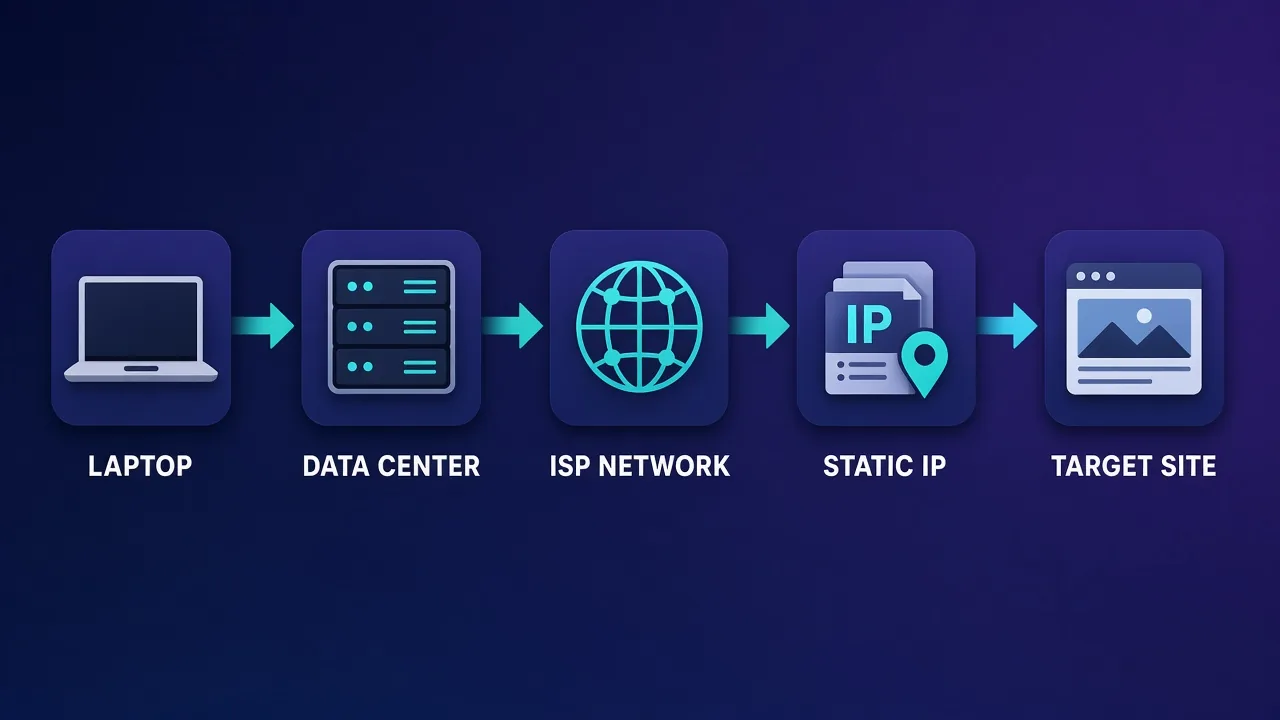
An ISP proxy, often sold as a static residential proxy, is an IP address that is registered to a consumer or business internet service provider but is hosted on a server in a data center rather than on someone's home device. When a website looks up who owns the address, it sees a familiar broadband or telecom network instead of a cloud host. When you actually send traffic through it, you get the speed and uptime of a server connection.
That combination comes from how the IPs are sourced. Proxy providers lease or acquire address blocks that are announced under an ISP's autonomous system number, then route those addresses to their own servers. If you want the background on why the owning network matters so much to anti-abuse systems, our explainer on residential vs ISP vs datacenter proxies walks through the trust signals platforms check first.
How an ISP proxy connection works
- You connect to the provider's gateway or directly to an assigned IP and port, using a username and password or an allowlisted source IP.
- The provider's server forwards your request out through an address that belongs to an ISP's network.
- The destination site sees an ISP-registered IP that does not change between requests, sessions, or days.
- Responses return through the same path, typically with lower latency than a peer-to-peer residential network because no consumer device or home Wi-Fi sits in the middle.
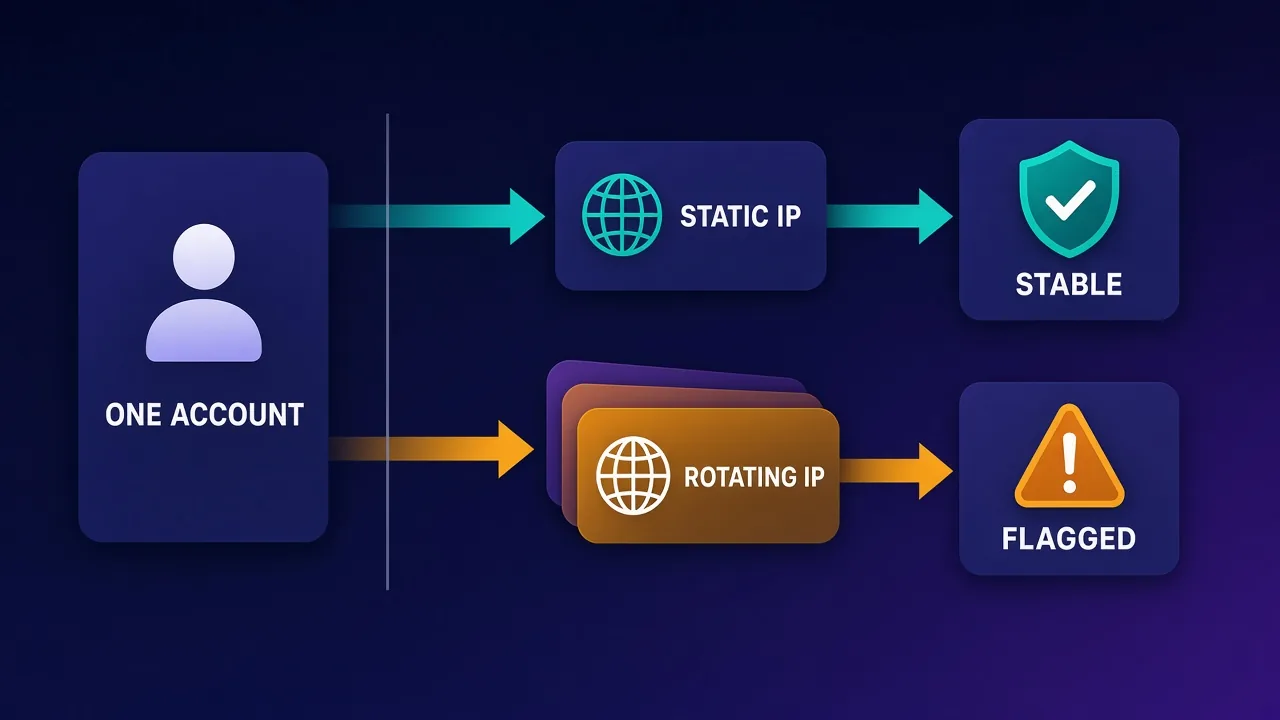
The defining trait is that the IP is static. Rotating residential proxies hand you a different household address on a schedule or per request. An ISP proxy is yours for the length of the rental, which is exactly what account-based work needs.
ISP vs Residential vs Datacenter Proxies
All three proxy families can be the right tool, depending on the job. The table below compares them on the traits that matter most for account management. It is deliberately qualitative: real-world performance depends on the provider, the specific IP range, and the target platform.
| Trait | ISP (static residential) | Rotating residential | Datacenter |
|---|---|---|---|
| Who owns the IP | Consumer or business ISP | Consumer ISP (real household devices) | Cloud or hosting company |
| IP stability | Static for the rental period | Changes per request or per sticky window | Static |
| Typical speed and uptime | High; server-grade connection | Variable; depends on the peer device | High |
| Platform trust | Generally good | Generally good | Often lower on social and ad platforms |
| Geo coverage | Usually a narrower set of countries and cities | Very broad | Broad, but in hosting regions |
| Common billing | Per IP, sometimes per GB | Per GB | Per IP or per GB |
| Best fit | Long-lived logins and account management | Large-scale scraping and geo-checks | Bulk, low-sensitivity tasks |
The short version: residential proxies win on sheer diversity and location coverage, datacenter proxies win on cost and raw throughput, and ISP proxies win when you need one trustworthy address that will still be there next week.
Why Sticky Static IPs Matter for Account Management
Social networks, ad platforms, and marketplaces score every login. Among the signals they weigh are the reputation of the IP's network, whether the IP has been tied to abuse, how far the location jumps between sessions, and whether many unrelated accounts share the same address. A static ISP proxy helps on several of those fronts at once.
- Consistent location. If an account logs in from the same city and network every day, it looks like a person with a stable home connection. Sudden jumps between countries are a classic trigger for verification prompts.
- Clean separation. Giving each account its own IP prevents a problem on one profile from spilling onto the others through a shared address.
- Session continuity. Cookies, device fingerprints, and IP history all line up, so the platform's risk model has fewer reasons to challenge you.
- Predictable performance. Server-grade hosting means fewer dropped connections in the middle of a post, an upload, or a checkout.
Rotating residential proxies can imitate some of this with sticky sessions, but those sessions eventually expire or the underlying device goes offline. Our guide to sticky sessions explains when a timed session is enough and when you really need a fixed address.
One account, one identity
The most reliable pattern for multi-account work is a one-to-one mapping: each account gets its own browser profile and its own static IP, and they stay paired for the life of the account. Changing the IP, the profile, or both at random undoes most of the trust an ISP proxy is meant to build.
How We Chose the Best ISP Proxy Providers
ISP proxies look similar on a pricing page, but the differences show up after a few weeks of use. These are the criteria we used to build the shortlist, and the same checklist works for your own evaluation. For a broader framework that applies to any proxy type, see our proxy provider buyer's guide.
1. Genuine ISP registration
The IP should resolve to a recognizable internet provider, not a hosting company relabeled as residential. Before committing, look up a sample IP's ASN and owner. If it points to a cloud host, it is a datacenter proxy no matter what the product page says.
2. Dedicated vs shared allocation
For account work, dedicated (private) IPs are usually worth paying for, because nobody else's behavior can damage the address. Shared ISP IPs can be fine for lighter tasks but add uncertainty.
3. Locations that match your accounts
ISP inventory is typically concentrated in fewer countries than residential pools. Make sure the provider has stock in the regions where your accounts are registered and your audience lives.
4. IP cleanliness and replacement policy
Ask how the provider screens ranges against blocklists and what happens if an IP arrives already flagged. A clear, fast replacement policy is a strong sign of a serious operator.
5. Protocols and authentication
Check for HTTP(S) and SOCKS5 support, plus both credential and IP-allowlist authentication. Antidetect browsers and automation tools differ in what they handle best.
6. Billing model and rental terms
Some providers bill ISP proxies per IP with unmetered or generous traffic, while others meter by bandwidth. Per-IP billing is usually easier to budget for account management, where traffic per account is modest but the IP must stay put.
7. Support and transparency
When an account gets a challenge at an awkward hour, responsive support and honest documentation matter more than a long feature list.
The Best ISP Proxy Providers in 2026
The providers below all list ISP or static residential proxies in our directory. We have ordered them by the type of buyer each one suits best rather than by a single score, because the right choice for an agency running dozens of client profiles is different from the right choice for a freelancer managing a handful of accounts. Live pricing and ratings appear in each card.
NetNut: best for stability-first operations
NetNut's whole pitch is direct connectivity through ISP partners rather than a peer-to-peer device network, and its static residential pool is a core part of the product rather than an add-on. That architecture tends to produce steady, long-running sessions, which is exactly what account management rewards. The trade-offs are higher minimum commitments and fewer small pay-as-you-go options, so it fits businesses with steady demand better than casual users.

NetNut
NetNut's direct-ISP architecture is more than marketing — it genuinely delivers steadier, faster sessions than peer-to-peer networks, because it does not depend on consumer devices staying online. That makes it a standout for uptime-critical workloads like brand protection and ad verification, where a dropped session means lost data. The trade-offs are business-oriented pricing, higher minimum commitments, and a dashboard that takes some learning. If session stability is your priority and you operate at business scale, NetNut is one of the most reliable residential networks available and well worth the 7-day trial.
Bright Data: best for enterprise targeting and compliance
Bright Data runs one of the most complete proxy platforms on the market, with ISP proxies alongside residential, mobile, and datacenter networks. Its targeting options and compliance processes are among the most thorough we have seen, which matters for agencies and brands that need audit trails. Expect premium pricing, a steeper learning curve, and stricter onboarding checks than budget providers.
Bright Data
Bright Data remains the most complete data-collection platform money can buy. No competitor matches its combination of network scale, targeting granularity, and compliance tooling — and for enterprise teams whose revenue depends on reliable data, that completeness justifies the premium. The trade-offs are real: it is one of the priciest providers per gigabyte, the interface overwhelms newcomers, and KYC verification adds friction before you can route a single request. Smaller projects will get better value from Decodo or IPRoyal. But if you need city-level residential targeting at scale, a managed unblocker for the hardest targets, and audit-ready compliance, Bright Data is the default — and our highest-rated proxy provider overall.
Oxylabs: best for teams that want enterprise support
Oxylabs offers ISP proxies as part of a broad, well-maintained network, backed by dedicated account management and strong documentation. It suits teams that want a reliable vendor relationship and may also need scraping tools down the line. Entry pricing sits above mid-market rivals, and some advanced features are reserved for larger plans.

Oxylabs
Oxylabs is the enterprise provider that gets the fundamentals right. The network is huge and well-maintained, the scraper APIs are genuinely best-in-class, and the documentation and SDKs make integration faster than almost any competitor. What sets it apart from Bright Data is service: dedicated account managers, responsive support, and cleaner tooling mean less time fighting the platform and more time shipping. The cost is higher entry pricing, and the deepest discounts favor high-volume commitments. For serious commercial data operations that can justify the spend, Oxylabs is a top-two choice and frequently the one teams stay with long-term.
Decodo: best balance of price and usability
Decodo, formerly Smartproxy, packages ISP (static residential) proxies with the same clean dashboard and responsive support that made its residential product popular. For small teams and growing agencies, it offers much of what the enterprise leaders do without the same complexity. Some advanced targeting is limited on certain plans, so confirm the locations you need are available.

Decodo
Decodo offers the best price-to-performance ratio in the industry. It delivers roughly 90% of what the enterprise leaders provide — high success rates, a large clean pool, sticky sessions, an unblocker — at a fraction of their cost. The dashboard is the friendliest of any major provider, the 14-day money-back guarantee removes the risk of trying it, and support actually responds. The main gaps are enterprise-grade compliance tooling and the very deepest targeting, neither of which most teams need. For startups, solo developers, and any team that wants professional results without enterprise pricing, Decodo is our top value pick and an easy recommendation.
IPRoyal: best for flexible, low-commitment buyers
IPRoyal sells ISP proxies per IP alongside its well-known non-expiring residential traffic, and it supports SOCKS5 across its products. It is a sensible starting point for freelancers and small operators who want to test a few static IPs before scaling. Its pool is smaller than premium rivals and analytics are basic, but for straightforward account management that is rarely a dealbreaker.

IPRoyal
IPRoyal is the best pure pay-as-you-go deal in proxies. Non-expiring traffic is a genuinely customer-friendly policy that no major rival matches — buy what you need, use it whenever, lose nothing. The pool is smaller than the premium networks and success rates can soften on the most heavily defended targets, so high-volume enterprise scraping is not its strength. The dashboard is also fairly basic. For intermittent scraping, account work, and sneaker copping on a predictable budget, IPRoyal is an easy recommendation and one of the best value picks for occasional users.
Proxy-Seller: best for dedicated per-IP rentals
Proxy-Seller specializes in dedicated IPs sold per address with unlimited bandwidth and flexible rental periods, and its ISP line follows the same model. That makes it easy to assign one address per account and know exactly what each identity costs. It is not built for mass rotation or huge scraping jobs, and the dashboard is functional rather than polished.

Proxy-Seller
Proxy-Seller is excellent value if you want fixed, dedicated IPs instead of metered bandwidth. Per-IP pricing from $1.30 with unlimited bandwidth, flexible rental terms, and unusually cheap IPv6 make it a smart choice for account management and SEO. It is not the place for large rotating-residential workloads — the per-IP model does not scale to mass scraping that needs thousands of fresh addresses. The dashboard is also plain and functional rather than polished. But for stable, dedicated identities at a low cost, backed by 24/7 support, Proxy-Seller is one of the better dedicated-proxy specialists around.
SOAX: best for precise location matching
SOAX is known for country, region, city, and ISP-level targeting on every plan, plus a pool it cleans continuously. If your accounts need to appear from a specific city or a specific provider's network, that precision is useful. Speeds trail the premium leaders slightly, and some products lack SOCKS5, so check compatibility with your tools.

SOAX
SOAX is the targeting specialist. City- and ISP-level selection on every plan — not locked behind premium tiers — is genuinely rare, and the continuously cleaned pool keeps success rates high where it matters. It is not the fastest network, the interface could use a refresh, and SOCKS5 coverage is uneven. Those are real but minor gripes against a provider that nails the fundamentals of precision and reliability. For ad verification, localized market research, and social-media work that depends on appearing in an exact location, SOAX is one of the best mid-market options available.
Webshare: best self-service entry point
Webshare is a fully self-service platform with instant activation and highly customizable plans, and it offers static residential (ISP) proxies next to its popular datacenter line. It is a quick way to trial ISP proxies without talking to sales. Its geo-targeting is less granular than specialists and live support is limited on lower tiers, so it suits technically confident users.

Webshare
Webshare is the developer's self-service favorite. Instant activation, a free tier that is actually free, and the cheapest fast datacenter proxies in the market make it the easiest provider to just start using. The custom plan builder — pick your IP count, bandwidth, and threads — is a genuinely good model that lets you avoid paying for capacity you do not need. The residential pool is newer and less battle-tested than specialists, and support is thin on the lower tiers. For datacenter proxies, API-driven workflows, and anyone who wants to try before paying, Webshare is one of the best-value options around.
Start small, then scale
Whichever provider you choose, rent a handful of IPs first, assign them to low-risk accounts, and watch for verification prompts over a couple of weeks. That real-world signal is worth more than any spec sheet.
Quick Picks by Use Case
If you only want the headline recommendations, this summary maps common account-management scenarios to the provider we would test first. It is a starting point, not a substitute for a short trial on your own accounts.
| Scenario | Provider to test first | Why |
|---|---|---|
| Agency running many client profiles | NetNut or Bright Data | Stable sessions, strong compliance, built for steady volume |
| Team that wants a dedicated account manager | Oxylabs | Enterprise support and documentation |
| Growing team on a sensible budget | Decodo | Good balance of usability, support, and value |
| Freelancer testing a few accounts | IPRoyal or Webshare | Low commitment, self-service setup |
| Fixed cost per account identity | Proxy-Seller | Dedicated per-IP rentals with flexible terms |
| Accounts tied to specific cities | SOAX | Fine-grained location and ISP targeting |
Head-to-Head Comparisons
Two matchups come up often when buyers narrow the list. Bright Data and Oxylabs are the usual enterprise finalists; both offer ISP proxies within large, mature platforms, and the decision usually comes down to targeting depth versus support style and pricing structure.
Bright Data
Proxy
Oxylabs
Proxy
Editor score
User rating
Starting price
Founded
Decodo and IPRoyal are the common mid-market finalists. Decodo leans toward a polished experience and broad product range, while IPRoyal leans toward flexible, low-commitment buying. Both are reasonable for small teams managing a moderate number of accounts.
Decodo
Proxy
IPRoyal
Proxy
Editor score
User rating
Starting price
Founded
How to Set Up ISP Proxies for Social Media Accounts
A good ISP proxy can still fail if it is wired up carelessly. This sequence keeps each account's identity consistent from the first login.
- Plan the mapping. List every account, its home country and city, and the IP you will assign to it. Keep this in a spreadsheet or your antidetect browser's notes.
- Buy IPs in matching locations. Choose addresses near where each account is registered or where its audience is. Avoid putting a long-established local account on a foreign IP overnight.
- Verify each IP before use. Check the ASN owner, look the address up on common blocklists, and confirm the reported location matches what you ordered.
- Create one browser profile per account. Assign the proxy inside the profile so the IP, timezone, language, and fingerprint all agree. Our article on proxies for Facebook accounts and ads covers how this works on one of the strictest platforms.
- Warm up gradually. Begin with normal browsing and light activity before scheduling posts, sending messages, or launching ads.
- Never share or swap. Do not reuse one IP across unrelated accounts, and avoid moving an account to a new IP unless the old one has a real problem.
- Monitor and document. Note any verification prompts or blocks against the account and IP, so you can spot a bad address quickly and request a replacement.
Follow platform rules
Proxies help you keep legitimate accounts organized and secure; they do not make policy violations safe. Running fake accounts, evading bans, or automating spam can lead to permanent suspensions regardless of IP quality. Always read and respect the terms of each platform you use.
Common Mistakes to Avoid
Most account problems we hear about trace back to a few avoidable habits rather than to the proxy product itself.
- Buying "ISP" proxies that are really datacenter IPs. Always check the ASN. A relabeled hosting range offers none of the trust benefits you are paying for.
- Mismatched fingerprints. A US IP paired with a browser set to another timezone and language is an easy inconsistency for platforms to catch.
- Too many accounts per IP. Stacking several unrelated profiles on one address links them together in the platform's eyes.
- Frequent IP changes. Swapping addresses whenever something feels off creates exactly the location-jumping pattern you are trying to avoid.
- Ignoring the replacement window. If an IP arrives flagged, report it promptly; many providers only replace addresses within a set period after purchase.
- Choosing on price alone. The cheapest shared static IPs can carry a history you cannot see. For valuable accounts, a dedicated IP from a reputable vendor is usually the better deal over time.
Costs and Trade-Offs
ISP proxies usually cost more per IP than datacenter proxies, because ISP-registered address space is scarcer and more valuable. Compared with rotating residential plans, the economics depend on how you use them. If you need a modest amount of traffic through a fixed number of identities, per-IP ISP pricing is often easier to plan and can work out cheaper than paying per gigabyte. If you need huge geographic spread or constantly fresh addresses, residential bandwidth is the better fit.
There are other trade-offs to weigh as well:
- Coverage vs stability. You gain a steady address but give up the wide country and city menu that residential pools offer.
- Dedicated vs shared. Dedicated IPs cost more but protect you from other customers' behavior.
- Commitment length. Longer rentals can lower the effective cost and keep account histories intact, but they lock you in if a provider disappoints.
Because pricing changes frequently, rely on the live cards above and the provider's own checkout page for current figures rather than any number you read in a static article.
Who ISP Proxies Are (and Aren't) For
A strong fit if you:
- Manage multiple social media, ad, or marketplace accounts that need a consistent home location.
- Run an agency where each client profile must stay isolated from the others.
- Need fast, reliable connections for posting, uploading media, or running ad dashboards.
- Want to pair long-lived antidetect browser profiles with fixed IPs, so each profile keeps the same network identity over months of use.
Probably not the right tool if you:
- Need to scrape large volumes of public pages from many locations; rotating residential or a scraping API will usually serve you better.
- Require coverage in less common countries where ISP inventory is thin.
- Only need occasional, low-sensitivity browsing, where a datacenter proxy or a VPN may be enough.
- Need mobile-carrier IPs specifically; for apps that weigh carrier signals heavily, mobile proxies are the closer match.
Final Verdict
ISP proxies are the quiet workhorses of account management. They give each identity a trustworthy, ISP-registered address that stays put, with the speed and uptime of server hosting. That makes them a natural match for social media managers, advertisers, and agencies who care more about keeping accounts healthy than about hopping between thousands of locations.
If you want maximum stability and are buying at business scale, start with NetNut, Bright Data, or Oxylabs. If you want a strong all-rounder for a growing team, Decodo is an easy recommendation. For smaller, flexible setups, IPRoyal, Proxy-Seller, and Webshare make it simple to rent a few dedicated IPs and expand later, while SOAX is the pick when exact location matching matters most. Whichever you choose, verify the ASN, keep a strict one-account-per-IP mapping, and let real trial results, not marketing claims, make the final decision.
Frequently asked questions
An ISP proxy is an IP address registered to an internet service provider but hosted on a server in a data center. Websites see a consumer or business ISP network, while you get server-grade speed and uptime. The address stays the same for as long as you rent it.
In practice, yes. Most providers use the two terms interchangeably for static IPs that belong to an ISP's network but run on data-center infrastructure. Some vendors use slightly different naming, so check the product description and the IP's ASN to confirm what you are buying.
Rotating residential proxies route traffic through real household devices and usually change IP per request or after a sticky session window. ISP proxies keep one fixed ISP-registered address hosted on a server, so they are faster and more stable but typically cover fewer locations. Residential suits wide-scale data collection, while ISP suits long-lived account logins.
Often, yes. Datacenter IPs belong to hosting companies, and social and ad platforms tend to treat that traffic with more suspicion. ISP proxies offer similar speed with the ownership signal of a real internet provider, which generally helps accounts stay in good standing.
The safest approach is one account per IP, paired with its own browser profile. Putting several unrelated accounts on the same address can link them in a platform's risk systems, so a problem with one may affect the others. Some users group closely related accounts, but that increases risk.
For valuable or long-lived accounts, dedicated ISP proxies are usually the better choice because no other customer's activity can damage the IP's reputation. Shared ISP proxies cost less and can be fine for lighter, lower-risk tasks. Weigh the value of the accounts against the price difference.
Look up the IP's ASN and owner using a public IP lookup or WHOIS tool. A genuine ISP proxy should resolve to a recognizable internet or telecom provider rather than a cloud or hosting company. It is also worth checking the address against common blocklists before assigning it to an account.
No. ISP proxies reduce IP-related risk signals, but platforms also look at behavior, device fingerprints, and policy compliance. Accounts that break a platform's rules can still be restricted regardless of IP quality, so pair good proxies with careful, legitimate use.