Table of contents
Scraping a website used to mean renting proxies, writing a parser, babysitting a headless browser and rewriting everything whenever the target changed its layout or its bot protection. In 2026 most teams skip that work and call a data extraction API instead: you send a URL, a search query or a product ID, and you get back clean HTML, markdown or structured JSON. The provider handles proxy rotation, CAPTCHAs, JavaScript rendering, retries and, increasingly, the parsing itself. This guide explains how these APIs actually work, the four kinds you will run into, how their pricing really behaves, and which providers are worth shortlisting this year, with honest notes on where each one falls short.
What a data extraction API actually is
A data extraction API is a hosted service that turns web pages into data your code can use. It sits between your application and the target website. Instead of your scraper connecting to the site directly, it sends a request to the API; the API fetches the page on your behalf, gets past whatever defences the site runs, and hands back the result in a predictable format.
That sounds like a proxy, but the difference matters. A proxy only changes where your request comes from. You still own everything else: the browser fingerprint, the retry logic, the CAPTCHA handling, the parsing, and the monitoring that tells you when it all breaks. An extraction API bundles those layers into one call and, in most cases, only bills you when the call succeeds. If you are new to the underlying mechanics, our explainer on what web scraping is and how it works covers the fundamentals this article builds on.
The trade is control for convenience. You give up fine-grained say over how each request looks on the wire, and in return you stop maintaining an anti-bot stack. For most data teams, that is a good deal, because the anti-bot stack is the part that consumes engineering time without adding any value to the data itself.
How a data extraction API works
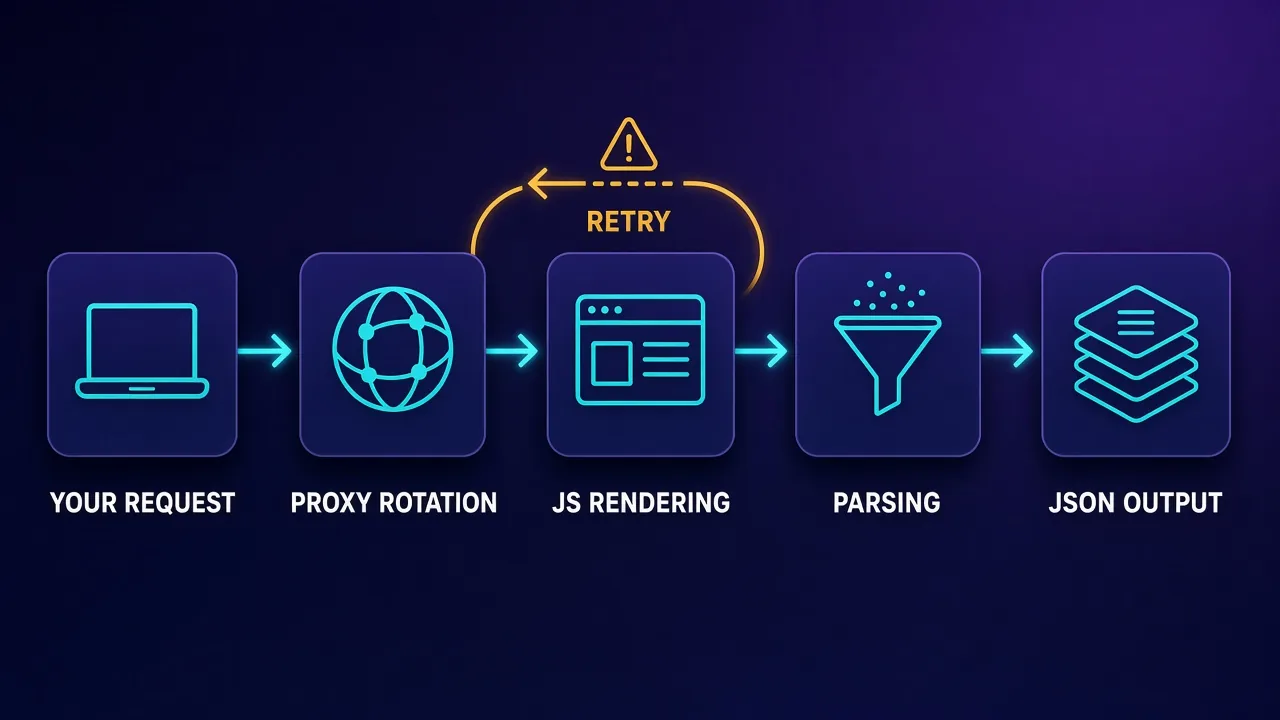
Every provider wraps its product differently, but under the hood the request pipeline is remarkably similar. Knowing the stages helps you understand why some requests cost more than others and why a "successful" response can still contain the wrong data.
1. Request intake
You call an endpoint with a target URL (or, for target-specific APIs, a query such as a search term or product ID) plus options: country, device type, whether to render JavaScript, and what output format you want. Many providers offer both a synchronous mode, where the connection stays open until the result is ready, and an asynchronous mode, where you submit a batch and collect results later by polling or webhook.
2. Routing and unblocking
The API chooses an exit IP and a network type for the request. Good services start cheap, with a datacentre IP, and escalate to residential or mobile IPs only when a site pushes back. At the same time they present a consistent browser identity: headers, TLS characteristics and a browser fingerprint that match a real device, because a mismatched fingerprint gets flagged no matter how clean the IP is.
3. Rendering
If the content is loaded by JavaScript, the API runs the page in a headless browser, waits for the relevant element to appear and, on some platforms, performs scripted actions like scrolling, clicking "load more" or typing into a search box. Rendering is the single most expensive step, which is why most providers make it opt-in and bill it at a higher rate.
4. Retries and validation
When a request hits a block page, a CAPTCHA or a timeout, the API retries with a fresh identity. This is where success-based billing earns its keep: the retries are the provider's cost, not yours. The better services also check whether the page they got back is the real content or a disguised challenge page before calling it a success.
5. Parsing and delivery
Finally, the raw page is turned into the format you asked for. That might be the untouched HTML, cleaned markdown for a language model, or structured JSON with named fields such as price, title, rating and availability. Results are returned in the response, pushed to a webhook, or written straight to cloud storage.
The four kinds of extraction API
"Scraping API" is used loosely for very different products. Sorting them into four groups makes shortlisting much easier, because the right choice depends more on the type than on the brand.
General-purpose scraping and unblocker APIs
You pass any URL and get the page back, unblocked and optionally rendered. Examples include Bright Data's Web Unlocker, NetNut's Website Unblocker, Rayobyte's Scraping API and the base modes of ScraperAPI, Zyte API and Decodo's Web Scraping API. These are the most flexible option, but parsing is usually your job.
Target-specific structured endpoints
These are pre-built, maintained scrapers for popular sources: search engines, big marketplaces, maps and social platforms. You send a query and receive parsed JSON with a stable schema. When the target site changes its layout, the provider updates the parser, not you. Coverage is the limitation: they only exist for sites the provider has chosen to support.
AI and LLM-powered extraction
The fastest-growing group. Instead of writing CSS selectors, you describe the fields you want in a schema or a plain-English prompt, and a model finds them on any page. Zyte's automatic extraction, Oxylabs' OxyCopilot, ScraperAPI's AI Parser and tools such as Firecrawl fall here. They are superb for messy, varied layouts, but model-based extraction can occasionally misread or invent a value, so validation matters more, not less.
Scraping platforms, marketplaces and datasets
At the top end are platforms where you run, schedule and store scraping jobs, and dataset stores where the data has already been collected. Apify's marketplace of community-built "Actors" and Bright Data's ready-made datasets are the best-known examples. If a dataset already covers your source, buying it can beat scraping entirely.
The best data extraction APIs in 2026
We shortlisted providers that sell a genuine extraction product rather than raw proxy bandwidth, then weighed them on five things that decide real-world outcomes: how reliably they unblock protected sites, how much parsing they take off your plate, how transparent and predictable their billing is, how pleasant they are to integrate, and how well they scale from a prototype to millions of requests. Live pricing, ratings and any active deals appear in each card below and are pulled from our directory, so they stay current.
Bright Data: the broadest data-collection suite
Bright Data covers every layer: a Web Unlocker API for any URL, a SERP API, a Web Scraper API with dedicated endpoints for hundreds of popular domains, Scraper Studio for building custom scrapers in a cloud IDE, a Scraping Browser for Playwright or Puppeteer, and ready-made datasets. Billing is success-based, and new accounts get a recurring monthly free credit allowance to test with. The downsides are complexity and cost: the dashboard has a learning curve, KYC can slow onboarding, and it is rarely the cheapest route for small projects.
Bright Data
Bright Data remains the most complete data-collection platform money can buy. No competitor matches its combination of network scale, targeting granularity, and compliance tooling — and for enterprise teams whose revenue depends on reliable data, that completeness justifies the premium. The trade-offs are real: it is one of the priciest providers per gigabyte, the interface overwhelms newcomers, and KYC verification adds friction before you can route a single request. Smaller projects will get better value from Decodo or IPRoyal. But if you need city-level residential targeting at scale, a managed unblocker for the hardest targets, and audit-ready compliance, Bright Data is the default — and our highest-rated proxy provider overall.
Oxylabs: polished all-in-one scraper API for production
Oxylabs folded its separate scraper products into one Web Scraper API that handles unblocking, JavaScript rendering and parsing, with a built-in scheduler, batch queries, custom parsers and delivery straight to cloud storage. OxyCopilot, its AI assistant, generates request code and parsing instructions from a plain-English description, which shortens the time from "new target" to "clean JSON". You are billed per successful result, with rates that vary by target and by whether rendering is needed. Entry pricing sits above mid-market rivals, so it suits teams that value reliability and support over the lowest unit price.

Oxylabs
Oxylabs is the enterprise provider that gets the fundamentals right. The network is huge and well-maintained, the scraper APIs are genuinely best-in-class, and the documentation and SDKs make integration faster than almost any competitor. What sets it apart from Bright Data is service: dedicated account managers, responsive support, and cleaner tooling mean less time fighting the platform and more time shipping. The cost is higher entry pricing, and the deepest discounts favor high-volume commitments. For serious commercial data operations that can justify the spend, Oxylabs is a top-two choice and frequently the one teams stay with long-term.
Zyte API: best for developers and AI extraction
From the team behind Scrapy, Zyte API prices each website automatically into difficulty tiers, separately for plain HTTP and browser-rendered requests, so easy sites cost very little and only hard ones cost more. Its automatic extraction returns structured products, articles, job postings and page content from almost any site, custom attributes can be pulled with an LLM, and you can even send your own HTML for extraction only. The catch is lock-in once your pipeline depends on its extraction features, and browser-rendered requests on the hardest tiers can add up quickly.

Zyte
Zyte API is the most complete scraping-as-a-service offering from the most credible engineering lineage in the space (they wrote Scrapy). Automatic ban handling, escalation, and rendering behind a success-priced API genuinely deletes the proxy-ops workload. It is not a general-purpose proxy — account management and browser-based workflows need conventional providers — and heavy scraping teams with anti-bot expertise can beat its per-request economics. For developer teams whose product is the data, not the infrastructure, it is the benchmark.
Decodo: best value for mixed workloads
Decodo (formerly Smartproxy) merged its scraping products into a single Web Scraping API where JavaScript rendering and the premium proxy pool are switched on per request, so you only pay the higher rate when a target needs it. It ships 100+ pre-built templates, outputs HTML, JSON, CSV, markdown and screenshots, supports synchronous and asynchronous jobs, and offers a free plan plus a money-back window. Compared with Bright Data or Oxylabs you give up some enterprise depth, but for most teams the per-request control makes it one of the easiest APIs to keep cheap.

Decodo
Decodo offers the best price-to-performance ratio in the industry. It delivers roughly 90% of what the enterprise leaders provide — high success rates, a large clean pool, sticky sessions, an unblocker — at a fraction of their cost. The dashboard is the friendliest of any major provider, the 14-day money-back guarantee removes the risk of trying it, and support actually responds. The main gaps are enterprise-grade compliance tooling and the very deepest targeting, neither of which most teams need. For startups, solo developers, and any team that wants professional results without enterprise pricing, Decodo is our top value pick and an easy recommendation.
ScraperAPI: simplest credit-based API
ScraperAPI is the classic "send a URL, get the page" service. Each request costs credits, with multipliers for harder domains and for options like rendering or premium IPs; you are only charged for successful responses, and a cost-estimate endpoint and per-response cost header let you see exactly what a request will burn before you scale it. Structured endpoints return parsed JSON for Amazon, Walmart and Google, an async API handles large batches, and DataPipeline runs scheduled projects without code (it was repriced in 2026 to match standard API credits). It also offers an MCP server and LangChain integration for agents. Heavy use of premium domains can make it expensive at very high volumes.

ScraperAPI
ScraperAPI nails the "I just want the data" use case. You send a URL, it handles proxies, anti-bot, CAPTCHAs, and rendering, and you get the page back — no infrastructure to maintain. Billing per successful request is genuinely fair, the free tier is generous, and the structured endpoints for Google and Amazon save real work. The trade-off is flexibility: you give up direct IP control, and at very high volumes buying bandwidth directly can be cheaper. For developers who value time over fine-grained control, ScraperAPI is one of the easiest and most reliable ways to scrape at scale.
Nimble: AI-oriented structured data platform
Nimble pairs a premium residential network with a Web API that renders pages, runs browser actions, parses to JSON and delivers results in batches or to cloud storage, alongside dedicated SERP, e-commerce and maps APIs. It is aimed at data teams that want clean, structured output and a modern developer experience. It is priced toward the premium end and its ecosystem is smaller than the long-established leaders, so it is overkill if you only need raw pages.

Nimble
Nimble is one of the most modern entrants in the space, and it shows. The developer experience is excellent, the structured-output APIs save real engineering time, and the AI-driven collection pipeline handles unblocking gracefully. It is priced as a premium platform, so cost-sensitive teams that just need raw bandwidth will look elsewhere. The ecosystem is also younger than Bright Data or Oxylabs, meaning fewer community resources. For data and analytics teams that want clean, structured web data with first-class tooling rather than a bag of IPs, Nimble is a strong and forward-looking choice.
NetNut: stable SERP data and unblocking
NetNut is best known for its direct-ISP proxy network, and its scraping products lean on that stability: a SERP Scraper API for Google and Bing with localisation, pagination and a choice of structured JSON or raw HTML, plus a Website Unblocker for arbitrary pages with optional rendering. It is a strong fit for search-monitoring workloads. It is business-focused, with higher minimum commitments and limited pay-as-you-go flexibility, and its structured coverage beyond search is narrower than the suites above.

NetNut
NetNut's direct-ISP architecture is more than marketing — it genuinely delivers steadier, faster sessions than peer-to-peer networks, because it does not depend on consumer devices staying online. That makes it a standout for uptime-critical workloads like brand protection and ad verification, where a dropped session means lost data. The trade-offs are business-oriented pricing, higher minimum commitments, and a dashboard that takes some learning. If session stability is your priority and you operate at business scale, NetNut is one of the most reliable residential networks available and well worth the 7-day trial.
Rayobyte: straightforward, low-friction scraping API
Rayobyte's Scraping API is deliberately minimal: a token, a URL and an optional module that decides between plain HTML fetching and browser rendering. The provider handles proxy selection, ban detection and retries, the same engine is available behind a proxy port as a Web Unblocker for existing clients, and there is a free allowance to start. It is a sensible choice for teams that want predictable per-scrape billing on moderately protected sites and prefer to write their own parsers. Do not expect the AI extraction or the breadth of structured endpoints offered by the larger platforms.

Rayobyte
Rayobyte is a dependable, transparent US provider that does the basics very well. Its unlimited-bandwidth datacenter proxies are the highlight — predictable costs for heavy scraping, backed by a responsive US-based support team. The ethical residential sourcing program is a genuine plus for compliance-minded teams, even if the pool is mid-sized rather than enormous. The interface is functional rather than polished, and datacenter country coverage is narrower than some. For SEO tooling, high-volume datacenter scraping, and anyone who values support and transparency, Rayobyte is a solid, no-drama choice.
Worth knowing: Firecrawl and Apify
Two popular tools are not in our provider directory but belong on many shortlists. Firecrawl turns URLs and whole sites into LLM-ready markdown or schema-based JSON with a small, credit-based API, which makes it a favourite for RAG pipelines and agents. Apify is a full scraping platform with a store of community-built Actors, many billed per result at prices set by each developer. We compare the two in depth in Firecrawl vs Apify: when to use what.
Side-by-side comparison
The table summarises how each API is built and billed. It deliberately avoids list prices, which change often; check the cards above for current figures.
| Provider | Main extraction product | Output | Billing model | Best for |
|---|---|---|---|---|
| Bright Data | Web Unlocker, SERP API, Web Scraper API, Scraper Studio, datasets | HTML, parsed JSON, datasets | Per successful request or record | Enterprise scale and breadth |
| Oxylabs | All-in-one Web Scraper API with OxyCopilot | HTML, parsed JSON | Per successful result, varies by target and rendering | Production pipelines with support |
| Zyte | Zyte API with automatic extraction | HTML, screenshots, structured JSON | Per successful request, tiered by site difficulty | Developers, Scrapy users, AI extraction |
| Decodo | Unified Web Scraping API with templates | HTML, JSON, CSV, markdown, PNG | Per request, higher rate for rendering or premium IPs | Value and mixed workloads |
| ScraperAPI | Scraping API, structured endpoints, DataPipeline | HTML, parsed JSON | Credits per successful request, domain multipliers | Simple integrations, small teams |
| Nimble | Web, SERP, e-commerce and maps APIs | Parsed JSON | Per request or managed plans | Structured data for analytics teams |
| NetNut | SERP Scraper API, Website Unblocker | JSON or raw HTML | Business plans | Search monitoring |
| Rayobyte | Scraping API with HTML and browser modules | HTML | Per scrape | Predictable, simple fetching |
If you are torn between the two enterprise leaders, this head-to-head card shows their live directory data side by side:
Bright Data
Proxy
Oxylabs
Proxy
Editor score
User rating
Starting price
Founded
How extraction API pricing really works
Headline prices are almost meaningless on their own, because every provider meters something slightly different: requests, results, records, credits or scrapes. Two things matter far more than the sticker price.
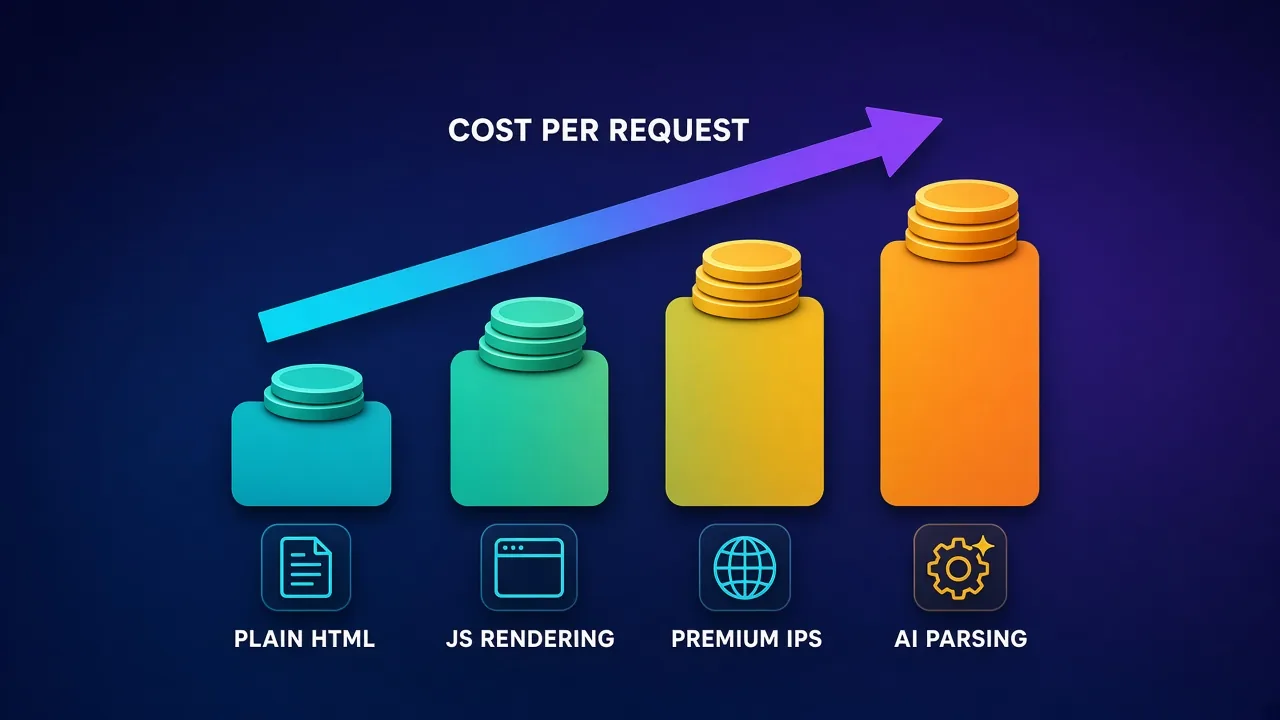
Multipliers, not base rates, decide your bill
Nearly every API charges a low base rate for a plain HTML fetch and multiplies it for each extra capability. JavaScript rendering is typically the biggest jump, because a browser session costs the provider far more CPU and bandwidth than an HTTP request. Premium residential or mobile IPs add another step, and hard targets such as major search engines, marketplaces or social networks are often priced higher still. AI parsing can add a per-field or per-token charge on top. A workload that looks cheap on the pricing page can cost many times more once rendering and premium IPs are switched on for every request.
Success-based billing is the norm, but read the definition
Most providers say you only pay for successful requests. The fine print varies: some count any 2xx and 4xx response as a success, so a 404 still costs you; others exclude only their own system errors. None of them can guarantee that a "successful" page contains the data you expected, so your own validation is what protects your budget.
Requests versus bandwidth
Extraction APIs bill per request or result, while raw proxies bill per gigabyte or per IP. APIs win when pages are heavy, when targets are hard and retries would be costly, or when you value engineering time. Raw proxies win at very high volumes on lenient sites, where a tuned in-house scraper can be far cheaper per page. Many teams run both: an API for the hard targets and plain proxies for everything else.
Tip: price your real workload, not the pricing page
Before committing, take a sample of 200-500 of your actual target URLs, run them through two or three APIs on their free tiers, and record the success rate, the share of requests that needed rendering and the effective cost per usable record. That single spreadsheet will tell you more than any comparison article, including this one.
Real-world use cases
- Price and assortment monitoring. Retailers and brands track competitor prices, stock and promotions across marketplaces. Structured e-commerce endpoints save the most effort here because product pages change layout frequently.
- Search engine monitoring. SEO teams and rank trackers collect localised search results for thousands of keywords. Dedicated SERP APIs return rankings, ads and features as JSON and handle the geo-targeting that makes results accurate.
- AI and RAG pipelines. Teams feeding documentation, news or product pages into language models need clean markdown without navigation and ads. LLM-oriented output formats, and agent integrations such as MCP servers, are now common. Our roundup of the best proxies for AI agents explains when agents need raw proxies instead.
- Market and investment research. Analysts collect job postings, reviews, real-estate listings or public company data to spot trends early. Automatic extraction for job and article types shortens the path to a usable dataset.
- Brand protection and ad verification. Companies check how their brand, ads and products appear in different countries, which depends on reliable geo-targeting and consistent unblocking.
- Lead and directory data. Sales teams pull public business listings and maps data. This is where privacy law needs the most care, because the data often concerns identifiable people.
How to choose and integrate an extraction API, step by step
- List your targets and classify them. Separate lenient sites from protected ones, and note which need JavaScript rendering. Check whether any have a structured endpoint or an existing dataset.
- Define the output you need. Decide whether you want raw HTML (you parse), markdown (for models) or structured JSON (someone else parses). This narrows the field faster than any other question.
- Run a paid-for-nothing trial. Use free tiers to run the same URL sample through two or three candidates. Measure success rate, latency, rendering share and cost per usable record.
- Build a thin wrapper. Put the API behind your own small client so you can swap providers, add retries and enforce a spending cap in one place.
- Validate every response. Check that expected fields exist and look sane before storing anything. Log failures by target so you can see which sites need a stronger configuration.
- Schedule and scale gradually. Move to async batches or the provider's scheduler once the pipeline is stable, and raise concurrency in steps while watching success rates.
A provider-neutral wrapper can be very small. The endpoint and parameter names below are placeholders; map them to your provider's documentation:
import time
import requests

API_URL = "https://api.your-provider.example/v1/scrape"  # placeholder endpoint
API_KEY = "YOUR_API_KEY"

def extract(url, render=False, retries=3):
    params = {"url": url, "render": str(render).lower(), "format": "json"}
    for attempt in range(1, retries + 1):
        resp = requests.get(API_URL, params=params,
                            headers={"Authorization": f"Bearer {API_KEY}"},
                            timeout=120)  # rendered pages can be slow
        if resp.status_code == 200:
            data = resp.json()
            # Validate before trusting a "successful" response
            if data.get("title") and data.get("price") is not None:
                return data
        time.sleep(2 ** attempt)  # back off before retrying
    return None  # report failure honestly instead of storing bad data
Keeping render off by default and turning it on only for targets that fail without it is the simplest cost control you can build in on day one.
Common pitfalls to avoid
- Rendering everything. Many "JavaScript" sites embed their data in the initial HTML or in a JSON call you can request directly. Test without rendering first.
- Trusting HTTP 200. A block page, a cookie wall or an empty template can all arrive with a success status. Validate the fields you need.
- Believing AI extraction blindly. Model-based parsers are excellent on varied layouts but can occasionally misread a value. Spot-check samples and add range checks for numbers such as prices.
- No spending cap. A loop that retries a hard target thousands of times can drain a monthly budget overnight. Use provider spend limits or per-request cost caps where available.
- Ignoring rate limits. An API spreads requests across IPs, but hammering one site with unlimited concurrency still looks like an attack and can degrade results for everyone. Respect rate limiting and pace your jobs.
- Deep lock-in. Proprietary templates and extraction schemas are convenient but hard to move. Keep your own schema and map provider output into it.
An API doesn't make scraping legal by default
Extraction APIs help you reach public pages; they do not give you permission to use the data however you like. Stick to publicly available information, respect site terms and robots.txt where they apply, avoid logging into accounts to collect data you would not otherwise be allowed to see, and treat personal data carefully under laws such as GDPR and CCPA. For anything commercially sensitive, get legal advice for your jurisdiction.
Who should use an extraction API, and who shouldn't
An extraction API is the right default when:
- Your targets are protected by serious anti-bot systems and you do not have in-house expertise to keep up with them.
- You need structured data from popular sources that already have maintained endpoints.
- Your team's time is better spent on the data than on the plumbing, or you are feeding pages into language models and want clean output fast.
- Your volume is small to large but not enormous, so per-request pricing stays reasonable.
Raw proxies or your own stack may be better when:
- You scrape very high volumes from lenient sites, where per-gigabyte bandwidth is much cheaper than per-request pricing.
- You need full control over browser sessions, such as logged-in workflows, anti-detect browser profiles or long sticky sessions.
- You use non-HTTP protocols or tools that expect a plain proxy endpoint.
Quick decision rules from our shortlist: choose Bright Data if you need every tool and dataset under one roof; Oxylabs for supported production pipelines; Zyte if you are a Python or Scrapy shop or want AI extraction on arbitrary sites; Decodo for the best balance of price and control; ScraperAPI for the simplest integration; Nimble for structured data with a modern developer experience; NetNut for search monitoring; and Rayobyte for plain, predictable fetching. If you want to understand why some sites are so much harder than others, read our guide to how websites detect bots.
The shortcut most teams miss
Before building anything, check whether a structured endpoint or a ready-made dataset already covers your source. Paying for maintained parsing is almost always cheaper than maintaining your own parser through a year of layout changes.
The bottom line
Data extraction APIs have turned web scraping from an infrastructure project into an API call. The best of them unblock protected sites, render JavaScript only when needed, retry for free and increasingly return structured data rather than raw pages. Bright Data and Oxylabs lead for breadth and production reliability, Zyte stands out for developers and AI-powered extraction, Decodo offers the best value with per-request control, and ScraperAPI, Nimble, NetNut and Rayobyte each fit a specific style of workload. Whichever you shortlist, judge it on your own URLs: measure the success rate, the share of requests that need rendering and the true cost per usable record, and keep a thin wrapper around it so switching providers stays a configuration change rather than a rewrite.
Frequently asked questions
A proxy only changes the IP address your request comes from; you still handle browser fingerprints, CAPTCHAs, retries, JavaScript rendering and parsing yourself. A data extraction API does all of that for you in a single call and returns the page as HTML, markdown or structured JSON. You trade fine-grained control for far less maintenance, and most APIs only bill successful requests.
Using a scraping API is generally treated the same as scraping yourself: collecting publicly available data is widely practised, but the API does not change what you are allowed to do with the data. Respect site terms and robots.txt where they apply, avoid collecting data behind logins you are not entitled to, and be careful with personal data under laws such as GDPR and CCPA. For commercial projects, get legal advice for your jurisdiction.
Most providers charge per successful request, result or credit rather than per gigabyte, usually quoted per 1,000 requests. The base rate for a plain HTML fetch is low, but JavaScript rendering, premium residential IPs, hard targets such as search engines and AI parsing each raise the price, sometimes many times over. The only reliable way to know your cost is to run a sample of your own URLs through each provider's free tier and calculate the cost per usable record.
Yes. Most APIs can render pages in a headless browser, wait for elements to load and, on some platforms, perform actions like scrolling or clicking. Rendering is usually opt-in and billed at a higher rate, so test whether a site really needs it; many sites embed their data in the initial HTML or in a JSON request you can fetch directly.
AI-powered extraction can pull fields such as prices, titles or job details from pages it has never seen, using a schema or plain-English prompt instead of hand-written selectors. It works well on varied, messy layouts, but models can occasionally misread or invent a value. Validate outputs with simple checks, such as required fields and sensible price ranges, and spot-check samples before trusting it at scale.
It depends on volume and difficulty. For protected sites, JavaScript-heavy pages or small teams, an API is usually cheaper once you count engineering time, proxy bandwidth and the cost of retries. At very high volumes on lenient sites, a tuned in-house scraper with raw proxies can be much cheaper per page, which is why many teams use an API for hard targets and their own stack for the rest.
Several providers offer free tiers, trial credits or free plans that are enough to test on real targets, including Bright Data, Decodo, ScraperAPI, Zyte, Rayobyte and Firecrawl. Free allowances are designed for evaluation rather than production, and their size changes over time, so check each provider's current terms. Use them to measure success rates and cost per record before paying for a plan.
Yes, and it is one of the fastest-growing use cases. Many APIs now return LLM-ready markdown, and some offer MCP servers or LangChain integrations so an agent can fetch pages or search results as a tool. If an agent only needs page content, an extraction API is usually simpler than wiring raw proxies; if it drives a full browser to click and log in, it needs proxies plugged into that browser instead.