Table of contents
Almost every price-comparison site, market-research report, AI training set, and SEO dashboard is built on data that was scraped from the public web. Web scraping is the automated way to collect that information at a scale no human could match. This guide explains what web scraping is, exactly how it works step by step, what it's used for, the tools you need, why scrapers get blocked, and where the legal lines sit.
What is web scraping?
Web scraping is the automated extraction of data from websites. A program — called a scraper or bot — requests a web page, reads its underlying HTML, pulls out the specific pieces you care about (prices, titles, reviews, contact details), and saves them in a structured format like a spreadsheet, CSV, or database.
It's easy to confuse three related terms:
- Web scraping — extracting specific data from pages and structuring it.
- Web crawling — systematically discovering and following links to map pages (what search engines do). Crawling finds the pages; scraping harvests the data on them.
- APIs — when a site offers an official API, you should use it: it returns clean, permitted data. Scraping is what you reach for when no API exists or it doesn't expose the data you need.
How web scraping works: the pipeline
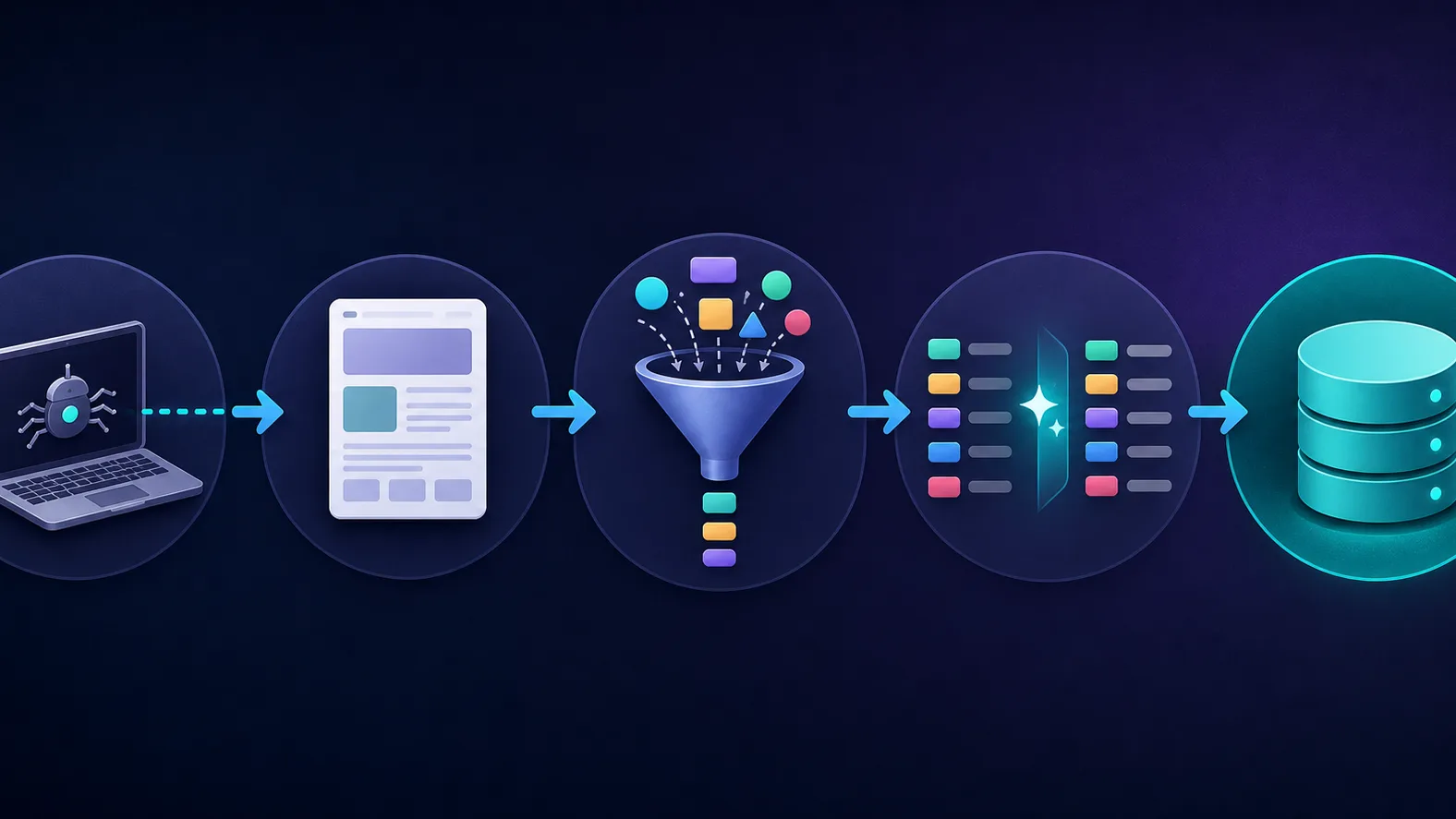
Every scraper, from a 10-line script to an enterprise platform, follows the same five-stage pipeline:
- Send a request. The scraper sends an HTTP request to a target URL, just like a browser does.
- Receive the response. The server returns the page's HTML (and sometimes JSON). For pages built with JavaScript, a headless browser is used to render the content first.
- Parse & extract. The scraper reads the HTML structure and locates the target data using selectors such as CSS classes or XPath.
- Transform & clean. Raw values are normalized — stripping currency symbols, fixing dates, deduplicating — so the data is consistent.
- Store. The clean records are written to a CSV, database, or data warehouse, ready for analysis.
Static vs dynamic pages
Simple pages return their data in the first HTML response. Modern sites often load content with JavaScript after the page arrives, so they need a headless browser (like Puppeteer or Playwright) to render the page before the data appears.
What web scraping is used for
| Use case | What gets collected |
|---|---|
| Price & competitor monitoring | Live prices, stock, and promotions across rival stores |
| SEO & SERP tracking | Search rankings, featured snippets, competitor content |
| Lead generation | Public business listings and contact details |
| Market & sentiment research | Reviews, ratings, and social discussion |
| AI & machine learning | Large text and image datasets for training models |
| Travel & real estate | Fares, availability, and property listings |
Why scrapers get blocked — and how proxies help
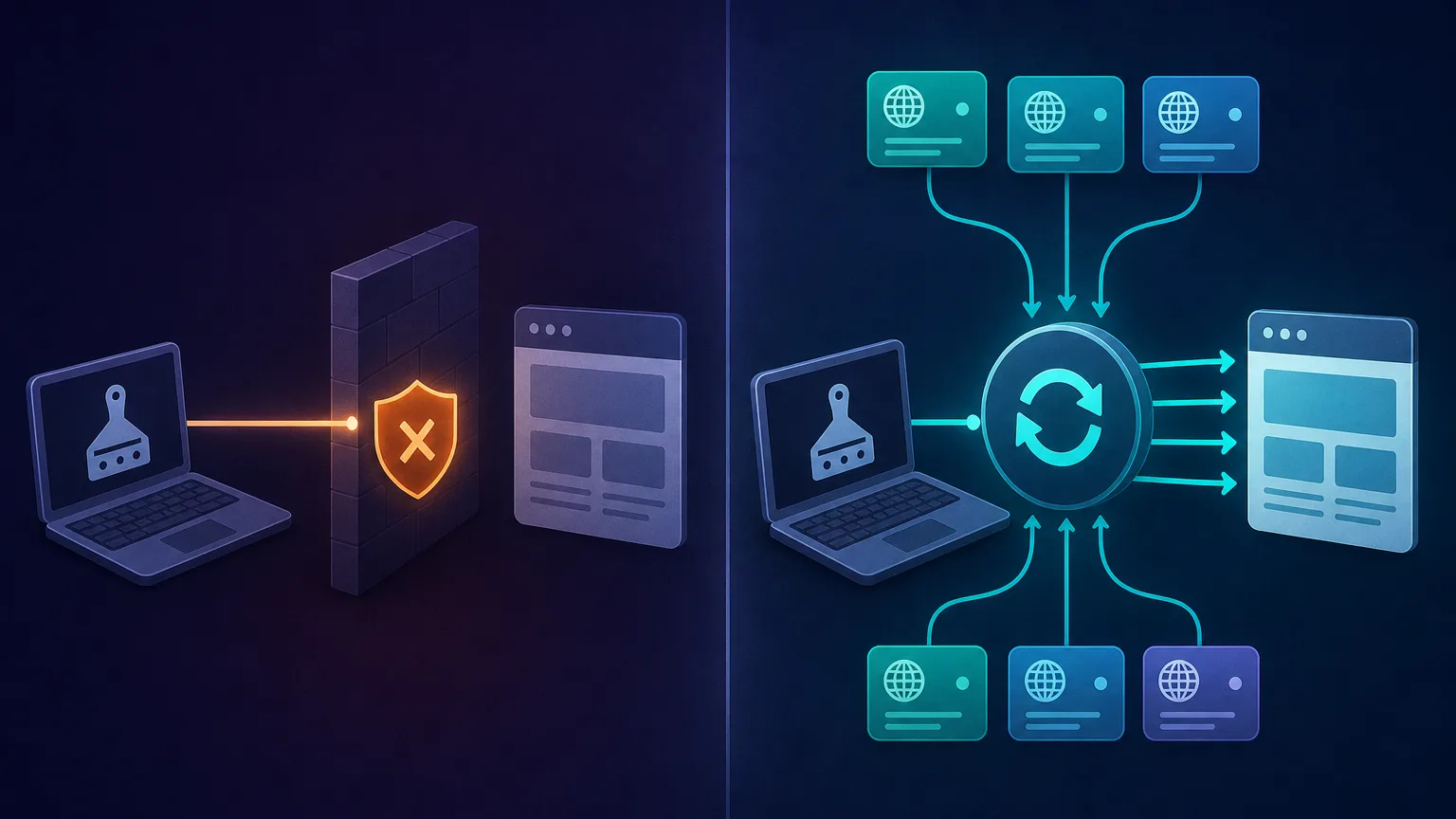
Run a scraper from a single IP address and you'll quickly hit a wall. Websites deploy anti-bot defenses that flag automation: rate limits, IP bans, CAPTCHAs, and browser-fingerprint checks. The moment one IP makes too many requests, it gets throttled or blocked.
The standard fix is rotating proxies, which route each request through a different IP from a large pool so your traffic looks like many ordinary users instead of one bot. Pair them with realistic headers, randomized delays, and a headless browser for JavaScript sites, and your success rate climbs dramatically.
The tools you need to scrape at scale
You can hand-build a scraper with libraries like Python's Requests, Beautiful Soup, Scrapy, or Playwright. But at scale, the hard part isn't parsing HTML — it's staying unblocked. These services handle the proxy and unblocking layer so you can focus on the data. Explore more in our proxies directory.
ScraperAPI — managed scraping, one endpoint
A fully managed API that handles proxy rotation, headless browsers, and CAPTCHA solving behind a single request. The fastest way to scrape without building anti-block infrastructure yourself.

ScraperAPI
ScraperAPI nails the "I just want the data" use case. You send a URL, it handles proxies, anti-bot, CAPTCHAs, and rendering, and you get the page back — no infrastructure to maintain. Billing per successful request is genuinely fair, the free tier is generous, and the structured endpoints for Google and Amazon save real work. The trade-off is flexibility: you give up direct IP control, and at very high volumes buying bandwidth directly can be cheaper. For developers who value time over fine-grained control, ScraperAPI is one of the easiest and most reliable ways to scrape at scale.
Bright Data — proxies plus unblocking infrastructure
The largest proxy network, paired with tools like Web Unlocker and a Scraping Browser. The most powerful option when you're scraping the toughest, best-defended targets.
Bright Data
Bright Data remains the most complete data-collection platform money can buy. No competitor matches its combination of network scale, targeting granularity, and compliance tooling — and for enterprise teams whose revenue depends on reliable data, that completeness justifies the premium. The trade-offs are real: it is one of the priciest providers per gigabyte, the interface overwhelms newcomers, and KYC verification adds friction before you can route a single request. Smaller projects will get better value from Decodo or IPRoyal. But if you need city-level residential targeting at scale, a managed unblocker for the hardest targets, and audit-ready compliance, Bright Data is the default — and our highest-rated proxy provider overall.
Decodo — affordable residential proxies for DIY scrapers
A reliable residential pool with a friendly dashboard and approachable per-GB pricing — a great fit if you're writing your own scraper and just need clean, rotating IPs.

Decodo
Decodo offers the best price-to-performance ratio in the industry. It delivers roughly 90% of what the enterprise leaders provide — high success rates, a large clean pool, sticky sessions, an unblocker — at a fraction of their cost. The dashboard is the friendliest of any major provider, the 14-day money-back guarantee removes the risk of trying it, and support actually responds. The main gaps are enterprise-grade compliance tooling and the very deepest targeting, neither of which most teams need. For startups, solo developers, and any team that wants professional results without enterprise pricing, Decodo is our top value pick and an easy recommendation.
Is web scraping legal?
Scraping publicly available data is generally legal in most jurisdictions, and courts have repeatedly upheld it. But "generally legal" is not "anything goes" — the details matter.
Scrape responsibly
Collect only public data, respect a site's robots.txt and terms of service, never harvest personal data without a lawful basis (GDPR/CCPA apply), don't overload servers with aggressive request rates, and avoid scraping content behind logins or paywalls.
Web scraping best practices
- Prefer official APIs when they exist — they're cleaner and lower-risk.
- Throttle politely with randomized delays so you don't strain the target.
- Rotate IPs and headers together — a fresh IP with a stale fingerprint still looks like a bot.
- Cache and scrape incrementally to avoid re-downloading unchanged pages.
- Monitor success rates and adapt the moment blocks start rising.
The bottom line
Web scraping turns the unstructured web into structured, analyzable data through a simple pipeline: request, extract, clean, store. The concept is straightforward; the challenge is doing it reliably at scale without getting blocked — which is where rotating proxies and managed scraping tools earn their keep. Start small with a single target, scrape responsibly, and add proxy infrastructure as your volume grows.
Frequently asked questions
Web scraping is using an automated program to copy specific information from websites - like prices, reviews, or listings - and save it in a structured format such as a spreadsheet or database, far faster than a person could collect it by hand.
Scraping publicly available data is generally legal in most jurisdictions, but you must respect a site's terms of service and robots.txt, avoid collecting personal data without a lawful basis under laws like GDPR, and not scrape content behind logins or paywalls.
Web crawling discovers and follows links to map which pages exist (what search engines do), while web scraping extracts the actual data from those pages. Crawling finds the pages; scraping harvests their content.
Websites block IP addresses that send too many requests. Rotating proxies route each request through a different IP from a large pool, so your scraper looks like many ordinary visitors instead of one bot, which dramatically reduces blocks and CAPTCHAs.
Building your own scraper requires programming (commonly Python with libraries like Beautiful Soup or Scrapy), but managed scraping APIs and no-code tools let you collect data with little or no coding by handling the technical work for you.