Table of contents
A new class of software is quietly rewriting how we use the web: the agentic browser — a browser driven by an AI agent that can read a page, decide what to do, and actually do it, all from a plain-English instruction. Tell it "find the cheapest flight next Friday and hold a seat," and it navigates, clicks, types and reasons its way there. As of early 2026 this space is exploding, messy, and genuinely useful. This guide explains what agentic browsers are, how they work under the hood, the best options for AI automation right now, and — just as importantly — the real risks and limits you need to understand before you trust one with a task.
What is an agentic browser?
An agentic browser is a web browser (or a browser controlled by an AI system) that can carry out multi-step tasks autonomously on your behalf. Instead of you clicking through pages, an AI agent perceives the page, forms a plan, and takes the actions — clicking buttons, filling forms, scrolling, navigating between sites — to accomplish a goal you describe in natural language.
The key word is agentic: the software doesn't just answer questions about the web (like a chatbot) or follow a rigid pre-written script (like traditional automation). It acts, adapting its steps as it goes based on what it sees. That shift — from "tell me how" to "just do it" — is what makes this category different from everything that came before.
How agentic browsers work
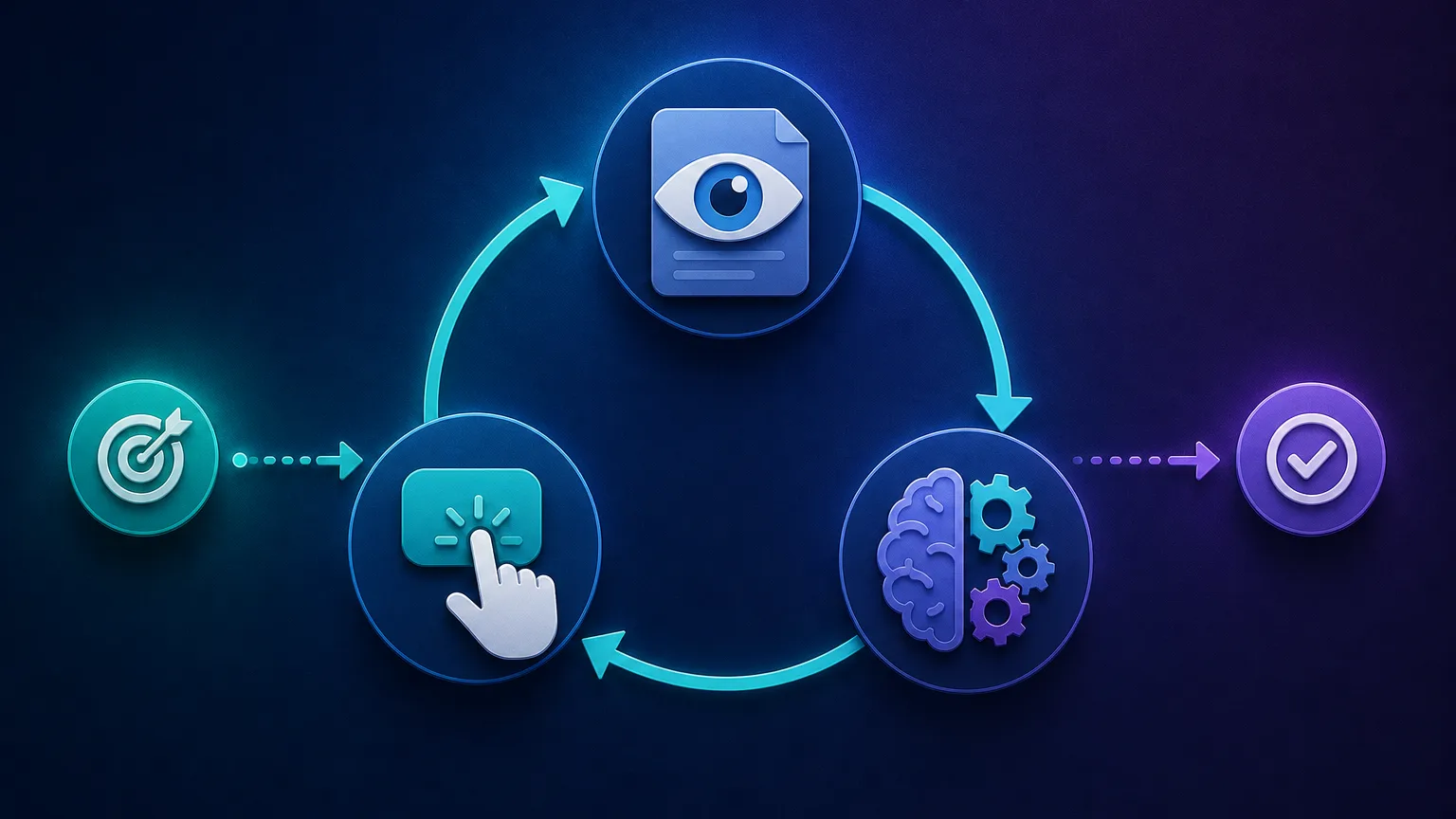
Under the hood, almost every agentic browser runs a version of the same loop, often called the perceive–reason–act cycle:
- Perceive. The agent captures the current state of the page — either by reading the underlying HTML/DOM, by "seeing" a screenshot with a vision model, or a combination of both.
- Reason. A large language model interprets that state against your goal and decides the next action: which element to click, what to type, whether the task is done.
- Act. The system executes that action in a real browser (via automation frameworks like Chromium's DevTools Protocol or Playwright), then loops back to perceive the new page state.
This cycle repeats until the goal is met or the agent gives up. Because the model re-evaluates after every step, an agentic browser can recover from unexpected pop-ups, layout changes and errors that would break a hard-coded script — that adaptability is its core advantage.
Agentic browser vs traditional automation vs antidetect browser
It's easy to confuse these three, but they solve different problems:
| Tool | How it decides what to do | Best for |
|---|---|---|
| Agentic AI browser | An AI reasons and adapts in real time | Open-ended tasks, changing pages, natural-language goals |
| Scripted automation (Selenium, Playwright) | Follows fixed, hand-written steps | Repetitive, predictable, high-volume tasks |
| Antidetect browser (Multilogin, GoLogin) | You (or a script) drive it; it hides your fingerprint | Managing many accounts without being linked |
The lines blur in practice — agentic browsers often use scripted-automation frameworks under the hood, and serious agent operators run them behind antidetect browsers and proxies to avoid detection. But conceptually: scripts are rigid and fast, agents are flexible and smart, and antidetect browsers are about identity, not decision-making.

The types of agentic browsers
As of early 2026, the landscape sorts into three broad groups:
- Consumer AI browsers — full browsers with an agent built in, aimed at everyday users (research, shopping, email triage).
- Agent modes and features — agentic capabilities bolted onto mainstream browsers and AI assistants.
- Developer frameworks and infrastructure — libraries and hosted services for engineers building their own browser agents.
Which group you want depends entirely on whether you're a person automating your own chores or a team building automation into a product.
The best agentic browsers for AI automation in 2026
This is a fast-moving field, so treat this as a map of the leading options rather than a fixed leaderboard — capabilities and availability change month to month. Match the tool to whether you're a consumer or a builder.
Perplexity Comet — best consumer AI browser for research
Comet pairs a full browser with Perplexity's answer engine and an agent that can carry out tasks across tabs. It's strong for research-heavy workflows where you want the browser to gather, summarise and act on information as you go.
ChatGPT Atlas (OpenAI) — best for deep assistant integration
OpenAI's agentic browser brings ChatGPT directly into the browsing experience, with an agent mode that can complete tasks on your behalf. A natural pick if your workflow already lives inside ChatGPT.
The Browser Company's Dia — best for a native AI-first browsing experience
Dia rebuilds the browser around an AI assistant, with agentic features woven into everyday navigation. Good for users who want AI help embedded in how they browse rather than as a bolt-on.
Microsoft Edge (Copilot Mode) & Google Chrome (Gemini) — best mainstream on-ramps
The incumbents are adding agentic features to the browsers billions already use. If you want to dip into AI automation without switching browsers, the Copilot and Gemini integrations are the lowest-friction way to start.
OpenAI Operator & Google Project Mariner — best task-completing agents
These are agent systems (rather than standalone browsers) that operate a browser to finish tasks like booking and ordering. They point at where the category is heading: describe an outcome, let the agent handle the clicks.
Browser Use — best open-source framework for developers
Browser Use is a popular open-source library that lets you connect an LLM of your choice to a real browser and give it tasks in code. It's the go-to for developers who want control and to avoid vendor lock-in. A minimal example looks like this:
from browser_use import Agent
# Plug in the LLM of your choice (representative API — check the current docs)

agent = Agent(
    task="Find the top 3 results for 'rotating proxies' and list their prices",
    llm=your_llm,
)
result = await agent.run()
print(result)
Browserbase + Stagehand — best hosted infrastructure for production agents
Browserbase provides headless browsers in the cloud, and Stagehand adds an AI-driven control layer. Together they're a strong choice for running browser agents reliably at scale inside your own product.
Skyvern & Amazon Nova Act — best for structured, workflow automation
Skyvern (open source) and Amazon's Nova Act SDK focus on turning agents into dependable, repeatable workflow automation — closer to RPA than free-form browsing. Worth a look when reliability matters more than open-ended flexibility.
Real-world use cases
Agentic browsers earn their keep on tasks that are tedious for humans and too variable for rigid scripts:
- Research and monitoring — gathering and summarising information across many sites.
- Form-filling and applications — completing repetitive multi-step forms.
- Shopping, booking and comparison — finding options and progressing checkouts.
- QA and testing — exercising web apps the way a real user would, adapting to UI changes.
- Data extraction — pulling structured data from sites without a fixed scraper, useful when layouts vary. (For high-volume, predictable jobs, traditional web scraping is still cheaper and faster.)
How to choose an agentic browser
Cut through the hype with a few decision rules:
- Consumer or developer? If you're automating your own tasks, pick a consumer AI browser (Comet, Atlas, Dia). If you're building automation into software, pick a framework (Browser Use, Stagehand).
- Open or closed? Open-source frameworks give control and avoid lock-in but need engineering effort; closed products are polished but opaque.
- Hosted or local? Hosted infra scales easily; local runs keep data on your machine.
- Reliability vs flexibility. Free-form agents handle novel tasks but are less predictable; workflow-focused tools trade some flexibility for dependability.
- Cost. The tool may be free or open source, but the LLM calls behind every step are not — budget for token and infrastructure costs at scale.
Start with a narrow task
Don't hand an agent your whole workflow on day one. Pick one well-defined, low-stakes task, watch how it performs, and expand only once you trust it. Agents are impressive but still make confident mistakes.
Limitations, risks and the prompt-injection problem
This is the section the marketing pages skip, and the most important one. Agentic browsers are powerful but genuinely risky, and being clear-eyed about that is essential.
Prompt injection
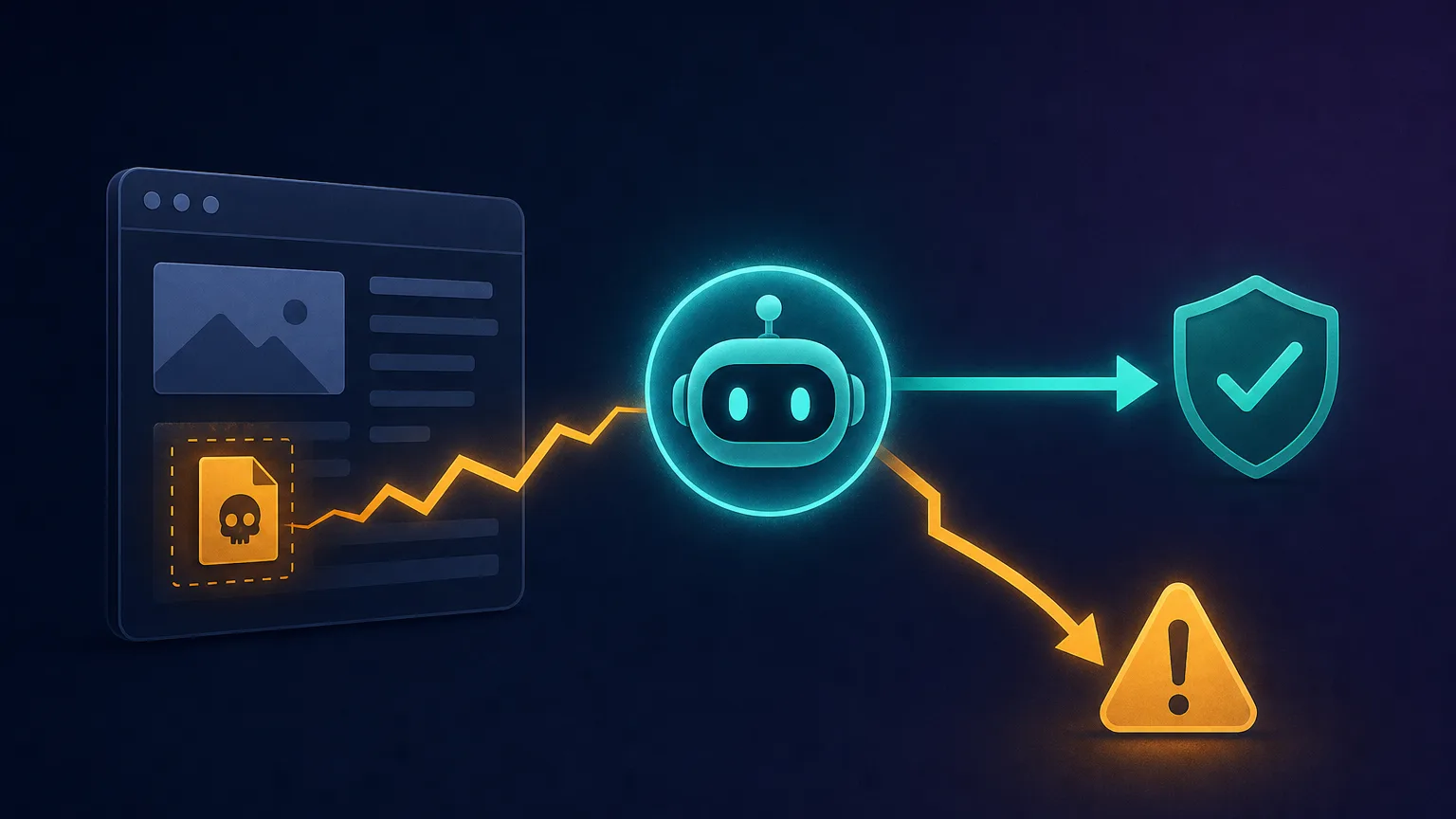
The biggest security concern is prompt injection. Because the agent reads web-page content and treats it as instructions, a malicious page can hide text that hijacks the agent — telling it to exfiltrate your data, make a purchase, or visit a harmful site. The agent can't always tell the difference between your instructions and instructions planted in the content it's reading. This is an unsolved problem, and it's why you should never let an agent operate with access to sensitive accounts unsupervised.
Reliability, cost and privacy
- They make confident mistakes. Agents hallucinate steps, misread pages and occasionally do the wrong thing convincingly. Human oversight is still required for anything that matters.
- They're slower and costlier than scripts, because every step is an LLM call. For high-volume, predictable work, a traditional script wins on speed and price.
- Privacy and access. An agent that can act on your behalf usually needs access to your logins and data. Understand what it can see and do before granting it.
Never fully unsupervise a capable agent
Keep a human in the loop for anything involving money, sensitive data, or irreversible actions. Use read-only or sandboxed modes where available, and treat every page the agent visits as potentially adversarial.
Agentic browsers, proxies and getting blocked
Here's a practical reality builders discover fast: websites often block agent traffic. Anti-bot systems flag the datacenter IPs and automation signals that agentic browsers exhibit, just as they flag scrapers. Running agents at any scale usually means pairing them with the same infrastructure serious automation relies on — residential or mobile proxies to present trustworthy IPs, and antidetect browser techniques to manage fingerprints. Our guide on proxies for Playwright covers the setup, since many agent frameworks are built on Playwright underneath. Without this layer, an agent that works perfectly in testing can get blocked the moment it hits a protected site in production.
Where agentic browsing is heading
The direction of travel is clear even if the details aren't: tighter integration into mainstream browsers, better reliability, standardised ways for agents to interact with sites, and a growing tug-of-war between agents that want to act on the web and sites that want to control automated access. Expect rapid change — the specific tools that lead this list will shift, but the underlying capability is here to stay.
Two themes are worth watching. First, security hardening: expect sandboxing, granular permission prompts and real defences against prompt injection to mature, since trust is the main thing holding agents back from sensitive tasks. Second, agent-friendly standards: proposals for machine-readable ways for sites to expose their actions to agents could make automation far more reliable — and less adversarial — than today's scrape-and-click approach. And as the underlying models get cheaper and faster, the cost and latency penalties that make agents impractical for high-volume work will shrink, steadily widening the range of tasks where reaching for an agent actually makes sense.
The bottom line
Agentic browsers turn natural-language goals into real actions on the web by looping through perceive, reason and act — and as of early 2026 they're genuinely useful for research, testing and repetitive tasks. For personal automation, a consumer AI browser like Comet, ChatGPT Atlas or Dia is the easiest start; for building your own, Browser Use and Browserbase + Stagehand lead the developer stack. But go in clear-eyed: agents make confident mistakes, cost more than scripts, and carry real security risks like prompt injection. Start with narrow, low-stakes tasks, keep a human in the loop, and add proxy and antidetect infrastructure before you scale — and you'll get the upside of this new category without the nasty surprises.
Frequently asked questions
An agentic browser is a browser driven by an AI agent that can complete multi-step tasks autonomously from a natural-language instruction. It perceives the page, reasons about what to do, and takes actions like clicking and typing - acting on the web rather than just answering questions about it.
Scripted tools like Selenium and Playwright follow fixed, hand-written steps and break when a page changes. An agentic browser uses an AI model to decide each step in real time, so it adapts to unexpected layouts and errors. Agents are more flexible but slower and less predictable than scripts.
They carry real risks. The biggest is prompt injection, where malicious page content hijacks the agent into unwanted actions. Agents can also make confident mistakes and often need access to your accounts, so keep a human in the loop for anything involving money, sensitive data, or irreversible actions.
Prompt injection is when a web page hides instructions that the agent reads and mistakes for your commands - for example, telling it to leak data or make a purchase. Because the agent treats page content as input, it can't always separate your instructions from malicious ones planted in the content.
It depends on your goal. For personal automation, consumer AI browsers like Perplexity Comet, ChatGPT Atlas and Dia lead. For building automation into software, developer frameworks like Browser Use and Browserbase + Stagehand are the strongest picks. There's no single winner - match the tool to consumer versus developer use.
Yes. Anti-bot systems flag the automation signals and datacenter IPs that agents exhibit, just like scrapers. Running agents at scale usually requires residential or mobile proxies and antidetect fingerprinting to avoid being blocked on protected sites.
It varies. Some consumer AI browsers have free tiers or subscriptions, and developer frameworks like Browser Use are open source. But the LLM calls behind every agent step cost money, so running agents at scale carries real token and infrastructure expenses regardless of the tool being free.
Partly. They shine on variable, open-ended tasks where a fixed script would break. But for high-volume, predictable jobs, traditional scraping and RPA are faster, cheaper and more reliable. Many teams use both - agents for the messy edges, scripts for the bulk.